how would I turn the 360's left analouge stick into a dpad?
Moderator: Moderators
-
Diminuendo
- Posts: 338
- Joined: Fri Jan 16, 2009 1:12 am
how would I turn the 360's left analouge stick into a dpad?
thanks in advance for any help.
-
stuntpenguin007
- Posts: 667
- Joined: Sun Apr 27, 2008 12:21 pm
Re: how would I turn the 360's left analouge stick into a dpad?
Time to bust out the ascii art. ignore the ....s
(nvm about the ascii art, just gonna find a pic)

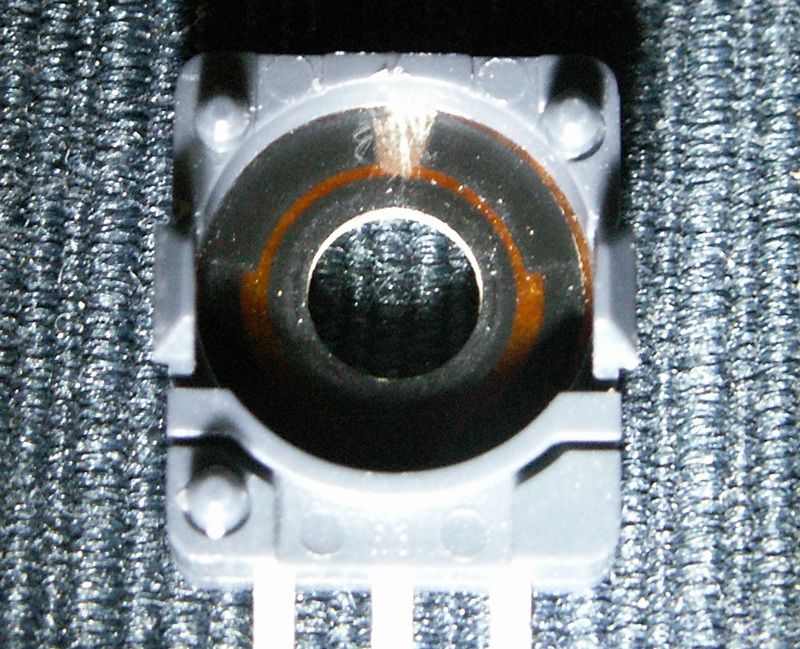
attached to the analog stick are two different pots. They are the things soldered to the pcb and look sort of like what I just made. pins 2 and 5 would be ground.
So lets say the first one I made is the X axis (goes up and down) when 1 and 2 are connected it goes up, 2 and 3 are down
so the other one is the Y axis (left and right) 4 and 5 are left 5 and 6 are right.
Now if you want to add in an extra d-pad so there are two you do this.... the buttons are these interlocking traces that don't touch, but when the button is pressed it connects them. one trace is ground and the other is the direction being pressed. so hook up the up and down grounds to pin 2, up to 1, down to 3 and similare with the other pot, but using left and right.
I'll see if I can find a picture of the pots that could be more helpful than my ascii art, or maybe even a full tutorial. Sorry if this wasn't that helpful, I made it in about 5 minutes, I mostly just wanted to make some ascii art
edit: noooo I need to fix my ascii art somehow it got all messed up when I posted
(nvm about the ascii art, just gonna find a pic)
attached to the analog stick are two different pots. They are the things soldered to the pcb and look sort of like what I just made. pins 2 and 5 would be ground.
So lets say the first one I made is the X axis (goes up and down) when 1 and 2 are connected it goes up, 2 and 3 are down
so the other one is the Y axis (left and right) 4 and 5 are left 5 and 6 are right.
Now if you want to add in an extra d-pad so there are two you do this.... the buttons are these interlocking traces that don't touch, but when the button is pressed it connects them. one trace is ground and the other is the direction being pressed. so hook up the up and down grounds to pin 2, up to 1, down to 3 and similare with the other pot, but using left and right.
I'll see if I can find a picture of the pots that could be more helpful than my ascii art, or maybe even a full tutorial. Sorry if this wasn't that helpful, I made it in about 5 minutes, I mostly just wanted to make some ascii art
edit: noooo I need to fix my ascii art somehow it got all messed up when I posted
SNESP WIP
Case - 50%
acquired parts - 90%
assembly - 0%
Case - 50%
acquired parts - 90%
assembly - 0%
-
Diminuendo
- Posts: 338
- Joined: Fri Jan 16, 2009 1:12 am
Re: how would I turn the 360's left analouge stick into a dpad?
thanks, so all I have to do is connect the ground to the relevent direction contact to make a button press, thought I'd have to fiddle around with resistors, for what I plan to do this should be easy.
one quick hypathetical, what would happen if two opposing directions were pressed at the same time?
one quick hypathetical, what would happen if two opposing directions were pressed at the same time?
-
stuntpenguin007
- Posts: 667
- Joined: Sun Apr 27, 2008 12:21 pm
Re: how would I turn the 360's left analouge stick into a dpad?
I'm guessing one would prevail over the other, probably the second one you press.
Remember that the X and Y axis have separate grounds.
Remember that the X and Y axis have separate grounds.
SNESP WIP
Case - 50%
acquired parts - 90%
assembly - 0%
Case - 50%
acquired parts - 90%
assembly - 0%
Re: how would I turn the 360's left analouge stick into a dpad?
So 123= x axis 456 = y axis?
Re: how would I turn the 360's left analouge stick into a dpad?
This only works if the controller is a CG or CL version, since they're the only ones that use a common connection, Ground for the CG and Voltage for the CL, this will not work on a Matrix version controller. Also you have to remove the POTs from the sticks and cut the traces in them so at dead center the Wiper (center pin) doesn't touch anything or it's not going to work, you'll just be connecting the up/down and left/right lines together.
Screwing up is one of the best learning tools, so long as the only thing you're not learning is how to screw up.
Re-mappable Wireless 360 Controller - The CGnome
Re-mappable Wireless 360 Controller - The CGnome
Re: how would I turn the 360's left analouge stick into a dpad?
Wasnt there another topic like this where the guy had 3 analog sticks and red and white spray paint? Im looking for it so please tell me where the topic is k thanks.