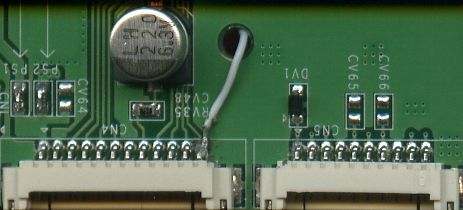
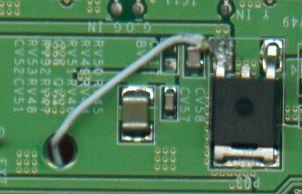
I picked up a PSOne and a travel screen earlier, and the screen doesn't seem to want to power up. I wasn't ripped off, I bought it with this knowledge.
The screen gets no power and I get no sound when plugging in the headphones. The LCD is not cracked, but even if it was you'd think that the backlight would power up. There wasn't anything obviously wrong with any part of it, except the piece that I have provided pictures of.
What this tells me is that the mainboard isn't getting power. So I open it up and lo and behold, there was a broken component. I don't know what exactly it is as I'm not too familiar with my electronics lingo. I definitely know how to solder and desolder etc., and assembly and disassembly isn't something that is new or scary to me.
Edit: pictures changed to clickable links so people can actually see the text in this thread.
Last edited by slowman on Mon Feb 02, 2009 11:16 pm, edited 2 times in total.
Ok, glad to know it can be fixed with LED's. If I could find another transformer, I could easily solder it on and fix that. LED's sound like a better option anyway.
However, that still doesn't explain why I would get no sound upon powering it up. You would think that even if the backlight wasn't working that I could get sound output when I plug in headphones to the jack.
I'm using the PSOne that it is intended for to test it out as I go.
The connection you refer to on the transformer doesn't go anywhere, there is no trace (I just looked); so means its just a solder joint to keep the transformer in place.
Think issue might be elsewhere, I might be wrong, but think if the transformer was faulty you would still see an image, all be it very very dim; you would still get audio. Perhaps the fuse is blown at the bottom of the board / board is dead?
That's sort of what I was thinking. I might replace the transformer since everything else looks good. I'll just keep it in place with a dab of hot glue. I'll look elsewhere for the problem.
I read that there is a fuse that can go when the board is overpowered. I also read that it can be jumped. Does anyone know specifically which fuse this is? IIRC, it is the fuse labeled CV30, but of course I don't just want to blindly go jumping that fuse.
I bought a faulty PSone screen board and working LCD about a year ago, for £7 inc posting, as I thought I could make it work (or have a working LCD anyway). Tried to by-pass the fuse (its the one to the right of the contrast + tact switch I believe), however when I ran the system I got smoke from the other side of the board as a component blew. I then read somewhere about feeding 5v into the board after by-passing the fuse instead of the normal voltage, although it didn't say where to connect the 5v input to (the 7805 output??).
Hopefully someone who managed to by-pass the fuse successfully can post here what to do as my attempt failed. I have been using this dead board since as a template for my other systems, rather than using a working board, as I can abuse a dead board.
khaag - indeed, that is certainly needed to power the screen, however his audio doesn't work either.
I don't really need this to work, as I'm looking to sell the system and the screen itself. I was hoping to fix the screen and sell it back to the pawn shop that usually takes my extra/unused electronics. They know my work there.
Here's the backstory... To make extra income I buy broken PSP's, fix what ails them, and then resell them with CFW on them. I sold one to a person in exchange for $65 and a complete working PSOne with some games. Not too bad of a price for them or me, as I only had $40 into that PSP.
If someone wants this screen as-is, I would be willing to sell it for a very reasonable price considering its current state. I just don't have the time to invest in bringing the travel screen back from the dead. Looking at it, I see no reason why the LCD screen wouldn't work. The mainboard I'm not sure about, because it obviously won't power anything up. When I plug the travel screen and plug the power and AV cable in behind it, I can still play it on the TV, so obviously the two PCB's in the bottom work. They are designed to allow pass-through of the travel screen if you want to play it on a television. If I could make $15 or $20 out of it I'd be a pretty happy camper.


 The higher resolution it is, the easier it is for you guys to see.