My friend gave me an old PSOne LCD screen that hasn't worked for a while to do with as I pleased. My first instinct was to rip it open and try to fix it. After looking for a fix on the internet I found this site and decided to fix it for the purpose of making a portable SNES.
That being said, the repairs aren't going well. The screen has gone from not getting any sound or video at all, to getting a solid black column down one side of the screen, to now having a blinking, solid black screen accompanied by clicking in the speakers. Before I tinker (read destroy) with the screen anymore, can anyone offer any suggestions as to where I should go from here? I'll post pics if it'll help, any info would be appreciated.
My first project/LCD problems
Moderator: Moderators
-
Spyder12587
- Posts: 214
- Joined: Fri Aug 29, 2008 3:31 pm
- Location: North Carolina

-
Spyder12587
- Posts: 214
- Joined: Fri Aug 29, 2008 3:31 pm
- Location: North Carolina

Bottom of the frontside, near volume and brightness buttons.

Backside of board
I soldered a wire from the far right (+5v pin, I believe) to the back of the board at the KA7805R, as per http://forums.benheck.com/viewtopic.php?t=2278. I have to desolder a bit near the pin on the front, snagged the two pins beside it. Like I said, I get a flashing black screen and clicking speakers along with it. Sorry the pictures aren't great, if there's a specific area that'd help if you could see it, let me know, I'll try and adjust the lighting for a better pic.
-
Sharp Sapphire
- Portablizer
- Posts: 415
- Joined: Fri Feb 22, 2008 9:40 pm
-
Spyder12587
- Posts: 214
- Joined: Fri Aug 29, 2008 3:31 pm
- Location: North Carolina
The ones on the left side of this picture?
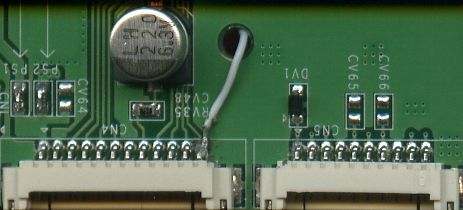
(This is not my board)
Also, is there a good way to desolder the little mess I made in this area? The tip on my desoldering bulb doesn't reach in there very well, but I need to get solder off the other pins so they're not bridged.
(This is not my board)
Also, is there a good way to desolder the little mess I made in this area? The tip on my desoldering bulb doesn't reach in there very well, but I need to get solder off the other pins so they're not bridged.
There is no black or white but rather a million shades of gray...
-
Spyder12587
- Posts: 214
- Joined: Fri Aug 29, 2008 3:31 pm
- Location: North Carolina
Got an update on the screen (not sure if this counts as a double post since it's be a day or two, if so I apologize). After tinkering some more, I found that if I plug the power into the the screen and the screen into the PSOne, it flashes on and off; however, when I unplug the cables from the screen and use the pass-through to power the PSOne, it gets solid, continuous power. Anyone have any ideas as to what may be causing the flashes?
There is no black or white but rather a million shades of gray...
-
lovablechevy
- Portablizer Extraordinaire
- Posts: 1104
- Joined: Wed Nov 01, 2006 3:09 pm
- Location: busy with a project
- Contact:
so these are bridged?Spyder12587 wrote:Also, is there a good way to desolder the little mess I made in this area? The tip on my desoldering bulb doesn't reach in there very well, but I need to get solder off the other pins so they're not bridged.

that's not so good... get some desoldering braid. it's good for small components like that.use it with a soldering iron.
i think sharp might have been referring to this.Sharp Sapphire wrote:did you jump the fuse on the +7.5 line?
as in the first pic and instructions that go along with it.
the jump you did simply puts the screen into rgb mode. so if you aren't using rgb, it will not work.
use the braid to get rid of the bridged pins. and then try removing the fuse that ben talks about.
they call me the Queen of Bondo, though maybe i should be called the Queen of Epoxy Putty
current project - code name: blue mushroom!
current project - code name: blue mushroom!
-
Spyder12587
- Posts: 214
- Joined: Fri Aug 29, 2008 3:31 pm
- Location: North Carolina
Well, I think I did it properly but when I reconnected everything, I still get clicking speakers and power flashes to the system. After I removed the wire you said put it in RGB mode, I stopped getting flashes on the screen, it just stays dead. Any other suggestions?
I'm probably going to order a new screen so this one would just be an added bonus if I could get it working.
I'm probably going to order a new screen so this one would just be an added bonus if I could get it working.
There is no black or white but rather a million shades of gray...
-
lovablechevy
- Portablizer Extraordinaire
- Posts: 1104
- Joined: Wed Nov 01, 2006 3:09 pm
- Location: busy with a project
- Contact:
did you remove that fuse that i also mentioned in my previous post...?Spyder12587 wrote:Well, I think I did it properly but when I reconnected everything, I still get clicking speakers and power flashes to the system. After I removed the wire you said put it in RGB mode, I stopped getting flashes on the screen, it just stays dead. Any other suggestions?
I'm probably going to order a new screen so this one would just be an added bonus if I could get it working.
they call me the Queen of Bondo, though maybe i should be called the Queen of Epoxy Putty
current project - code name: blue mushroom!
current project - code name: blue mushroom!
-
Spyder12587
- Posts: 214
- Joined: Fri Aug 29, 2008 3:31 pm
- Location: North Carolina
-
lovablechevy
- Portablizer Extraordinaire
- Posts: 1104
- Joined: Wed Nov 01, 2006 3:09 pm
- Location: busy with a project
- Contact:
hmmm......Spyder12587 wrote:Yeah, the one marked PS1? I removed it and put a little solder in it's place. Still just clicking speakers and flashing power to the console....
did you get all the solder off the pins so they are no longer bridged?
sorry, just tryin to figure out what it might be...
they call me the Queen of Bondo, though maybe i should be called the Queen of Epoxy Putty
current project - code name: blue mushroom!
current project - code name: blue mushroom!
-
Spyder12587
- Posts: 214
- Joined: Fri Aug 29, 2008 3:31 pm
- Location: North Carolina

-
Spyder12587
- Posts: 214
- Joined: Fri Aug 29, 2008 3:31 pm
- Location: North Carolina

