 . can anyone help me out? Please i really want to get this finished.
Controller mod help
Moderator: Moderators
-
clenteastwood
- Posts: 43
- Joined: Fri Oct 12, 2007 7:49 am
- Location: a little town called six mile :)
Controller mod help
I'm working on a custom arcade controller for my Dreamcast and i've ran into a problem.... I can't for the life of me get the L and R buttons to work! i want to make the shoulder buttons digital but cant figure out how . can anyone help me out? Please i really want to get this finished.
. can anyone help me out? Please i really want to get this finished.-
clenteastwood
- Posts: 43
- Joined: Fri Oct 12, 2007 7:49 am
- Location: a little town called six mile :)
Re: Controller mod help
bump?
-
AngelArm1110
- Posts: 233
- Joined: Fri Feb 06, 2009 8:35 am
- Location: Canada, eh?? (stereotype much??)
Re: Controller mod help
if you want to get the shoulder buttons to work your gonna have to use a different controller, most likely a third party model of some kind. the official dreamcast controller uses devises to measure current based on magnetic resistance. as the magnet in the triggers is pulled closer to the board, the resistance increases and the controller reads that as the trigger being pulled. the quantum fighter pad, uses a different method of achieving this variable resistance, and is instead based on potentiometers, and luckily, these parts are easily removable, and can be implemented in your arcade controller design
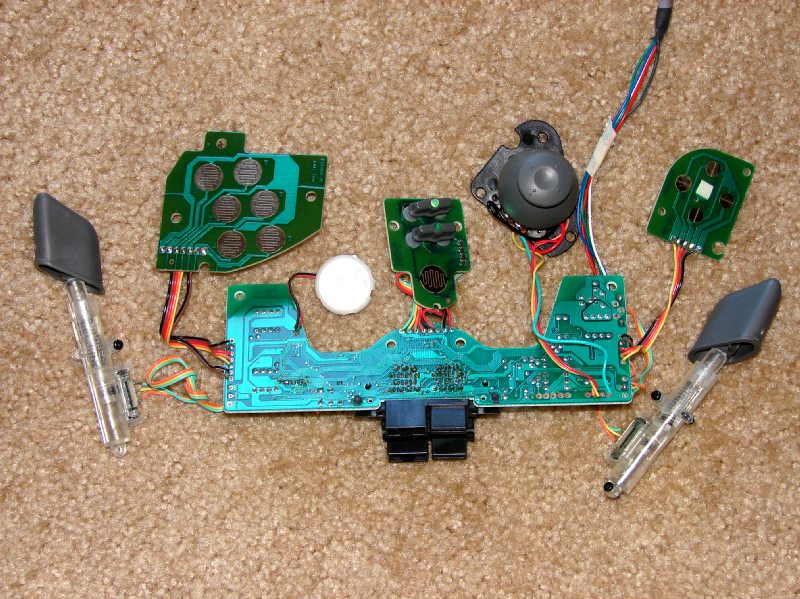
in this image (care of hailrazer), you can see all the different components inside a QFP, and how much easier they would be to mod
in this image (care of hailrazer), you can see all the different components inside a QFP, and how much easier they would be to mod
-
clenteastwood
- Posts: 43
- Joined: Fri Oct 12, 2007 7:49 am
- Location: a little town called six mile :)
Re: Controller mod help
i'm using a third party controller its a performance astropad (its basically the same as the Quantam pad). thanks for the help.
i should have said that in my 1st post sorry
i should have said that in my 1st post sorry
Re: Controller mod help
steal some parts from a ps2 or ps3 controller, most of the buttons are pressure sensitive.
Re: Controller mod help
If your controller uses Potentiometers for the L and R buttons then connect one wire of the new digital button to the center wire of the original POT and the other to one of the outside ones. If it doesn't work switch the outside one to the other outside one and it should. If you plan to remove the POTs from the controller you should install a 10k or so Resistor in place of it from the center to the opposite outside lead of the new button. This will keep the controller from acting all screwy as some do when the Analog lines have the POT removed from the circuit.

The original DC controllers use Hall Effect sensors (as AngelArm1110 touched on) and OpAmps to convert those current changes to voltage, it all boils down to working the same as a POT as a voltage divider when you've traced it all out, so an official DC controller is every bit as easy to use if you forget the whole Hall Effect part and just wire up the new buttons after the OpAmp to the correct places.
The original DC controllers use Hall Effect sensors (as AngelArm1110 touched on) and OpAmps to convert those current changes to voltage, it all boils down to working the same as a POT as a voltage divider when you've traced it all out, so an official DC controller is every bit as easy to use if you forget the whole Hall Effect part and just wire up the new buttons after the OpAmp to the correct places.
Screwing up is one of the best learning tools, so long as the only thing you're not learning is how to screw up.
Re-mappable Wireless 360 Controller - The CGnome
Re-mappable Wireless 360 Controller - The CGnome