PS36D, Left Stick and D-pad Swapped on PS3 Controller

Discuss LEGAL mods for your game systems, and turning them into portables!

Moderator: Moderators

Post Reply
RDC
Posts: 349
Joined: Thu Jul 03, 2008 9:55 pm
Location: VA
Contact:

PS36D, Left Stick and D-pad Swapped on PS3 Controller

Post by RDC »

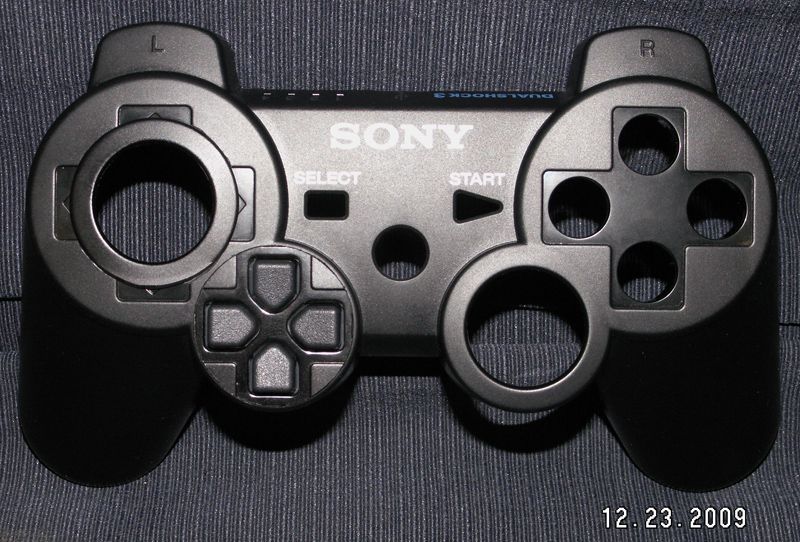
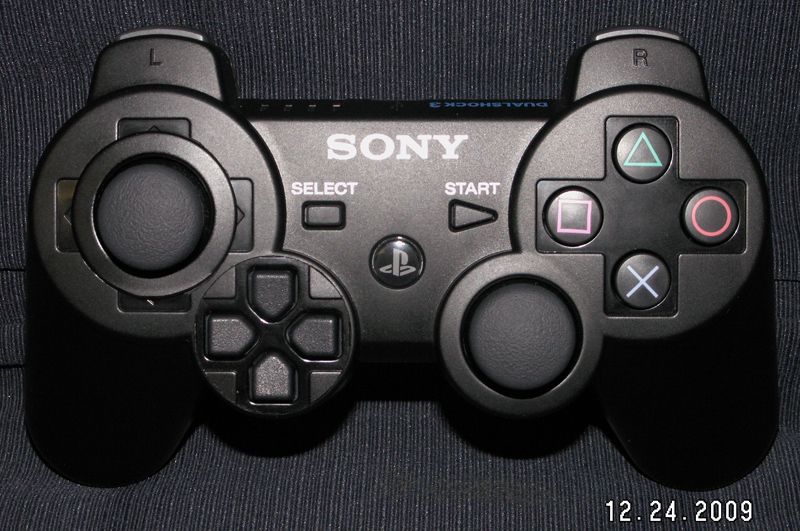
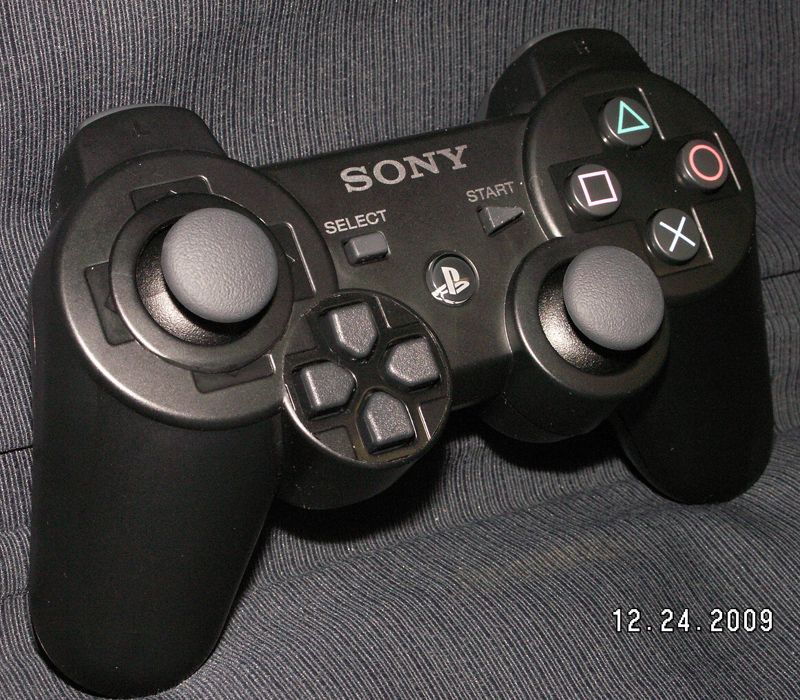
I figure someone had to do it. ;)

Image

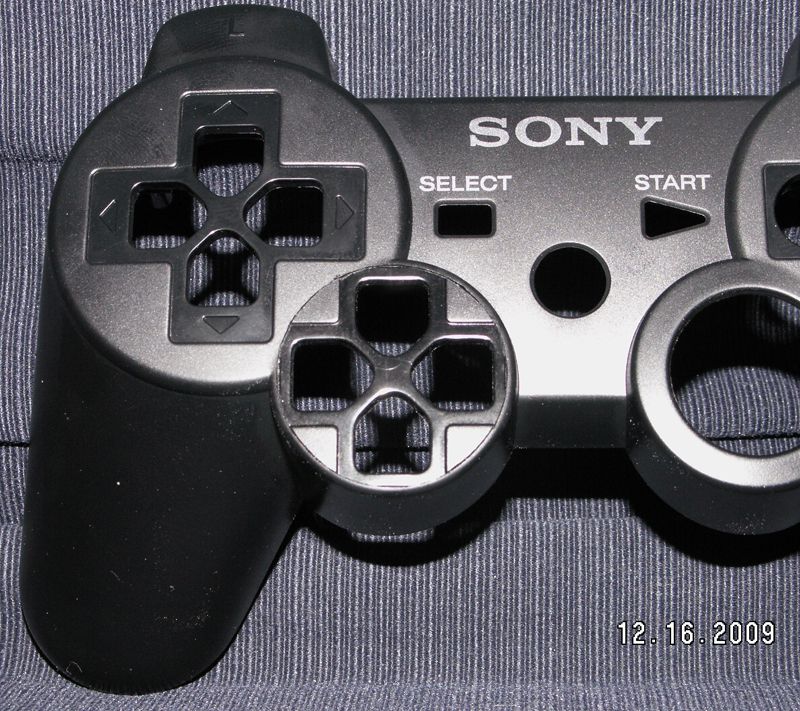
D-pad is just installed for looks at this point.

Image

Nasty quality video of testing the Left Stick..
http://s50.photobucket.com/albums/f320/ ... 36D007.flv

Still have a bit to do on it, like install the D-pad's insides and wire it up, which isn't too much of an issue by comparison to what's already been done, then make the opening for the stick a bit better looking.

EDIT: The D-pad insides are installed and wired up. Still have to do something about the stick opening, but as far as function goes, there she is.

http://s50.photobucket.com/albums/f320/ ... 36D008.flv" onclick="window.open(this.href);return false;
Screwing up is one of the best learning tools, so long as the only thing you're not learning is how to screw up.
Re-mappable Wireless 360 Controller - The CGnome
Axaj
Posts: 135
Joined: Sun Oct 05, 2008 8:52 pm
Location: ur mom

Re: PS36D, Left Stick and D-pad Swapped on PS3 Controller

Post by Axaj »

Good job so far!
haterz wrote:omg nuh-uh u liar i have a big ps1 and a small 1 and the big 1 is biger on the owtsides so its biger on the insides too cuz otherwise itd b smaler on the owtsides liar
RDC
Posts: 349
Joined: Thu Jul 03, 2008 9:55 pm
Location: VA
Contact:

Re: PS36D, Left Stick and D-pad Swapped on PS3 Controller

Post by RDC »

Thanks.


I don't care much for messing with bondo/paint, so I went with transplanting the stick opening from another controller over the original D-pad opening.

Image

Which didn't turn out too bad IMO, not quite as good as I'd like it to look, but it'll do.

Image

Image
Screwing up is one of the best learning tools, so long as the only thing you're not learning is how to screw up.
Re-mappable Wireless 360 Controller - The CGnome
doofiz
Posts: 5
Joined: Mon Jan 18, 2010 2:58 pm

Re: PS36D, Left Stick and D-pad Swapped on PS3 Controller

Post by doofiz »

hey RDC,
That's exactly what I want to do with my dual shock 3. Is there any chance that you can explain how to wire it up? This will be my first mod. I took apart my dual shock three and am guessing that for the analog stick wiring, all you'd have to do is desolder the analog contacts from the board, move it to where the dpad is and then solder wires from the analog contacts to where they would be on the board. Basically just relocating. Please correct me if I'm wrong.

As for the d-pad, I'm stuck on how to wire these. Any help would be much appreciated
thanks
RDC
Posts: 349
Joined: Thu Jul 03, 2008 9:55 pm
Location: VA
Contact:

Re: PS36D, Left Stick and D-pad Swapped on PS3 Controller

Post by RDC »

For a first mod you've picked a decent one. ;)

You'll technically need 3 controllers to do this, at least bits and pieces from 2 others including the full one the way I've done it here.

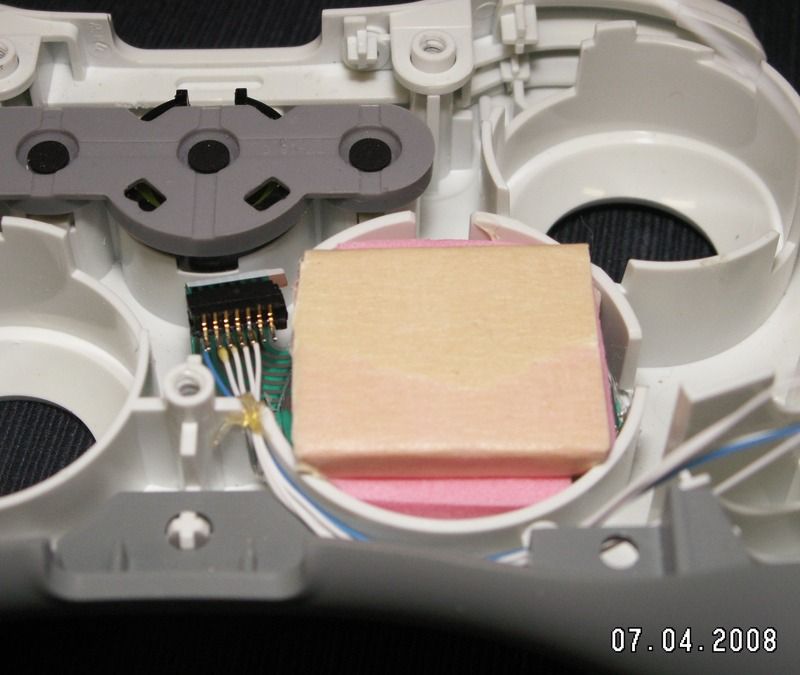
Moving the stick is pretty much how you described it, just put it wherever you want and rewire it. You'll notice in the pic here that the stick is turned from it's original position, this makes no difference at all, and is in fact how it will have to be installed because of space limitations, but just so long as it's in there 'square' all you have to do is wire it back up to the correct spots. If it's backwards you simply swap the Pole connections around. Try and keep the wires as short as possible as the sticks in the DS3 controllers are Hall Effect sensors and they can be really picky sometimes about being moved around. I used part of another controller board to mount the stick too.

Image

You'll also have to do all sorts of alterations to the brace of the controller, so the stick has room and the shell to get it all back together. These are things I didn't get any pics of as I dislike stopping in the middle of something new to take 10 pics for the actual one that I will keep, but that mess needs to be done carefully as you have to keep the original Daughter board connection in place.

As for the D-pad, you'll need parts from one of the older PS3 controllers, before the DS3 controllers came out and the Daughter board connection was changed. You'll need the Daughter board and it's connector off of the controller board from one of those older versions of controller, then it basically gets done the same way I did the 36D controller. The connector gets wired up and run to the 5 spots on the DS3 board for the D-pad connections, COM1, DU, DD, DL and DR, then you can plug up the older Daughter board to it and there's you're new D-pad that you can place wherever. There's no need to sever the traces of the Daughter board like I did on the 36D controller, because the PS3 controller is designed to work with it.

http://forums.xbox-scene.com/index.php?showtopic=655017" onclick="window.open(this.href);return false;

For a first time out this isn't what I'd really recommend trying, the PS3 controllers are a witch to work on and if something gets messed up they're even harder to repair, so be prepared to loose at least one for the cause, but take your time and work it out, it most definitely can be done. ;)

PS3 controller info here > http://forums.xbox-scene.com/index.php?showtopic=648322" onclick="window.open(this.href);return false;
Screwing up is one of the best learning tools, so long as the only thing you're not learning is how to screw up.
Re-mappable Wireless 360 Controller - The CGnome
doofiz
Posts: 5
Joined: Mon Jan 18, 2010 2:58 pm

Re: PS36D, Left Stick and D-pad Swapped on PS3 Controller

Post by doofiz »

thanks RDC.

I am trying to wrap my head around all of it but I think it can be done. As a first step, I decided to take apart my dual shock 3 and put it back together and to get familiar with the parts. That was okay.

i have a similar board to your 3.011. I want to use only one controller if possible. Can't I just use a perf board instead of take a part of the board off another controller? Also, what is the reason why I need the controller portion from an old Six axis? Can't I just solder directly to the points on the board (where the ribbon cable makes contact with the board)


Thanks a lot and if you don't mind, as I go along, can I post questions here?

Also, what is that black piece that has the blue hook up wire connected to?

http://i50.photobucket.com/albums/f320/ ... pad015.jpg" onclick="window.open(this.href);return false;

looking at the above picture, I'm confused as to what that black connector piece is and how you connected it to the ribbon cable. I know that there are different versions of the DS3 boards but is that dpad ribbon part the same for all models?

Again, much appreciated.
RDC
Posts: 349
Joined: Thu Jul 03, 2008 9:55 pm
Location: VA
Contact:

Re: PS36D, Left Stick and D-pad Swapped on PS3 Controller

Post by RDC »

You can use 1 controller, but it's not going to look or work at all like this one.

You can use any kind of board to remount the stick to.

The controller I used was the MSU_VX3_0.08, but this can be done on any of them.

If you plan to use Tact switches for your D-pad so it 'clicks' when pressed and IMHO sux, then you can solder directly to the board and then the Tact switches, which would eliminate using the older PS3 parts, but doesn't get you a nice 100% stock feeling and functioning D-pad, which is Analog on the PS3 controllers, and still is on that controller there, but with Tact switches it wouldn't be. I use the Daughter board from an older PS3 controller because it uses a connector, that black part you're wondering about, to connect to the older Daughter board like it originally did (it's just cut down to size) and then wired up to the controller board. The controller you have, as well as the one that I used and all DS3 controllers now, use a different type of connection there so it's parts can't be used. In either case you can't solder directly to the Daughter board of either one, so you have to either Tact switch that all up to work or do it with parts from an older PS3 controller as I've done. The Tact switch method is easier and less work, but if you played a controller done up that way next to one that I made you'd bin the Tact switch controller quick. ;)
Screwing up is one of the best learning tools, so long as the only thing you're not learning is how to screw up.
Re-mappable Wireless 360 Controller - The CGnome
doofiz
Posts: 5
Joined: Mon Jan 18, 2010 2:58 pm

Re: PS36D, Left Stick and D-pad Swapped on PS3 Controller

Post by doofiz »

hey RDC,
Thanks for the quick reply!

Do you mind explaining explaining what "analog" dpad means compared to the tact switches? I want to stick to as stock as possible but if it means having to use 2-3 controllers, well, then throw that idea out. After all, my purpose for wanting this type of controller is for FPS which doesn't use too much of the dpad anyway.

I can see why the clicky tact switches may be an issue. Today was the first day I found out what tact switches are so please bear with me. I looked at my analog stick and was like hey...so that's what they are...haha.

I've heard of mushier tact switches that I hope will make the dpad feel a little better.

Once again, I appreciate all the work you've done to help other modders with your guides. I've read a bunch of them these last few days
RDC
Posts: 349
Joined: Thu Jul 03, 2008 9:55 pm
Location: VA
Contact:

Re: PS36D, Left Stick and D-pad Swapped on PS3 Controller

Post by RDC »

On the PS3 controllers, and since the PS2 days, all of the face buttons have been 'pressure sensitive', that is they give a different reading depending on how hard they're pushed, and that's a good analogy for Analog. Tact switches, soft or hard, are Digital, that is they're off or they're on, no in between at all. Analog covers everything from one end to the other, and all that in the middle. Think of it like numbers, Digital would be 0 or 255, where as Analog would be 0, 1, 2 and everything up to 253, 254, 255. For a FPS game that's not really needed, and for most games it's not used at all, even though the controller is capable of it. It's really pointless as the amount of action in the buttons (distance you can push them) is so little that it's difficult to be accurate with it, but Sony doesn't want to pull their head out of whatever cloud it's in long enough to see the controller needs a real revamp, not just a new board revision every time the wind changes.

If all you're after is playing FPS games with it you can just Tact switch it up, and really could for any games you wanted to play, though for a fighting game that would get old fast as well as be all stiff. I'm just picky about how I do most things and I wouldn't go that route. That's why I make the PS360 controllers how I do, using the 360 controller board, no Tact switches at all except the Sync/Reset button that's already on there.
Screwing up is one of the best learning tools, so long as the only thing you're not learning is how to screw up.
Re-mappable Wireless 360 Controller - The CGnome
doofiz
Posts: 5
Joined: Mon Jan 18, 2010 2:58 pm

Re: PS36D, Left Stick and D-pad Swapped on PS3 Controller

Post by doofiz »

thanks. How do you feel about the switch? Has it made fps gaming on the PS3 more comfortable?
RDC
Posts: 349
Joined: Thu Jul 03, 2008 9:55 pm
Location: VA
Contact:

Re: PS36D, Left Stick and D-pad Swapped on PS3 Controller

Post by RDC »

Welcome. I feel fine about the switch. You'd have to ask the person that bought it that, but I know they prefer their older PS360 controller I made for them over it.
Screwing up is one of the best learning tools, so long as the only thing you're not learning is how to screw up.
Re-mappable Wireless 360 Controller - The CGnome
doofiz
Posts: 5
Joined: Mon Jan 18, 2010 2:58 pm

Re: PS36D, Left Stick and D-pad Swapped on PS3 Controller

Post by doofiz »

do you still make controllers? May I ask the difference in price to make a PS360 or the dpad switch?
RDC
Posts: 349
Joined: Thu Jul 03, 2008 9:55 pm
Location: VA
Contact:

Re: PS36D, Left Stick and D-pad Swapped on PS3 Controller

Post by RDC »

Yes I currently still make custom controller setups for people.

The price difference really depends on how you'd want the PS360 made up. More can be done with the PS360 than just putting the PS3 controller into the 360 shell, the buttons can be swapped, the D-pad can be replaced, I can rearrange the button layout (swapping the Bumpers/Triggers for example) so that controller has a pretty wide price range, just depends on how it's getting made up.

The PS36D controller, as it's shown here, is just the D-pad and stick swapped, other things could be done if they had to like swapping the sticks so it was SP or moving some buttons around, but even comparing a 'base' PS360 to the PS36D as shown here, the PS36D is cheaper to make up.
Screwing up is one of the best learning tools, so long as the only thing you're not learning is how to screw up.
Re-mappable Wireless 360 Controller - The CGnome
Post Reply