For my portable, I would like to use a gamecube joystick instead of a crappy 3rd-party N64 one. I have the same controller as Electric Rain in his tutorial:
http://forums.benheck.com/viewtopic.php?t=11318
However, my pinout is slightly different. Rather than having four pins my controller board has five.
VCC1
VCC2
X
Y
Gnd
as opposed to,
VCC
X
Y
Gnd
The gamecube joystick has only four leads so how do I wire it to work correctly?
Gamecube Joystick
Moderator: Moderators
-
killercottontail
- Posts: 51
- Joined: Thu Dec 03, 2009 7:03 pm
- Location: Warshington, USA
Gamecube Joystick
“I reject your reality and substitute my own.” -Adam Savage
-
eagle5953
- Moderator
- Posts: 1892
- Joined: Mon Jul 07, 2008 5:06 pm
- 360 GamerTag: eagle5953
- Steam ID: eagle5953
- Contact:
Re: Gamecube Joystick
I just did this mod yesterday with this same controller. Mine also had 5 contacts instead of four. However, instead of using a Gamecube controller, I used the stick from a Pelican XBox controller.
For my mod, the middle contacts were X and Y and connected to the points labeled X and Y. It was easy to see the two pins that were ground, and I wired them together and ran a wire from one to the ground point. For the remaining two, I connected the X side remaining pin to the first VCC and the Y side to the second VCC.
I hope that's clear enough - it's too late to draw up a diagram.
Edit: your Gamecube controller stick has 4 leads? Is it a third-party controller? Electric Rain's diagram showed a 6-lead stick.
For my mod, the middle contacts were X and Y and connected to the points labeled X and Y. It was easy to see the two pins that were ground, and I wired them together and ran a wire from one to the ground point. For the remaining two, I connected the X side remaining pin to the first VCC and the Y side to the second VCC.
I hope that's clear enough - it's too late to draw up a diagram.
Edit: your Gamecube controller stick has 4 leads? Is it a third-party controller? Electric Rain's diagram showed a 6-lead stick.
-
killercottontail
- Posts: 51
- Joined: Thu Dec 03, 2009 7:03 pm
- Location: Warshington, USA
Re: Gamecube Joystick
3rd party... Although I'm not sure about the state that it's in after my last attempt. I might end up using an official. Also I have a brand new 3rd party PS2 controller. *goes searching* That might be promising.
Any idea on how to the this with the 6 contact official joystick??
Any idea on how to the this with the 6 contact official joystick??
“I reject your reality and substitute my own.” -Adam Savage
-
killercottontail
- Posts: 51
- Joined: Thu Dec 03, 2009 7:03 pm
- Location: Warshington, USA
Re: Gamecube Joystick
*Update*
I completed the gamecube joystick transfusion. Used an official gamecube controller C stick. Everything works perfectly and I was able to move the cursor on the Super Smash Bros. character selection screen with 100% accuracy.
Pics:
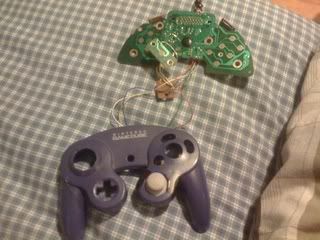

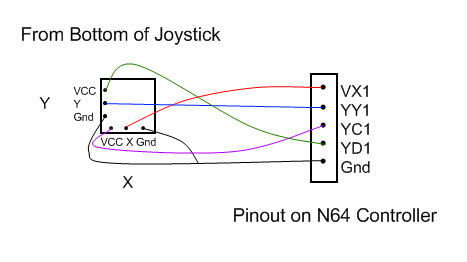
Quick wiring diagram:
I completed the gamecube joystick transfusion. Used an official gamecube controller C stick. Everything works perfectly and I was able to move the cursor on the Super Smash Bros. character selection screen with 100% accuracy.
Pics:
Quick wiring diagram:
“I reject your reality and substitute my own.” -Adam Savage
-
eagle5953
- Moderator
- Posts: 1892
- Joined: Mon Jul 07, 2008 5:06 pm
- 360 GamerTag: eagle5953
- Steam ID: eagle5953
- Contact:
Re: Gamecube Joystick
Yes! This is exactly what mine looked like as well, except the view would be from the top instead of the bottom.killercottontail wrote:Quick wiring diagram:
I'm glad it worked for you too. The difference is positively drastic.