Installation was really pretty simple. Microsoft finally ditched the old NT 4.0 text-based preinstaller; you're given a Fedora 7 style GUI installer. Installation only took a half hour, including downloading the drivers for the computer's RealTek audio chip. (The only hardware not automatically recognized and installed.)
It's working on downloading 3DMark Vantage now. I'll probably record the results and post them to YouTube for kicks. (Seeing as it barely struggled through 3DMark 06 and only got an Experience Score of 4.0, we're in for some comedy.
 )
)The wallpaper kept changing on me (with a nice but annoying fade effect), so it changed a couple times between screenshots.

Here's the desktop it booted up to (with the addition of the sticky note and clock window.) The clock is still down in the taskbar, where it's been since Windows 95, but now if you click it once it brings up a window with an analog clock and a calendar. We like that. If anyone knows of a freeware XP addon that does this, please post it.

IE 8 beta showing the forums and about box. The "Sticky Notes" application is also running, describing how it's not such an original idea after all. Apple had basically the same thing back in the early 90s with System 7.5.)

Also, IE 8 beta retains the completely retarded "a window for every download" model from IE 5. What the hell, Microsoft? Opera and Firefox both have consolidated download windows, and they at least 100 times better than this bologna.

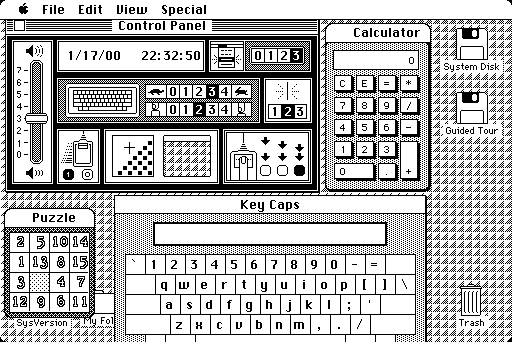
Some of the desktop "gadgets" (really liberated Vista Sidebar addons). I like how half the RAM is used up. Obligatory analog clock (why?! there's a perfectly good clock in the system tray!) and CPU tachometer included. Weather forecasting snow (:evil:), and a tiny puzzle. Including a slidey puzzle as a miniature desktop diversion isn't a new idea either. Apple did that 25 years ago in System 1.

Media Player 11 (12?) finally has a slimmed default interface. It still has a big Library view, if you want. Unfortunately, as far as I can tell the SRS WOW effects and equalizer are absent. (At least, I can't find them...)

The Legend of Sol-Tar is looking pretty shiny these days. (Another Apple tie-in: Susan Kare made a lot of the 80s Mac icons, and later made Windows 3.1 icons and the Solitaire cards we saw from 95 through XP.)

Paint got some well-needed attention. They added several new brushes, some dynamically stretchable clip art shapes, rulers, and a crop tool. Unfortunately, they thought it necessary to cram the ribbon interface from Office 2007 in there as well, and not give you the option of changing it back. Boo to that, Microsoft. At least it defaults to saving as PNG now, instead of BMP. The mspaint.exe executable from XP runs just fine, though it gives me an error when I tell it to save.

Here's your new brushes. The top row and the spray can are all from the old Paint. Finally, Paint has anti-aliased brushes!

Win7 </3 Celeron.

By default it wants to clump all the application windows into one taskbar button with no description. Instead when you click it, it generates thumbnails of all the applications under that group and display them in a pop-up window. Thankfully, it's really easy to make them behave like they should. (The way it was done from 95 through XP.)

 They left Windows Classic in there! And it doesn't look like they slapped it together at the last second! They did try to hide it at the bottom of the Customize control panel, under "Accessibility Themes", though. Once you set the taskbar to classic mode and set the theme to Windows Classic, it really feels like Windows 2000.
Overall, I like it. It's reasonably fast (performed as I expected on my single-core "budget CPU from 2005" cheap compy), clean, and picked up on everything I've thrown at it from an AGP Radeon HD 2600 card to a Wacom tablet. Plus, it has the best marketing champaign ever backing it up: Vista. ("Vista sucks, wait for the next one." Sound familiar?
)Anyone else gotten in there and tried this sucker out? Anything you want a screenshot of?
http://blog.wired.com/business/2009/01/ ... publi.html