If you're making a portable you probably need something to watch it on. (Unless you want to guess what's happening in the game, but I wouldn't advise that) Anyway, this forum is your "Hacking a pocket TV/screen" one-stop solution. Share your experiences and knowledge here.
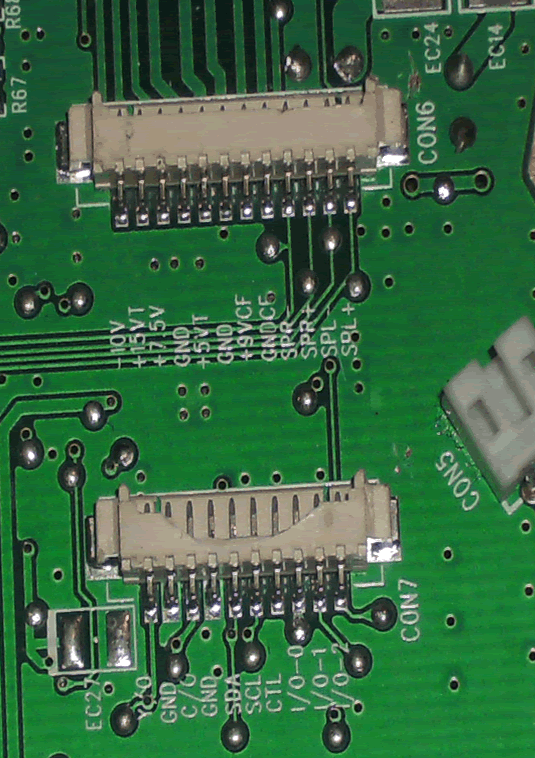
There are two groups of wires coming out of the screen that go to two connectors on the board. Here is a picture of the slots. What do all these labels mean?
Current projects:
Ultimate N64 Guide
N64 Portable (x2)
NES Portable
For the top connector I believe they are(in order):
Negative 10 volts
Positive 15 volts
Positive 7.5 volts
Ground
Positive 5 volts
Ground
Positive 9 volts for the CF backlight
Ground for the CF backlight
Right Speaker Negative
Right Speaker Positive
Left Speaker Negative
Left Speaker Positive
I'm not sure what the "T" means after some of the voltages
The second connector might have something to do with data transfer, but I'm not sure.
Like is says in the sticky about which screens you can and can't use, most portable DVD players don't work unless they have an AV in port already, otherwise it's not worth it to get the screen to work.
This will probably cause your screen to throw a spaz and explode, but...
Connect power to the cables on the screen. It seems to require some weird voltages- have fun with that. The "CF" labeled power inputs might be for the cold cathode backlight, but I don't know.
Now on the other cable try connecting Luma where the Y/O would connect and Chroma where the C/O would connect. Turn the sucker on and don't blame me if/when it explodes.
It would be very helpful if we had pictures of the other board.
Well, im pretty positive I can't just slap composite video anywhere on here and make it work - I knew that before I even posted the thread. I was just wondering what the labels all meant and the like (the not obvious ones). Also, that is the only board except maybe the screen board, but I can't seem to get the stupid thing apart and as I can't really use it anyway, I'm not going to try any harder.
Current projects:
Ultimate N64 Guide
N64 Portable (x2)
NES Portable