hi all,
newbie here and hoping someone may be able to assist with a technical query if possible.
would it be feasible to utilise the wireless parts from a ps3 controller to implement them into a negcon controller casing (whilst obviously keeping the functionality of the original negcon itself?
ie to get a negcon to be compatible with the ps3.
if so, is there anybody here who could and would help with the challenge to make this a realisation?
regards,
rich
PS3 Negcon Controller help pls
Moderator: Moderators
I haven't seen a negcon controller for over 15 years! ...
does it work on the ps3, with a converter?
what games are/would be compatible on the ps3 with it?
what games would you intend on playing with it?
After reading the wiki page entry the main problem I see is compatibilty. There are functions missing from the negcon that are an integral part of the ps3 controller setup, ie dual analogue control, L2 and R2 shoulder buttons, wireless, and the negon is split in half for starters...
plus as far as I know there are no driving games on the ps3 that would work with this, again a dual analogue issue.
it's certainly a novel idea but one I see would inevitably to be hampered by outdated methods...
does it work on the ps3, with a converter?
what games are/would be compatible on the ps3 with it?
what games would you intend on playing with it?
After reading the wiki page entry the main problem I see is compatibilty. There are functions missing from the negcon that are an integral part of the ps3 controller setup, ie dual analogue control, L2 and R2 shoulder buttons, wireless, and the negon is split in half for starters...
plus as far as I know there are no driving games on the ps3 that would work with this, again a dual analogue issue.
it's certainly a novel idea but one I see would inevitably to be hampered by outdated methods...
hi ffrr,
many thanks indeed for the response.
i've not tried it personally, but apparently the negcon doesn't work on the ps3 with a convertor.
there's stacks of games compatible with it - its your ridge racers, gran turismo's, etc but i, and a horde of others, are after it chiefly for wipeout.
whether thats the new wipeout hd or just playing older versions on a ps3.
i know there's a set of shoulder buttons and dual analogues missing but can the wireless "gubbings" (technical term that lol) be implemented across from a ps3 controller to make it run?
i would be more than willing to supply a negcon and ps3 controller and aid with costs if someone with suitable knowledge would be able to assist.
regards and thanks again,
rich
many thanks indeed for the response.
i've not tried it personally, but apparently the negcon doesn't work on the ps3 with a convertor.
there's stacks of games compatible with it - its your ridge racers, gran turismo's, etc but i, and a horde of others, are after it chiefly for wipeout.
whether thats the new wipeout hd or just playing older versions on a ps3.
i know there's a set of shoulder buttons and dual analogues missing but can the wireless "gubbings" (technical term that lol) be implemented across from a ps3 controller to make it run?
i would be more than willing to supply a negcon and ps3 controller and aid with costs if someone with suitable knowledge would be able to assist.
regards and thanks again,
rich
ahhhh wipeout ;) ...lol
thats why you want it! ... I can see the reasoning behind the idea now.
...and if you did pull it off, and it worked well, you'd certainly be laughing!
I reckon it's do-able once a few things are worked out, I doubt it'll be easy though.
First off why doesn't it work with an adapter on the ps3? I'm guessing the unique analogue setup is the problem.
Also, if it didn't work, was it not fully working, or did some of the buttons/steering work?
And that's before the thought of making it wireless!
If you cannot get it to register with an adapter then I wouldn't pursue that avenue...
If I really wanted this badly enough... I'd get hold of a few negcons for testing...
a ps2-ps3 usb adapter.
...and an old ps2 dual analogue control to jump off of. Strip this pad down to the circuit board.
and then start testing buttons that correspond to each other on each of the pads...
I have no idea how the negcon layout is once taken apart. It would be interesting to see how the twist part works, and what relation it has to a normal analogue thumb control... if any at all.
lol... anyway those are just thoughts...also, have you thought about emailing Namco about this?
thats why you want it! ... I can see the reasoning behind the idea now.
...and if you did pull it off, and it worked well, you'd certainly be laughing!
I reckon it's do-able once a few things are worked out, I doubt it'll be easy though.
First off why doesn't it work with an adapter on the ps3? I'm guessing the unique analogue setup is the problem.
Also, if it didn't work, was it not fully working, or did some of the buttons/steering work?
And that's before the thought of making it wireless!
If you cannot get it to register with an adapter then I wouldn't pursue that avenue...
If I really wanted this badly enough... I'd get hold of a few negcons for testing...
a ps2-ps3 usb adapter.
...and an old ps2 dual analogue control to jump off of. Strip this pad down to the circuit board.
and then start testing buttons that correspond to each other on each of the pads...
I have no idea how the negcon layout is once taken apart. It would be interesting to see how the twist part works, and what relation it has to a normal analogue thumb control... if any at all.
lol... anyway those are just thoughts...also, have you thought about emailing Namco about this?
hi again ffrr,
yes wipeout lol, it's quite simply the most perfect controller for that game, there's quite a number of us who are desperate for a ps3 negcon.
i see today, someone else on the wipeout forum has fired an email off to Namco, so it'll be interesting to see their response (if any).
i'm not sure of the results with the ps3 / ps2 convertor as not tried it personally, but a few others there have, so i have requested their results and i shall let you know asap.
not having any circuitry or electronic knowledge would you be able to assist with this request - or failing that point me to someone who could spare the time to tinker with this if parts were supplied?
many thanks again ffrr,
yes wipeout lol, it's quite simply the most perfect controller for that game, there's quite a number of us who are desperate for a ps3 negcon.
i see today, someone else on the wipeout forum has fired an email off to Namco, so it'll be interesting to see their response (if any).
i'm not sure of the results with the ps3 / ps2 convertor as not tried it personally, but a few others there have, so i have requested their results and i shall let you know asap.
not having any circuitry or electronic knowledge would you be able to assist with this request - or failing that point me to someone who could spare the time to tinker with this if parts were supplied?
many thanks again ffrr,
heheh I was going to suggest emailing Namco! ... you never know?!
as for the wiring... I have a fair amount of soldering experience but when it comes to circuitry I'm at a loss pretty much...
I modded a wii nunchuck to work on the ps3 a while ago using the piggy back method I mentioned. I came across a few problems in the process, some obvious and some not so obvious... but I managed to get the result I was after... although my working model only worked for around a month, I wore it out due to excessive use! ...
I'll await your findings from these other people who have negcons ;)
as for the wiring... I have a fair amount of soldering experience but when it comes to circuitry I'm at a loss pretty much...
I modded a wii nunchuck to work on the ps3 a while ago using the piggy back method I mentioned. I came across a few problems in the process, some obvious and some not so obvious... but I managed to get the result I was after... although my working model only worked for around a month, I wore it out due to excessive use! ...
I'll await your findings from these other people who have negcons ;)
-
Djdavies83
- Posts: 6
- Joined: Sun Apr 19, 2009 8:01 pm
- PSN Username: djdavies83
- Location: manchester UK
- Contact:
challenge accecpetd!
At about 2am this worning while playing wipeout HD, I suddenly remembered I had a negcon from my 1st psx floating around the back of a cupboard! 
after 10mins of digging it out I plugged it into my cheap and nasty (but working perfectly) ps pad to usb converter.
some buttons work some don't, reseults as follows...
up, down, left, right, start, B (triangle), A (circle), twist
= ok
left shoulder, II (square), I (X)
= dead
right shoulder
= R1
I'm not sure if this is the converter or the ps3, my psx to gamecube converter has L + R issuses.
after a lot of 'ps' button and re-assigning the pads from p1 to p2 and back again it can be used!
But it is very limmited, by setting A (circle) as accelerate, B (triangle) as use weapon, twist is
automaticaly set to steer, this can't be changed. This does mean that you can not Nose up/down,
convert into weapon into shield or use the airbreaks.
I also had to use the ps3 pad to set the DEAD buttons even though they can not be used they have
to be asigned to something for the menu to let you back into the game, it was fun but with no airbrakes
and no nose control it was a little hard to fly.

looking at this pic and reading about the 'gubbings' the R button works as it NOT analogue like the L button.
think it would be hard to fit all the bits from a dual-shock inside, even without the rumble motors.
maybe I could make it into a plugin, like the wii classic controller.

dual shock 2

dual shock 3
I should just be able to connect to potentiometers in the negcon to where they should be in the dual shock, and replace the analogue I and II buttons with normal ones and piggy-back them in and it should work.
my only concern is with the dual-shock there is a margin or Deadspace in the center of the stick, meaning that you had to move the stick a little before movement was registered in the game, this is the
ps system, not the dual-shock.
I realised it is not the dual-shock when I used it on a pc with the same ps to usb adapter as I mentioned earlier,
Could this margin affect how good the neg-shock or dual-con hybrid would work?
another idea, seeing how the twist works, if I use a dual shock compatable wheel, maybe I could get force-feedback
to work!
I got a kid so time is limitted, but I wanna bet this working A.S.A.P. the negcon is the best wipeout controller ever!
so Frrrrrr, LoveDr any ideas you guys have would help.
after 10mins of digging it out I plugged it into my cheap and nasty (but working perfectly) ps pad to usb converter.
some buttons work some don't, reseults as follows...
up, down, left, right, start, B (triangle), A (circle), twist
= ok
left shoulder, II (square), I (X)
= dead
right shoulder
= R1
I'm not sure if this is the converter or the ps3, my psx to gamecube converter has L + R issuses.
after a lot of 'ps' button and re-assigning the pads from p1 to p2 and back again it can be used!
But it is very limmited, by setting A (circle) as accelerate, B (triangle) as use weapon, twist is
automaticaly set to steer, this can't be changed. This does mean that you can not Nose up/down,
convert into weapon into shield or use the airbreaks.
I also had to use the ps3 pad to set the DEAD buttons even though they can not be used they have
to be asigned to something for the menu to let you back into the game, it was fun but with no airbrakes
and no nose control it was a little hard to fly.
looking at this pic and reading about the 'gubbings' the R button works as it NOT analogue like the L button.
think it would be hard to fit all the bits from a dual-shock inside, even without the rumble motors.
maybe I could make it into a plugin, like the wii classic controller.
dual shock 2
dual shock 3
I should just be able to connect to potentiometers in the negcon to where they should be in the dual shock, and replace the analogue I and II buttons with normal ones and piggy-back them in and it should work.
my only concern is with the dual-shock there is a margin or Deadspace in the center of the stick, meaning that you had to move the stick a little before movement was registered in the game, this is the
ps system, not the dual-shock.
I realised it is not the dual-shock when I used it on a pc with the same ps to usb adapter as I mentioned earlier,
Could this margin affect how good the neg-shock or dual-con hybrid would work?
another idea, seeing how the twist works, if I use a dual shock compatable wheel, maybe I could get force-feedback
to work!
I got a kid so time is limitted, but I wanna bet this working A.S.A.P. the negcon is the best wipeout controller ever!
so Frrrrrr, LoveDr any ideas you guys have would help.
Re: PS3 Negcon Controller help pls
looking at the inside pic of the negcon, as you noted, there are three potentiometers, two for the I and II buttons and one shoulder button. I have never used a negcon for playing wipeout so I don't know why that is, apart from guessing they were simply used as analogue controls; in game.
I reckon the piggy back method should work with the buttons that you need to make normal...
From what I read on the negcon a while back, didn't you have to calibrate it each time wipeout was played? Maybe that would be why it's not as responsive as it should be...?
Are the in-game controls on the PS version the same as the PS3 one? if not what has changed... taking that into account I don't think it's going to be easy/possible to get it working 100%
I cannot remember where now, as it was a long while back, but I remember reading other threads on different site about this [maybe the official PS3 forums]... maybe worth a search?
I reckon the piggy back method should work with the buttons that you need to make normal...
From what I read on the negcon a while back, didn't you have to calibrate it each time wipeout was played? Maybe that would be why it's not as responsive as it should be...?
Are the in-game controls on the PS version the same as the PS3 one? if not what has changed... taking that into account I don't think it's going to be easy/possible to get it working 100%
I cannot remember where now, as it was a long while back, but I remember reading other threads on different site about this [maybe the official PS3 forums]... maybe worth a search?
-
Djdavies83
- Posts: 6
- Joined: Sun Apr 19, 2009 8:01 pm
- PSN Username: djdavies83
- Location: manchester UK
- Contact:
rough edit of negcon compatabilty now LIVE
The controls are very similar, there is no calibration page or anything, there is now an option to absorb weapon/pickup into your sheild enrgy (there is no more 'pit' lane).
I was telling my friend who gave me the ps3 what I am planning on doing with the negcon and he sent me a "kit form"
ps3 dualshock, I say kit form because he gave up on putting it back together and just mailed it up to me. I will use this for the final neGcon conversion at some point.
I have started on a ps2 dualshock, don't want to run before I can walk!
After more testing I have found there is no deadspace or margin with the ps2 dualshock and the pcb (printed circuit board) can easily be trimmed down to fit inside the neGcon housing!
The top buttons are not bare copper board and carbon impregnated rubber as I hoped, it's a thin plastic membrane
(Photos of the current stage in my next post), this will makie piggy-backing impossible! I have an odd but ingenious solution.....
An old dvd remote has a simular makeup to the original blue buttons of the neGcon (plastic button -to- carbon impregnated rubber -to- bare copper pcb) so, for the I and II buttons I will be using a piece of dvd remote pcb, with its rubber buttons (pressing the plastic I or II will press down on the rubber to the pcb) I will solder the 'New' pcb directly to where the plastic button membrane used to make contact with the dualshock pcb, well directly onto the control micro chip as the contacts part of the pcb will be trimmed away to make it fit in the neGcon.
Untill my next post Leave you both with a Short unfinshed (you can hear the kid I mentioned in my 1st post) video showing the neGcon kinda work on the ps3
http://www.youtube.com/watch?v=zloc2Hmx0AM
I was telling my friend who gave me the ps3 what I am planning on doing with the negcon and he sent me a "kit form"
ps3 dualshock, I say kit form because he gave up on putting it back together and just mailed it up to me. I will use this for the final neGcon conversion at some point.
I have started on a ps2 dualshock, don't want to run before I can walk!
After more testing I have found there is no deadspace or margin with the ps2 dualshock
and the pcb (printed circuit board) can easily be trimmed down to fit inside the neGcon housing!The top buttons are not bare copper board and carbon impregnated rubber as I hoped, it's a thin plastic membrane
(Photos of the current stage in my next post), this will makie piggy-backing impossible! I have an odd but ingenious solution.....
An old dvd remote has a simular makeup to the original blue buttons of the neGcon (plastic button -to- carbon impregnated rubber -to- bare copper pcb) so, for the I and II buttons I will be using a piece of dvd remote pcb, with its rubber buttons (pressing the plastic I or II will press down on the rubber to the pcb) I will solder the 'New' pcb directly to where the plastic button membrane used to make contact with the dualshock pcb, well directly onto the control micro chip as the contacts part of the pcb will be trimmed away to make it fit in the neGcon.
Untill my next post Leave you both with a Short unfinshed (you can hear the kid I mentioned in my 1st post) video showing the neGcon kinda work on the ps3
http://www.youtube.com/watch?v=zloc2Hmx0AM
A wise man learns from his mistakes,
A wiser man learns from the mistakes of others!
A wiser man learns from the mistakes of others!
Re: PS3 Negcon Controller help pls
Hope the OP doesn't mind, seems like the place to ask this instead of starting up a new thread. I have a couple of questions for any hardcore neGcon users that have happened across this thread and would like to see it PS3 compatible...
What functions do what in the more popular games you all are wanting to use with the neGcon versus the PS1/2/3 controller? ie GT, WipEout and such..
Like steering is the twisting action, which translates to the Left Sticks left/right axis..
Gas/Brake in the GT games are the I and II buttons which translate to X and [ ], but in newer games that'll be L2 and R2..
Etc., etc.
How would you guys want it setup versus the PS3 controller? because there are going to be some limitations..
In WipEout HD for example, the steering and pitch is controlled by the left stick, and this can't be duplicated with the neGcon, it lacks the second Axis (up/down) that a Stick has and adding in buttons to duplicate it isn't really an option as that isn't Analog and ya loose the precision, it's doable, but not how I'd prefer to go about it. Also using the Tilt function for that is right out as twisting the neGcon will play havoc with the Accelerometer (if kept internal) or be useless if the board is left out of the neGcon, so either way that's no option.
Since the PS3 controller has 17 buttons and 4 axis in total versus the neGcon's 11 button and 1 Axis, some things are going to have to either go or be dealt with in some fashion to make it even half usable for some games and almost sure to cripple it for others. Adding in the Select and PS buttons are not a big deal at all, neither is getting around the common ground setup of the neGcon versus the 3 common line setup of the PS3 controller, nor is adding any additional buttons to make up for the neGcon's lack thereof, but Axis are another thing, as are maintaining the majority of the PS3 controller buttons Analog feature.
Stripping the neGcon and 'piggy backing' it onto a PS3 controller isn't the real issue (wouldn't be with a PS2 controller either ) it's getting it setup to actually be usable in a game that is the PITA since it's really a half controller half steering wheel, or 1/3 of what a normal PS3 controller is capable of, and since the game doesn't know you're using the neGcon it can't reconfigure itself for using it properly, like it can on the PS1 where ya have control over it's settings, as far as the PS3 is concerned you're using a PS3 controller.
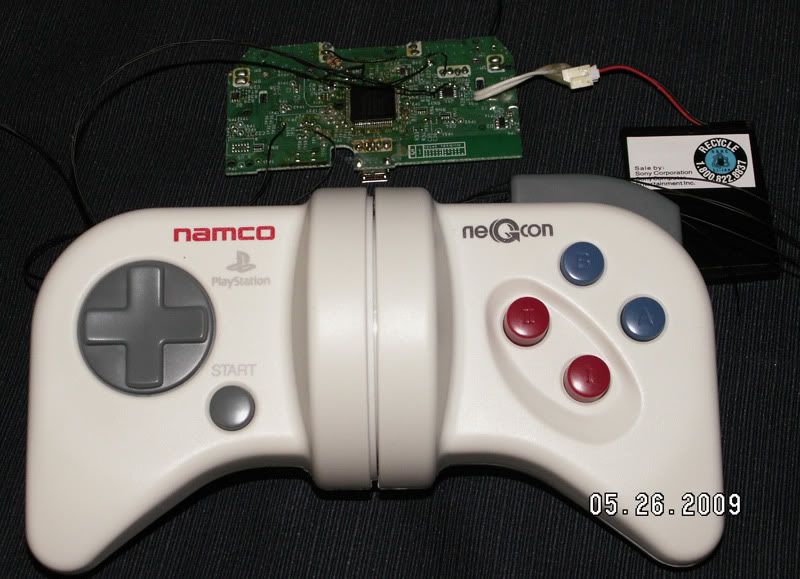
..this is just the Twist and I/II buttons wired up to the Left Stick (left/right) and R1/R2 for a quickie test in MotoGP '08 (demo). There's no LED lit up on the controller because all of them have been removed.

I plan to mess around slowly on this project, tinker on it from time to time as I have another project in the works that's taking up my real play/hack time, and I may take this in a different direction once I get some time to really spend on it, I'll have to wait and see on that one.
Also, just so anyone that's interested knows, there are at present 10 versions of known wireless PS3 controllers (none really like any PS controller layout before it) and any of them can be used for something like this. The major version changes are different from each other with each having it's advantage/disadvantage to using it, which makes it an even bigger mess, so if ya have any serious aspirations about doing this be prepared to do some research and a lot of figuring some things out.
What functions do what in the more popular games you all are wanting to use with the neGcon versus the PS1/2/3 controller? ie GT, WipEout and such..
Like steering is the twisting action, which translates to the Left Sticks left/right axis..
Gas/Brake in the GT games are the I and II buttons which translate to X and [ ], but in newer games that'll be L2 and R2..
Etc., etc.
How would you guys want it setup versus the PS3 controller? because there are going to be some limitations..
In WipEout HD for example, the steering and pitch is controlled by the left stick, and this can't be duplicated with the neGcon, it lacks the second Axis (up/down) that a Stick has and adding in buttons to duplicate it isn't really an option as that isn't Analog and ya loose the precision, it's doable, but not how I'd prefer to go about it. Also using the Tilt function for that is right out as twisting the neGcon will play havoc with the Accelerometer (if kept internal) or be useless if the board is left out of the neGcon, so either way that's no option.
Since the PS3 controller has 17 buttons and 4 axis in total versus the neGcon's 11 button and 1 Axis, some things are going to have to either go or be dealt with in some fashion to make it even half usable for some games and almost sure to cripple it for others. Adding in the Select and PS buttons are not a big deal at all, neither is getting around the common ground setup of the neGcon versus the 3 common line setup of the PS3 controller, nor is adding any additional buttons to make up for the neGcon's lack thereof, but Axis are another thing, as are maintaining the majority of the PS3 controller buttons Analog feature.
Stripping the neGcon and 'piggy backing' it onto a PS3 controller isn't the real issue (wouldn't be with a PS2 controller either
) it's getting it setup to actually be usable in a game that is the PITA since it's really a half controller half steering wheel, or 1/3 of what a normal PS3 controller is capable of, and since the game doesn't know you're using the neGcon it can't reconfigure itself for using it properly, like it can on the PS1 where ya have control over it's settings, as far as the PS3 is concerned you're using a PS3 controller...this is just the Twist and I/II buttons wired up to the Left Stick (left/right) and R1/R2 for a quickie test in MotoGP '08 (demo). There's no LED lit up on the controller because all of them have been removed.
I plan to mess around slowly on this project, tinker on it from time to time as I have another project in the works that's taking up my real play/hack time, and I may take this in a different direction once I get some time to really spend on it, I'll have to wait and see on that one.
Also, just so anyone that's interested knows, there are at present 10 versions of known wireless PS3 controllers (none really like any PS controller layout before it) and any of them can be used for something like this. The major version changes are different from each other with each having it's advantage/disadvantage to using it, which makes it an even bigger mess, so if ya have any serious aspirations about doing this be prepared to do some research and a lot of figuring some things out.
Screwing up is one of the best learning tools, so long as the only thing you're not learning is how to screw up.
Re-mappable Wireless 360 Controller - The CGnome
Re-mappable Wireless 360 Controller - The CGnome
Re: PS3 Negcon Controller help pls
wow - seriously impressed here with the progress made on this - you guys my new heroes lol!
and apologies for not replying sooner, i didn't realise the thread was still active and being updated.
i believe RFC has also posted on the wipeoutforum re some of the functionality queries for the controller.
djdavies83 - totally agree the negcon is such a seriously seriously underated controller - especially for the likes of wipeout which is why i was so desperate to find the right people to make this a reality.
imo (for wipeout at least) the "twist" on the negcon was always used for the steering and the up / down on the d-pad used for the pitch of the crafter, with the left / right of the d-pad only used for menu selection and i always used to use, button II for thrust (go) and button (I) for fire.
you folks are gods, please do complete this project and I'll happily pay someone to make me one of the controllers.
regards,
rich
and apologies for not replying sooner, i didn't realise the thread was still active and being updated.
i believe RFC has also posted on the wipeoutforum re some of the functionality queries for the controller.
djdavies83 - totally agree the negcon is such a seriously seriously underated controller - especially for the likes of wipeout which is why i was so desperate to find the right people to make this a reality.
imo (for wipeout at least) the "twist" on the negcon was always used for the steering and the up / down on the d-pad used for the pitch of the crafter, with the left / right of the d-pad only used for menu selection and i always used to use, button II for thrust (go) and button (I) for fire.
you folks are gods, please do complete this project and I'll happily pay someone to make me one of the controllers.
regards,
rich
Re: PS3 Negcon Controller help pls
Suc-freaking-cess, for what I set out for anyway.
With the extremely expert help of Manta (coding) and DojThis (some vital math) the Twist is now a done deal with 4 modes for a different max turning radius..
Default - Which is around 110 degrees
Mode 1 - 90 degrees
Mode 2 - 75 degrees
Mode 3 - 45 degrees
For this mess we used a PIC 16F690 and an LTC1660 DAC. The DAC is an Octal, which means it has 8 Digital Analog Converters, but only one of them is used for this and the PIC is also sort of overkill, they were just leftovers that we put to some use.
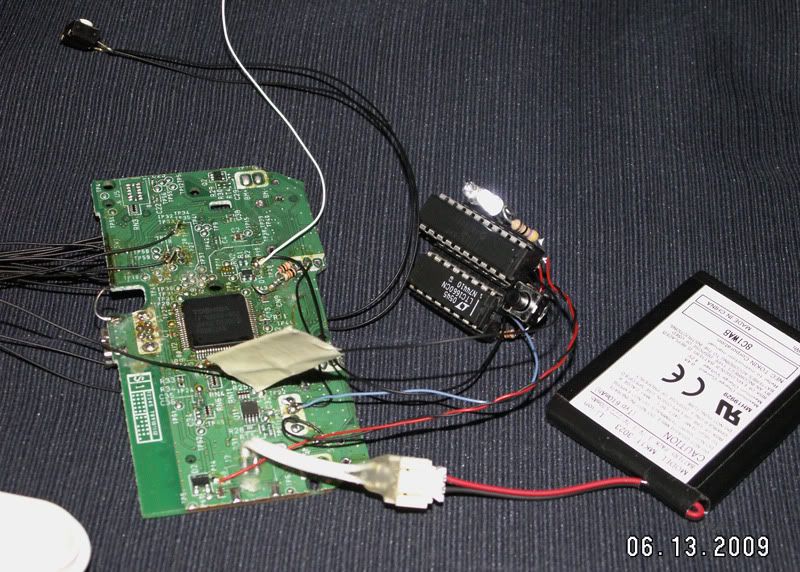
It has a single push button to cycle thru the modes and a couple of LEDs for feedback so ya know what mode it's in. All that's really left now is to stuff the controller board and PIC/DAC into a project box and make up a decent cable for it, figure 3ft. or so is more than enough, so it's semi-wireless. Stuffing the entire PS3 controller into the neGcon isn't going to happen, and if it did it would look like crap, there just isn't enough room for it to fit in there and to even get into that would be such a chore.
I'll try and get some vids up later for ya guys of the different modes and show how it all works, like to get it all in the project box first.
With the extremely expert help of Manta (coding) and DojThis (some vital math) the Twist is now a done deal with 4 modes for a different max turning radius..
Default - Which is around 110 degrees
Mode 1 - 90 degrees
Mode 2 - 75 degrees
Mode 3 - 45 degrees
For this mess we used a PIC 16F690 and an LTC1660 DAC. The DAC is an Octal, which means it has 8 Digital Analog Converters, but only one of them is used for this and the PIC is also sort of overkill, they were just leftovers that we put to some use.
It has a single push button to cycle thru the modes and a couple of LEDs for feedback so ya know what mode it's in. All that's really left now is to stuff the controller board and PIC/DAC into a project box and make up a decent cable for it, figure 3ft. or so is more than enough, so it's semi-wireless. Stuffing the entire PS3 controller into the neGcon isn't going to happen, and if it did it would look like crap, there just isn't enough room for it to fit in there and to even get into that would be such a chore.
I'll try and get some vids up later for ya guys of the different modes and show how it all works, like to get it all in the project box first.
Screwing up is one of the best learning tools, so long as the only thing you're not learning is how to screw up.
Re-mappable Wireless 360 Controller - The CGnome
Re-mappable Wireless 360 Controller - The CGnome
-
Djdavies83
- Posts: 6
- Joined: Sun Apr 19, 2009 8:01 pm
- PSN Username: djdavies83
- Location: manchester UK
- Contact:
Re: PS3 Negcon Controller help pls
wow, nice work... Congrats!
I was going to try changing the value of the resistor for the max turn but I can safely say you have best'd me there.
I will continue with my ps2 pad conversion for now, I think it will just about fit inside the housing of the neGcon, true a ps2-usb adaptor is needed but on the plus side it will be reverse compatible with almost any dual shock racing games on ps1 and ps2.
RDC. I have a couple of questions if you don't mind?
Embedded video, how did you do it on here? I tried to embed a youtube video on my last post with no luck.
Did you just piggy-back the twist potentiometer to the left and right potentiometer on the ps3 dual shock?
Variable L2 and R2, are you going to try and replicate this in your final version? Ps3 uses a kinda electro resistance sponge, harder its pressed the less resistance I think. Incorporating these parts would prob be easier that using variable resistors.
Project box buttons,
Ps
Select
L1 + R1
These should not be hard to add to a project box housing, though it
May be easier and cheaper to put the ps3 back into its housing, there should be enough space in negcon or in one or both of the handles of the dual shock for your extra micro chips.
Please excuse any spelling/layout errors, I've written this post on my n95, much easier on a pc but ain't got one with me.
I was going to try changing the value of the resistor for the max turn but I can safely say you have best'd me there.
I will continue with my ps2 pad conversion for now, I think it will just about fit inside the housing of the neGcon, true a ps2-usb adaptor is needed but on the plus side it will be reverse compatible with almost any dual shock racing games on ps1 and ps2.
RDC. I have a couple of questions if you don't mind?
Embedded video, how did you do it on here? I tried to embed a youtube video on my last post with no luck.
Did you just piggy-back the twist potentiometer to the left and right potentiometer on the ps3 dual shock?
Variable L2 and R2, are you going to try and replicate this in your final version? Ps3 uses a kinda electro resistance sponge, harder its pressed the less resistance I think. Incorporating these parts would prob be easier that using variable resistors.
Project box buttons,
Ps
Select
L1 + R1
These should not be hard to add to a project box housing, though it
May be easier and cheaper to put the ps3 back into its housing, there should be enough space in negcon or in one or both of the handles of the dual shock for your extra micro chips.
Please excuse any spelling/layout errors, I've written this post on my n95, much easier on a pc but ain't got one with me.
A wise man learns from his mistakes,
A wiser man learns from the mistakes of others!
A wiser man learns from the mistakes of others!
Re: PS3 Negcon Controller help pls
It's not the value of the POT, it's the turning radius it needs. The one in the neGcon for the Twist is a 10k Linear and has a 300 degree turning radius, to 'tighten up' the Twist action by swapping POTs (so it doesn't ahve to be twisted as far) means you'd have to get a POT with a different turning radius, then you're stuck with that since the hardware was swapped. Ya also can't just swap it out for a lower value POT because it's used as a voltage divider, so 5k, 10 or 100k, you'd get the exact same results.
I could get a couple of PS2 controllers stuffed in there, those things can be cut down to about nothing.
My videos are uploaded to PhotoBucket, then just use their IMG Code link is all.
The DS3 controller I used doesn't have the older style 'Analog' 3 lead POTs, which is just a Potentiometer, it uses the newer style 'Digital' 4 lead POTs which are Hall Effect Sensors and then use an Op-Amp to basically do the exact same thing that the Analog POT does, so it all boils down to working the same way as far as the main IC on the controller is concerned, 3 lead or 4 lead POTs, it's still just a voltage divider. Ya have to gut that 4 lead mess though because the Op-Amp will hold the line at center (1.4v) if the Digital POT is removed and it'll only half work. You'd have to do the same on a controller that used a 3 lead POT or the added Resistance of it would screw things up.
PS3 controller versions - http://forums.xbox-scene.com/index.php?showtopic=648322" onclick="window.open(this.href);return false;
This controller already has variable I and II buttons (X and [ ]) because the neGcon uses 10k Logarithmic POTs there, so it boils down to working the same as the PS3 'pressure sensitive' buttons for them, so if ya wanted to wire up L2/R2 to them it would be a done deal. The L button on the neGcon is also a 10k log POT, so it's Analog (pressure sensitive) already, but the R button is Digital, and I've no plans to really make it Analog, all of that twisting makes for Analog button use a real chore anyway The PS2/3 controllers use Variable Resistors for the buttons (and yes pressing them lowers the value) but they're different values on the PS2 versus PS3 controllers, those things are similar in setup, but still night and day apart from each other when you get into them.
Stuffing it all back in the controller was an option I considered, but kinda pointless since it's crippled as far as being a PS3 controller goes, so it would just be useless doing that and essentially be a PS3 controller shaped box. I figure just a nice 3ft. cord to a small project box with whatever buttons will do.
Where I'd really liked to have gone with this is make up an adapter box using a few ICs and PS3 controller, so the neGcon isn't touched at all internally, just plug it up and go, same would probably hold true for other PS2 type controllers as well, but the time and investment that has to be made into that kinda project far exceeds this, but it's something I may come back to later on, though it isn't gonna happen for awhile.
I could get a couple of PS2 controllers stuffed in there, those things can be cut down to about nothing.
My videos are uploaded to PhotoBucket, then just use their IMG Code link is all.
The DS3 controller I used doesn't have the older style 'Analog' 3 lead POTs, which is just a Potentiometer, it uses the newer style 'Digital' 4 lead POTs which are Hall Effect Sensors and then use an Op-Amp to basically do the exact same thing that the Analog POT does, so it all boils down to working the same way as far as the main IC on the controller is concerned, 3 lead or 4 lead POTs, it's still just a voltage divider. Ya have to gut that 4 lead mess though because the Op-Amp will hold the line at center (1.4v) if the Digital POT is removed and it'll only half work. You'd have to do the same on a controller that used a 3 lead POT or the added Resistance of it would screw things up.
PS3 controller versions - http://forums.xbox-scene.com/index.php?showtopic=648322" onclick="window.open(this.href);return false;
This controller already has variable I and II buttons (X and [ ]) because the neGcon uses 10k Logarithmic POTs there, so it boils down to working the same as the PS3 'pressure sensitive' buttons for them, so if ya wanted to wire up L2/R2 to them it would be a done deal. The L button on the neGcon is also a 10k log POT, so it's Analog (pressure sensitive) already, but the R button is Digital, and I've no plans to really make it Analog, all of that twisting makes for Analog button use a real chore anyway The PS2/3 controllers use Variable Resistors for the buttons (and yes pressing them lowers the value) but they're different values on the PS2 versus PS3 controllers, those things are similar in setup, but still night and day apart from each other when you get into them.
Stuffing it all back in the controller was an option I considered, but kinda pointless since it's crippled as far as being a PS3 controller goes, so it would just be useless doing that and essentially be a PS3 controller shaped box. I figure just a nice 3ft. cord to a small project box with whatever buttons will do.
Where I'd really liked to have gone with this is make up an adapter box using a few ICs and PS3 controller, so the neGcon isn't touched at all internally, just plug it up and go, same would probably hold true for other PS2 type controllers as well, but the time and investment that has to be made into that kinda project far exceeds this, but it's something I may come back to later on, though it isn't gonna happen for awhile.
Screwing up is one of the best learning tools, so long as the only thing you're not learning is how to screw up.
Re-mappable Wireless 360 Controller - The CGnome
Re-mappable Wireless 360 Controller - The CGnome
-
Djdavies83
- Posts: 6
- Joined: Sun Apr 19, 2009 8:01 pm
- PSN Username: djdavies83
- Location: manchester UK
- Contact:
Re: PS3 Negcon Controller help pls
Just checked out your ds3 versions page and read up on the hall effect sensor on wikipedia, nice work on all the tracing btw!
From the info in your last post I think I may skip forward to the ds3 pad I was given, From what I can see in your pic I need to completely remove the 4 pin Hall effect sensor and add two resistors, Can you tell me how to connect the 3 pin pot of the neGcon? what pin goes where and what resistors to use?
I can see you know more than me on this, really like what you have done with the turn radius, would you post a pic of the circuit diagram of what you have done? If I am unable to get the parts for this could I get them from you ready to drop into my project?
Thanks in advance, Dj*
From the info in your last post I think I may skip forward to the ds3 pad I was given, From what I can see in your pic I need to completely remove the 4 pin Hall effect sensor and add two resistors, Can you tell me how to connect the 3 pin pot of the neGcon? what pin goes where and what resistors to use?
I can see you know more than me on this, really like what you have done with the turn radius, would you post a pic of the circuit diagram of what you have done? If I am unable to get the parts for this could I get them from you ready to drop into my project?
Thanks in advance, Dj*
A wise man learns from his mistakes,
A wiser man learns from the mistakes of others!
A wiser man learns from the mistakes of others!