Do you have a technical question that doesn't really fit a specific console? Want some general info on electronics, hacking, making cookies, etc? Here's the place to ask! Go nuts.
Ok, i have a problem.. When i record something, there is always a lot of white noise. (recording guitar btw). I've tried the noise removal in audacity, but that makes all the guitar parts sound like its coming from a plasma gun mixed with a synth .
help?
edit:
im pretty sure its supposed to look like this
but mine looks like this
Last edited by ghosstt on Sat Mar 01, 2008 10:20 am, edited 1 time in total.
Does the mic always do that, 'cause it could just be a crappy mic. I have an audio cable with the 1/4" guitar plug on one side and standard headphone type plug on the other, so I just plug my guitar into line in. It would work much better. You can also just get one of those headphone adaptors to use a standard cable...
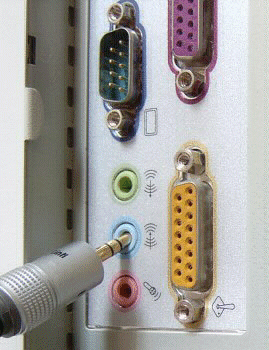
2 things. Im using an acoustic, but i do have an acoustic pickup i could use. I have a cable like that already, but i'm not sure if i have line in... i have a pink, a green, and a blue.. pink is mic, green is speakers.. blue?
Not sure what blue is. I have a pink and green in the front I use for headphones + mic and I can't really see the colours in the back but I have three jacks, the one in the middle I use for speakers and one on the right I use for line in. If you're using acoustic, I guess you have no other option (except for the pickup) but maybe a better microphone?
well, i got the line in to work on my electric. This is amazing! Can't believe I didn't know about that. Now the only problem is that with the acoustic pickup, its the big plug on the end, so now i have to go buy another adapter to make it headphone sized! Oi..
ghosstt wrote:pink is mic, green is speakers.. blue?
the most known settings are :
green - line out (to speakers) blue - line in (for example connect here your guitar,a mp3player or any other device with a "line out minijack")
pink - mic in (plug your microphone here)
anyway those colours can be different in some old computers or devices.
well, i figured it out! I'm running either guitar (acoustic or electric) into my amp, then from my amp running it into the line in. There is barely any white noise.
ghosstt wrote:well, i figured it out! I'm running either guitar (acoustic or electric) into my amp, then from my amp running it into the line in. There is barely any white noise.
That's a good idea. The problem here has to do with impedance. For elecronic devices it's generally true that input are high impedant and output are low impedant. (Low impedance means that the port can produce a lot of current) But a guitar is relatively high impedant for being an "output" device. * (Since you only have the passive pickups to produce current) What this means is that the high impedant input on the other side of the cable can pick up other signals. This is true for a computer microphone input as well as an preamp. However, in the case of a the computer there is lot of intereference, so there will be more noise. If you're really interested in the principle, try opening the cover of the amp and place it inside the computer case with the computer on.
* Technical sidenote: This is true for modern signal transmission, but works differently for speakers. There, you generally want to match the impedances of the amplifier and the speaker, rather than keeping it high/low. But that's a completely different story.
 .
.