iPod Touch: Your Honest Opinion

Want to just shoot the breeze? Forum 42 is the place!

Moderator: Moderators

bicostp
Moderator
Posts: 10491
Joined: Mon Mar 07, 2005 5:47 pm
Steam ID: bicostp
Location: Spamalot
Contact:

Post by bicostp »

vb_master wrote:I'm pretty confident that 320kb/s VBR mp3's encoded with the LAME encoder will sound better than a CD.
Never mind the fact that I'd rather have a real CD than just a bunch of 1s and 0s on a hard drive, there's always sound loss when you compress audio. the Red Book standard encoding is 2-channel signed 16-bit PCM sampled at 44100 Hz, which is probably as close to the master recordings the average consumer will get for the time being. Any music file derived from this will be an extremely close approximation unless you're using lossless compression (which MP3 is not).

And how do you expect a copy to gain quality over the source material? Somebody's been watching too much CSI... :P
jperryss
Posts: 330
Joined: Mon Aug 28, 2006 7:31 pm

Post by jperryss »

vb_master wrote:
bicostp wrote:(I still buy real CDs because they're lossless. High bitrate compressed audio is still compressed, after all.)
I'm pretty confident that 320kb/s VBR mp3's encoded with the LAME encoder will sound better than a CD.
Umm, no. At best, ripping to a lossless format (ie FLAC) will sound the same. Lossy formats always result in the file having less bits than the original, therefore data is lost. How it's ripped determines whether or not the change is really noticeable though.

The EAC/LAME v0 (~245 VBR) combo does rock. I rip all my stuff using it, and it's pretty hard to distinguish from the original CD, even on my Sennheisers.
CronoTriggerfan
Moderator
Posts: 4131
Joined: Fri Jan 27, 2006 3:07 pm
Location: University of Michigan - Ann Arbor
Contact:

Post by CronoTriggerfan »

cowsgoquack101 wrote:
Sir Games-A-Lot wrote:Personally, I think that the Nokia N800 series of internet tablets looks better than the iPod touch for WWW browsing over WiFi. Bigger screen, user removable batteries, camera, Linux based (already a tidy little group of applications starting to crop up).
Yeah, the Nokia internet tablets are pretty nice, and cheaper too. They have expandable memory as well (I'd get one of these for flash).

For a hard drive based one, I'd get an Archos 604 Wifi. Awesome screen, 30gb, internet.
I was looking at both of these, and combined I'd get one in a heartbeat; but they both have too big of shortcomings compared to the Touch, I think. The Archos has the multimedia and storage, but lacks flash and is ugly, and while the Nokias support some flash and are great for internet and more pretty, their storage space is very limited and I hear multimedia is clunky. If there's one that gets the best of both worlds, feel free to share, as I was almost reconsidering there for a second.

Another problem I've got is iTunes; I really have never used it before, is it user-friendly? And do I have to import my mp3 collection to it and put all my music and videos on the Touch that way, and if so, how do you get these files in your iTunes library? Also, what kind of video conversion software is needed for the Touch? I'm a fan of MediaCoder, but is there a plugin for the Touch available for it, or is there a different/better converter I can download or buy? Sorry for all the questions! :P

Oh, and could someone explain exactly what the Jailbreak hack does? I'm still a bit sketchy on the details. And how is it done? (If there are legal ramifications, feel free to PM me this part if you wish, don't wanna break the rules!) :) Thanks!

CTFan
Image
Turbo Tax 1.0
Portablizer Extraordinaire
Posts: 4773
Joined: Wed Mar 30, 2005 6:19 pm
Location: Delaware, no sales tax
Contact:

Post by Turbo Tax 1.0 »

the touch is wicked cool, but for some reason I feel like it was a waste of my money. I'd say get it for Christmas the jail break is really easy on the 1.1.1 fw by the way.
and when I updated to 1.1.2 It was really easy to downgrade back to 1.1.1 and just jailbreak it again.

emulation is kinda useless except for games like fire emblem because of the touch screen.
when life gives you lemons make flux
Image
snesp mk4
sgtpepper
Posts: 602
Joined: Sat Mar 25, 2006 7:03 pm
Location: Little Rock, AR

Post by sgtpepper »

CronoTriggerfan wrote:Another problem I've got is iTunes; I really have never used it before, is it user-friendly? And do I have to import my mp3 collection to it and put all my music and videos on the Touch that way, and if so, how do you get these files in your iTunes library? Also, what kind of video conversion software is needed for the Touch? I'm a fan of MediaCoder, but is there a plugin for the Touch available for it, or is there a different/better converter I can download or buy? Sorry for all the questions! :P
One of the reasons iPods are so successful is because of iTunes. It's a great piece of software, as long as you use it correctly. A lot of PC users (at least the ones I know personally) tend to hate iTunes because they don't know how to use it. So I'd say the most important thing is to learn how to use the software before you start to complain that it sucks! :P The other important thing to keep in mind is that iTunes keeps its music library organized, so that means don't mess with it! I know a couple of my friends have tried to move things out of the iTunes folder and of course, iTunes couldn't find the files. :roll:

Anyway, it's not at all difficult to import all your music and videos into iTunes, just click and drag! There are however a couple precautions you should take before you import, so you don't end up with two of everything. I'll help you out whenever the time comes.

And as far as video conversion goes, as long as MediaCoder converts the video to MPEG-4 format, it'll play in iTunes and on your iPod.
Image
 My iBook's modded logo!
Jobs vs Gates Google Fight!
Triton
Moderator
Posts: 7398
Joined: Mon May 24, 2004 12:33 pm
360 GamerTag: triton199
Steam ID: triton199
Location: Iowa
Contact:

Post by Triton »

imp the touch is kinda overpriced but i digress. itunes isnt the best thing ever, it works ok and does what its supposed to and it is INFINATLY, WORLDS BETTER IN ALMOST EVERY WAY than the sh*tpile called zune software, i hate that software so much i am SELLING MY ZUNE because i dislike the software that much. the zune itsself is fantastic but intill M$ pulls their heads out of their hindquarters i dont want one, hardware = nice software = EPIC FAIL
Turbo Tax 1.0
Portablizer Extraordinaire
Posts: 4773
Joined: Wed Mar 30, 2005 6:19 pm
Location: Delaware, no sales tax
Contact:

Post by Turbo Tax 1.0 »

Triton wrote:imp the touch is kinda overpriced but i digress. itunes isnt the best thing ever, it works ok and does what its supposed to and it is INFINATLY, WORLDS BETTER IN ALMOST EVERY WAY than the crap called zune software, i hate that software so much i am SELLING MY ZUNE because i dislike the software that much. the zune itsself is fantastic but intill M$ pulls their heads out of their hindquarters i dont want one, hardware = nice software = EPIC FAIL
:lol: was a big fan of my sansa, they are even less on ebay now you should try one out triton.
when life gives you lemons make flux
Image
snesp mk4
ValiantVenality
Portablizer
Posts: 655
Joined: Tue Dec 13, 2005 7:31 pm
Location: Villa Park,California

Post by ValiantVenality »

CronoTriggerfan wrote:
cowsgoquack101 wrote:
Sir Games-A-Lot wrote:Personally, I think that the Nokia N800 series of internet tablets looks better than the iPod touch for WWW browsing over WiFi. Bigger screen, user removable batteries, camera, Linux based (already a tidy little group of applications starting to crop up).
Yeah, the Nokia internet tablets are pretty nice, and cheaper too. They have expandable memory as well (I'd get one of these for flash).

For a hard drive based one, I'd get an Archos 604 Wifi. Awesome screen, 30gb, internet.
I was looking at both of these, and combined I'd get one in a heartbeat; but they both have too big of shortcomings compared to the Touch, I think. The Archos has the multimedia and storage, but lacks flash and is ugly, and while the Nokias support some flash and are great for internet and more pretty, their storage space is very limited and I hear multimedia is clunky. If there's one that gets the best of both worlds, feel free to share, as I was almost reconsidering there for a second.

Another problem I've got is iTunes; I really have never used it before, is it user-friendly? And do I have to import my mp3 collection to it and put all my music and videos on the Touch that way, and if so, how do you get these files in your iTunes library? Also, what kind of video conversion software is needed for the Touch? I'm a fan of MediaCoder, but is there a plugin for the Touch available for it, or is there a different/better converter I can download or buy? Sorry for all the questions! :P

Oh, and could someone explain exactly what the Jailbreak hack does? I'm still a bit sketchy on the details. And how is it done? (If there are legal ramifications, feel free to PM me this part if you wish, don't wanna break the rules!) :) Thanks!

CTFan
Hey Im here to answer your question seeing as im an experienced ipod touch hacker (haha i dont want to sound cocky :wink: )

1. Very easy to put your music library on iTunes. Its literally a drag and drop interface. No need for software.

2. Jailbreaking is not illegal. The only thing jailbreaking does is void your warrenty and you can easily force restore it to make it where theres not a single trace of jailbreak on there. Easiest noobiest way to jailbreak. No computer even needed.

1. Make sure your ipod touch's software is 1.1.1. If its 1.1.2, then download this http://www.megaupload.com/?d=V7H8X2QQ enter the 3 letter code and download it. Once completed make sure you save it to your desktop. Plug ipod into computer and open itunes. Then what you do is go to your ipod on itunes and shift+click restore. Open 1.1.1 and let it do its thing and your downgraded. Considering your getting an ipod this month apple probably updated there inventory with stores and its probably preloaded with 1.1.2. So your welcome. :lol:

2. Disconnect ipod from your computer. Hopefully you have a fast internet for this step. Ok go to jailbreakme.com on your ipod and scroll to the very bottom and click install appsnap. Once your done safari should crash. Thats a good thing, that means it worked. Once you close it, either right away, or in the next 30 seconds of closing it, you should see something downloading on your sprinboard (means the home screen of the ipod) Once its done downloading, your ipod should restart automatically. When you slide to unlock you should see installer. Its jailbroken!

3. Since ive already typed this much and im in the mood, ill tell you how to get the real and good apps on it. Once its jailbroken click on the icon. Then what you do is update the software on it. Click the little update icon at the bottom of the screen. It should update installer. When its done, click the home button, and it will restart (each time you install something it has to restart for it to work) Now that youve got that, you download community sources. Go back into installer, click install at the bottom, go to the all packages folder at the very top. Find community sources, download it, restart. Now your open to many apps. Find ones that you want and install, then restart. Ill make a new step for this one.

4. Now you want the iphone apps, dont you? That was the main reason i wanted one. I could get iphone apps without the iphone. Ok now go back into installer. On the very left hand corner and go to sources. Once your there, click edit, then add. When you click that http:// should pop up and it should allow you to type something in. Type in http://repo.us.to/ . Dont type in the extra http, just showing you what it will look like. Then it should refresh sources. Then click install at the bottom. Scroll down and look for iPhone apps for 1.1.1. Click on the folder and youll see all of the iphone apps. Dont start installing yet. Scroll all the way down and look for two folders. I think its called mail prep and maps prep or something. Im doing all this from memory so ya. Download those two things then restart. Oh yea I forgot to tell you. You dont have to restart each time you install an app. Anyways, go back into installer and install all the apps. Once your done restart and youve got em!

5. So theres your new beauty. Iphone apps. 3rd Part apps. And all of your music is still on there and is still able to connect to your computer. If you want themes, go to ipodtouchfans.com/forums and find out there. Ive typed a lot and its 12:30 am where i live right now. I'm pretty tired so I think im gonna go to bed. Well i hope this guide helped you a lot!

P.S Soryy for the punctuation issues, I have opera and i dont think theres a spell checker on there. Other than that the spelling should be good.


VV
Image
theelk
Posts: 323
Joined: Sat Mar 17, 2007 9:48 am
Location: boring old connecticut

Post by theelk »

Once there is more concrete Linux support (damn you Apple for encrypting the new iPods!) I'm totally all over the Touch. Sure, other mp3 players have similar features, but the Touch has by far the best interface. I might even get it for Hannukkah! That or the Eee...

EDIT: Damn quote button... Thank you to whoever deleted that.
Image
I don't want to make an "I'm leaving" thread, but I've sort of lost interest in this board. So if you notice that I'm gone, that's why.
CronoTriggerfan
Moderator
Posts: 4131
Joined: Fri Jan 27, 2006 3:07 pm
Location: University of Michigan - Ann Arbor
Contact:

Post by CronoTriggerfan »

Thanks a TON for typing that up, VV, I've got it bookmarked for when I open mine Christmas day. :P

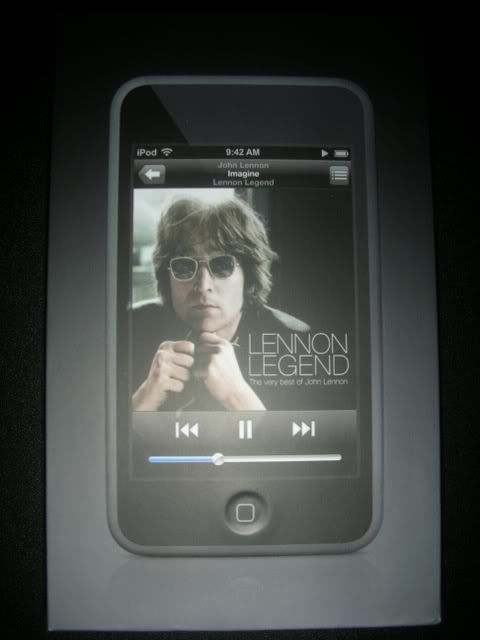
BestBuy had a sale on Touches today, $25 off the 16 gig one. I forked over the $75 to make up the difference, so I've got one for sure. Though it had John Lennon on the box, that's the first one I've seen like that.

Anyways, I know that when you first turn your Touch on, it asks you to sync with iTunes; when it does this, does it automatically perform the latest firmware update, or is the 1.1.1 or 1.1.2 pre-loaded on the unit?

CTFan
Image
sgtpepper
Posts: 602
Joined: Sat Mar 25, 2006 7:03 pm
Location: Little Rock, AR

Post by sgtpepper »

CronoTriggerfan wrote:Though it had John Lennon on the box, that's the first one I've seen like that.
John Lennon?!?! That's friggin' awesome. I want pictures ASAP!
Image
 My iBook's modded logo!
Jobs vs Gates Google Fight!
CronoTriggerfan
Moderator
Posts: 4131
Joined: Fri Jan 27, 2006 3:07 pm
Location: University of Michigan - Ann Arbor
Contact:

Post by CronoTriggerfan »

Sure thing! :P

Image

CTFan
Image
sgtpepper
Posts: 602
Joined: Sat Mar 25, 2006 7:03 pm
Location: Little Rock, AR

Post by sgtpepper »

That's soooo cool, all I got was Macy Gray :? :(
Image
 My iBook's modded logo!
Jobs vs Gates Google Fight!
vskid
Senior Member
Posts: 6314
Joined: Fri Mar 25, 2005 8:25 am
Steam ID: vskid3

Post by vskid »

(Decided to borrow your topic, CTFan, instead of making a new one)

I have decided that I need more space in a media player and that memory sticks for my PSP cost too much. I have been looking at a Creative Zen Vision or Vision W because of their large screens and memory. GamemasterAS told me his Vision is good, but I've found a cheap Vision W online, and was wondering if anyone has had any experience with it. Don't tell me they're big, I already know that, and they're both smaller than the PSP they'll be replacing.
Image
CronoTriggerfan
Moderator
Posts: 4131
Joined: Fri Jan 27, 2006 3:07 pm
Location: University of Michigan - Ann Arbor
Contact:

Post by CronoTriggerfan »

vskid wrote:(Decided to borrow your topic, CTFan, instead of making a new one)

I have decided that I need more space in a media player and that memory sticks for my PSP cost too much. I have been looking at a Creative Zen Vision or Vision W because of their large screens and memory. GamemasterAS told me his Vision is good, but I've found a cheap Vision W online, and was wondering if anyone has had any experience with it. Don't tell me they're big, I already know that, and they're both smaller than the PSP they'll be replacing.
Ohh man, Creative rules. I've had the Vision, W, and the Micro. They're all very solid players with great UIs, plenty of storage space, and are built like rocks. My only complaint about them is the screen size, which is too small to watch most movies on, but I complain about that with most PMPs with screens of its size. It was bearable for me in the beginning, but after watching movies on the PSP, I started to realize just how ridiculous the screen really was. If you want to know absolutely everything there is to know about the Vision W, check out the review at www.anythingbutipod.com . Great site, by the way. Look around, too, they may have a different alternative that you haven't yet considered. I got a Touch for exactly the same reason you're looking for a player, so let me know what conclusions you reach. Good luck man! :P

CTFan
Image
Post Reply