After getting my partitioning sorted out, i came cross another question.
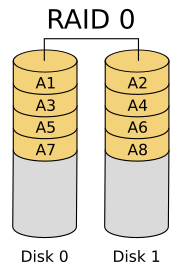
Would i be better to buy 2 x 160gb hdds and raid-0 them, or one 320? Both would bethe same prce.
Speedwise?
-Fel
Harddrive question.
Moderator: Moderators
Harddrive question.
Charlie wrote:I always wanted to try wall flips, but I'm too attached to my neck.

-
bacteria
- Portablizer Extraordinaire
- Posts: 3984
- Joined: Fri Apr 20, 2007 12:14 am
- Location: Hampshire, UK
- Contact:
One larger drive is better, because with two drives you double the risk of failure. Data can be spanned in your scenario between both disks.
Personally, I have one computer for internet only; but my main computer has 3 drives - one for normal computing, one for work with large files and a third which is a backup of any critical files from the other two which I really can't afford to lose - by critical I mean vital files like home accounts or application program backups.
Personally, I have one computer for internet only; but my main computer has 3 drives - one for normal computing, one for work with large files and a third which is a backup of any critical files from the other two which I really can't afford to lose - by critical I mean vital files like home accounts or application program backups.


yeah, higher failure rates are always brought up when talking about raid. thats because its important to consider for large arrays and sensitive data.
however, how often do brand new hard drives fail anyways?
and if you bough one drive instead of two, and it failed, how would you be any less screwed?
raid0 should preform close to twice as fast, in theory.
also, look into other raids... i think its 3 or 5 has striping along with some kind of parity for extra error busing power.
however, how often do brand new hard drives fail anyways?
and if you bough one drive instead of two, and it failed, how would you be any less screwed?
raid0 should preform close to twice as fast, in theory.
also, look into other raids... i think its 3 or 5 has striping along with some kind of parity for extra error busing power.

"Linux is only free if your time is worthless"
-
Electric Rain
- Senior Member
- Posts: 1911
- Joined: Tue Mar 29, 2005 12:39 pm
- PSN Username: Denki_no_Ame
- Location: What's it to you? Stalker...
Well, I'm a freak about failing hard drives, even though it's never happened to me and I don't currently have any back-ups to speak of (money thing... heh...).
If I were going RAID, I would go for a RAID 1 setup, hands down. Well, if I had the money, RAID 0+1... probably.
To answer your question with one of your given answers, I say get the larger drive. The RAID might provide you increased speed, but unless you're a video editor, it's probably not as important as a lower failure probability. If one of your drives fails in a RAID 0, you're f*ed. That scares me, personally.
Besides, if you get the larger drive now, you can back-up your data and add another 320GB to set up a RAID 0 later. The way I see it is like this: If you get two smaller drives, then you'll have to replace them later if you want larger drives. That costs you more money, and also leaves you with two 160GB drives that you're like, "WTF am I supposed to do with these?" But if you get one larger drive, you can just add-on another drive later.
I feel the same about RAM. If my computer supports up to 4 sticks of 1GB RAM, I'd rather buy a couple sticks of 1GB than 4 512MB sticks. Then I have to replace one of my sticks if I want more RAM later rather than just adding on a new one.
If I were going RAID, I would go for a RAID 1 setup, hands down. Well, if I had the money, RAID 0+1... probably.
To answer your question with one of your given answers, I say get the larger drive. The RAID might provide you increased speed, but unless you're a video editor, it's probably not as important as a lower failure probability. If one of your drives fails in a RAID 0, you're f*ed. That scares me, personally.
Besides, if you get the larger drive now, you can back-up your data and add another 320GB to set up a RAID 0 later. The way I see it is like this: If you get two smaller drives, then you'll have to replace them later if you want larger drives. That costs you more money, and also leaves you with two 160GB drives that you're like, "WTF am I supposed to do with these?" But if you get one larger drive, you can just add-on another drive later.
I feel the same about RAM. If my computer supports up to 4 sticks of 1GB RAM, I'd rather buy a couple sticks of 1GB than 4 512MB sticks. Then I have to replace one of my sticks if I want more RAM later rather than just adding on a new one.

-
Electric Rain
- Senior Member
- Posts: 1911
- Joined: Tue Mar 29, 2005 12:39 pm
- PSN Username: Denki_no_Ame
- Location: What's it to you? Stalker...

-
Electric Rain
- Senior Member
- Posts: 1911
- Joined: Tue Mar 29, 2005 12:39 pm
- PSN Username: Denki_no_Ame
- Location: What's it to you? Stalker...