Looking to do S-Vid mods on SMS & Genesis

Includes but not limited to: SNES, Genesis, Sega CD, PlayStation 1, Nintendo 64, Dreamcast, Game Gear and I guess the Virtual Boy.

Moderator: Moderators

eday2010
Posts: 11
Joined: Sat Sep 08, 2007 8:08 am
Location: Ottawa, Ontario, Canada
Contact:

Looking to do S-Vid mods on SMS & Genesis

Post by eday2010 »

So, I am new to this forum, and to the idea of modding a system. I've never done it before, but really want to learn. I have several spare systems, so if I break a couple learning, it's no big deal. I want to do the following:
  • S-Video output and RCA Audio output (I know it will be mono) on a Master System
    S-Video output and RCA Audio output on a Genesis 1
    S-Video output and RCA Audio output on a Genesis 2
I've been looking for instructions/guides online that show you step by step how to do mods, which actual photos instead of schematics showing you what does where. Needless to say I have found nothing. So I figured I would ask if anyone knows of such a thing, or has such a thing. If not, would someone be willing to explain in layman's terms how to do each of these mods?

For instance, I know you can put stereo audio outputs on a Genesis 1, but how is that done seeing as that model has the headphone jack? I also know that Genesis 2 systems with the KA2195D chip cannot be modded for S-Video. However, I read that you can remove that chip and put a CXA1645 or CXA2075M and then do the S-Vid mod. How easy is it to swap the chips and how is it done? And how would the audio outputs be done in general?

Like I said, I have several spare systems to experiment with, so if I break them, it's no big deal; it would be a good way for me to learn how to do these modifications. I don't live in Europe, so telling me I should go with RGB is of no use to me. S-Video is the best connection the TV I use has, so that's what I will go with.

So does anyone have the time to explain how all this is done? I know resistors and capacitors and wire and a soldering iron are needed, but I need to see where things go. I'd rather learn to do it myself and have fun with it than to pay $100US to OldSchoolGamer per mod ($300 total plus shipping) to have them do them for me. It's more fun to do it yourself :D
jedi knight
Posts: 644
Joined: Sun Jan 22, 2006 3:05 pm

Post by jedi knight »

Meh, I don't post much.
eday2010
Posts: 11
Joined: Sat Sep 08, 2007 8:08 am
Location: Ottawa, Ontario, Canada
Contact:

Post by eday2010 »

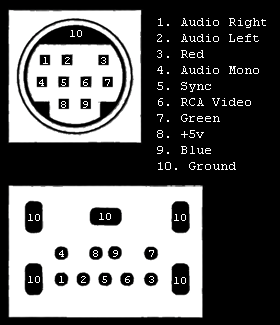
Uh...ok. What am I supposed to do with that informatiom? I don't know how those images will help me know what to solder where.
jedi knight
Posts: 644
Joined: Sun Jan 22, 2006 3:05 pm

Post by jedi knight »

Well, it shows the av pinout of the av port of all of the master system, genesis 1, and genesis 2. You can use that to make your own cable
Meh, I don't post much.
eday2010
Posts: 11
Joined: Sat Sep 08, 2007 8:08 am
Location: Ottawa, Ontario, Canada
Contact:

Post by eday2010 »

But from what I've read, the S-Video on the chips in the systems are not used, so making a cable for the AV Out won't give me S-Video.

I'd rather just modify the guts of the systems as described in my first post. I just need someone to show me information that makes it easy for a beginner to understand. :)
jedi knight
Posts: 644
Joined: Sun Jan 22, 2006 3:05 pm

Post by jedi knight »

Oh sorry :P
I know there is a guide out there because I remember reading one. I'll see if I can find it.
edit: The guide I was thinking of was for the Genesis 3. I did find something but it might be a little too difficult.
http://gamesx.com/wiki/doku.php?id=av:g ... -video_mod
Meh, I don't post much.
THON
Posts: 214
Joined: Sun May 13, 2007 3:50 pm

Post by THON »

Genesis 3 A/V = Genesis 2 A/V. Should work with both systems.

This may help.

And this. (bottom left of Genesis 2/3 board; under composite out).

And this should do it.
eday2010
Posts: 11
Joined: Sat Sep 08, 2007 8:08 am
Location: Ottawa, Ontario, Canada
Contact:

Post by eday2010 »

I can't make any sense of the diagream at http://gamesx.com/wiki/doku.php?id=av:g ... -video_mod, but the last one Thon supplied looks helpful. Since My Genesis 2 has the KA2195D, I would need to take it out (how?) and put a CXA1645 in its place (how?). Is it possible to do the swap in the Genesis 1 and Master System as well?

Also, now that I think I have enough enough that I could give the S-Video a try, how do you do the Audio outs (see first post)?

Thanks!
eday2010
Posts: 11
Joined: Sat Sep 08, 2007 8:08 am
Location: Ottawa, Ontario, Canada
Contact:

Post by eday2010 »

I can't make any sense of the diagream at http://gamesx.com/wiki/doku.php?id=av:g ... -video_mod, but the last one Thon supplied looks helpful. Since My Genesis 2 has the KA2195D, I would need to take it out (how?) and put a CXA1645 in its place (how?). Is it possible to do the swap in the Genesis 1 and Master System as well?

Also, now that I think I have enough enough that I could give the S-Video a try, how do you do the Audio outs (see first post)?

Thanks!
eday2010
Posts: 11
Joined: Sat Sep 08, 2007 8:08 am
Location: Ottawa, Ontario, Canada
Contact:

Post by eday2010 »

Something went wrong with the posting, so it ended up triple posting. My apologies. Please delete this message and the double.
THON
Posts: 214
Joined: Sun May 13, 2007 3:50 pm

Post by THON »

I don't happen to have a Genesis Model II available right now. Could you take some High resolution pictures of the front and back of the board?
eday2010
Posts: 11
Joined: Sat Sep 08, 2007 8:08 am
Location: Ottawa, Ontario, Canada
Contact:

Post by eday2010 »

Here ya go, pictures of the board in my spare Genesis 2 (my boxed complete awesome Genesis 2 has the same board). They are 1024x768 as that is the max size Photobucket allows. If you need them bigger (2608x1952), I can dump them on my web host or something :)

Image

Image

Image

Image

Image

Image

Image

That KA2195D chip you see there will need to be removed and replaced with a CXA1165. I'll need to learn how that is done, along with the audio.
eday2010
Posts: 11
Joined: Sat Sep 08, 2007 8:08 am
Location: Ottawa, Ontario, Canada
Contact:

Post by eday2010 »

No one can tell me how to take the one chip out and put the new one in? :(
jedi knight
Posts: 644
Joined: Sun Jan 22, 2006 3:05 pm

Post by jedi knight »

eday2010 wrote:No one can tell me how to take the one chip out and put the new one in? :(
I don't know if anyone here would know how you would do that exactly.
Meh, I don't post much.
THON
Posts: 214
Joined: Sun May 13, 2007 3:50 pm

Post by THON »

Sorry I haven't replied, those are really good pictures.

I think you should PM segasonicfan. I think if anyone he'd know how to do it. Search the gamesx forums, too.
Post Reply