Questions before buying a psp

Includes PS2, Xbox 1, GameCube (but not the Phantom Game Console)

Moderator: Moderators

ShockSlayer
Niblet 64
Posts: 5059
Joined: Thu Jun 29, 2006 12:47 pm
Location: In my inbox.

Questions before buying a psp

Post by ShockSlayer »

Ok, so my friend has never updated his psp, and he bought it 1 week after launch! :) I've never owned a psp, but i KNOW this is good for hacking. He said he would sell it to me for ~$100 with a mem stick

Problem: I have no idea where to start after buying.

Objective: Snes, Nes, N64, Gba, and Psone emus

Help?

SS

http://twitter.com/ShockSlayer" onclick="window.open(this.href);return false;
Twisted Warthog
Posts: 895
Joined: Tue Mar 20, 2007 4:30 pm
PSN Username: fragd0g
360 GamerTag: onionknight110
Steam ID: flint1011
Location: Ontario, Canada

Post by Twisted Warthog »

I'm pretty sure Emulator Zone has emulators for the PSP.
ShockSlayer
Niblet 64
Posts: 5059
Joined: Thu Jun 29, 2006 12:47 pm
Location: In my inbox.

Post by ShockSlayer »

Yeah, but how would I run them, Just paste on memcard and go?

SS
http://twitter.com/ShockSlayer" onclick="window.open(this.href);return false;
underclocked
Posts: 129
Joined: Tue Aug 07, 2007 8:51 am
Location: Indiana

Post by underclocked »

If you update to a CF then you would put them in the game 150 folder. Its really not that hard once you read a readme or just mess with it for a few minutes.
benol
Posts: 1371
Joined: Thu Aug 31, 2006 1:53 pm
Location: In ur fourmz, postin in ur thredz!
Contact:

Re: Questions before buying a psp

Post by benol »

ShockSlayer wrote:Ok, so my friend has never updated his psp, and he bought it 1 week after launch! :) I've never owned a psp, but i KNOW this is good for hacking. He said he would sell it to me for ~$100 with a mem stick

Problem: I have no idea where to start after buying.

Objective: Snes, Nes, N64, Gba, and Psone emus

Help?

SS
SNES9X TYL, NESTERJ, Daedalus, GBSP, and convert your PS1 ISO's to eboots with popstation.
PM me for DS friend codes. PLEASE!
DOLGAT IS REAL!!!!

Help My MyMiniCity, plzkthxbai
vskid
Senior Member
Posts: 6314
Joined: Fri Mar 25, 2005 8:25 am
Steam ID: vskid3

Post by vskid »

*In deep, mind-controlling voice* GET IT NOWWWWWWW!!!!!!!

Really, I thought the PSP was a piece of poo when it came out, but you get one, throw a custom FW on it and load the memory stick with emulators, ROMs, music, videos, whatever, and you won't regret it.

How big is the Memory Stick? It might be just the 32MB that came with it, you must have at least a 1GB, I've found myself running out of space on my 2GB (mostly because of music, solution: convert the mp3's down to 128kbps).
Image
benol
Posts: 1371
Joined: Thu Aug 31, 2006 1:53 pm
Location: In ur fourmz, postin in ur thredz!
Contact:

Post by benol »

Actually, vskid, PSP's come with a 1gb MemoryStick if you get the entertainment pack, which comes with ATV off road fury and some crappy movie.
PM me for DS friend codes. PLEASE!
DOLGAT IS REAL!!!!

Help My MyMiniCity, plzkthxbai
Twisted Warthog
Posts: 895
Joined: Tue Mar 20, 2007 4:30 pm
PSN Username: fragd0g
360 GamerTag: onionknight110
Steam ID: flint1011
Location: Ontario, Canada

Post by Twisted Warthog »

Wasn't the crappy movie Spider-Man 2? Or at least it use to be.

The best Spider-Man out of the three so far.
vskid
Senior Member
Posts: 6314
Joined: Fri Mar 25, 2005 8:25 am
Steam ID: vskid3

Post by vskid »

benol wrote:Actually, vskid, PSP's come with a 1gb MemoryStick if you get the entertainment pack, which comes with ATV off road fury and some crappy movie.
Actually, he said that his friend got it like a week after launch, and I'm pretty sure they all came with 32MB sticks when they first came out. And either way, it doesn't mean he got the entertainment pack, he could have easily gotten the value pack no matter when he got it.
Image
benol
Posts: 1371
Joined: Thu Aug 31, 2006 1:53 pm
Location: In ur fourmz, postin in ur thredz!
Contact:

Post by benol »

Twisted Warthog wrote:Wasn't the crappy movie Spider-Man 2? Or at least it use to be.

The best Spider-Man out of the three so far.
No, it's Lords Of Dogtown
PM me for DS friend codes. PLEASE!
DOLGAT IS REAL!!!!

Help My MyMiniCity, plzkthxbai
Valium
Posts: 1412
Joined: Wed Jun 06, 2007 12:08 pm
Location: Nova Scotia, I'm over from kurt

Post by Valium »

100$ Is a great deal.


If you end up putting custom firmware on it, do not go with the newest 3.52 M33, its been having a lot of problems. Stick with the 3.40 OE-A
Image
ShockSlayer
Niblet 64
Posts: 5059
Joined: Thu Jun 29, 2006 12:47 pm
Location: In my inbox.

Post by ShockSlayer »

Question: Is there any way to get a micro sd to memstick adapter? Or SD?

SS
http://twitter.com/ShockSlayer" onclick="window.open(this.href);return false;
Jakq
Posts: 125
Joined: Mon Jan 10, 2005 9:12 pm

Post by Jakq »

What you want to do is upgrade the psp to custom firmware. That way you get all the awesomeness of old psps and the decentness of new ones.
Valium
Posts: 1412
Joined: Wed Jun 06, 2007 12:08 pm
Location: Nova Scotia, I'm over from kurt

Post by Valium »

Image

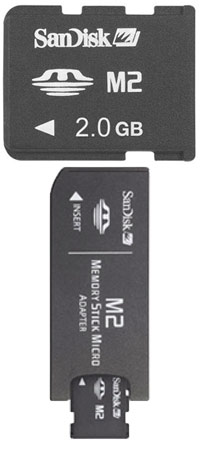
One of these?
Image
TheOnlyOneHeFears
Portablizer
Posts: 396
Joined: Mon Oct 16, 2006 9:53 am
Location: Here be Dragons!

Post by TheOnlyOneHeFears »

Valium wrote:Image

One of these?
No, that's a Micro Memory Stick to Memory Stick, he was asking about a Micro SD adaptor.

Plan of action for you SS

-Get yourself a decent sized Memory Stick (at least 2 GB, Amazon has them pretty cheap)

-Install 3.40 OE-A as your firmware (there's an easy install package here)

-Get yourself some emulators from PSP-Hacks (benol recommended the best ones, just make sure you get the latest releases)

-Each emulator should have two folders, one called 'name' (e.g. Daedalus), and one called 'name%' (e.g. Daedalus%). Open up the 'name' folder, and read the readme to find out where to paste your roms (usually either in a folder called 'Roms', or simply in the 'name' folder itself.

-Copy both 'name' and 'name%', and paste them in the folder called GAME150 (X:\PSP\GAME150). They will show up under the Memory Stick section of Game on the XMB

-For PS1 Games, convert the PS1 ISO file using Popstation (also on PSP-Hacks). Put the resulting EBOOT file in a folder named after the PS1 Game (e.g. Vagrant Story), and paste this folder into the GAME folder on your PSP (X:\PSP\GAME). Again, they will show up under the Memory Stick section of Game on the XMB.

Hope this helps
:)
Image
Post Reply