Like the thread title implies, I am making front loading versions of the Sega CD and Sega Saturn systems, because I have so many systems that top-loaders annoy me. (there's not enough room on my entertainment center's shelves to put top-loaders, I have to stack systems.) Anyway, any ideas on how to do this? I would be happy with either a slot-loader (for lack of a better term...) or tray-loader on either system.
Yeah, that's the problem, I'm pretty sure that only a CD drive made for that system will work, but if anyone knows how to modify a drive, that's what I'm after.
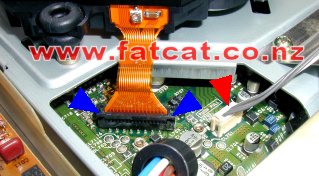
I imagine that the disc drive looks something like this;
If that's that case, all you have to do is extend the ribbon cable (the orange set of wires near the bottom middle connecting the drive to the board), and you're free to move it wherever you please.
Yeah, it's similar to that. The problem is not moving it, I know how to do that, the problem is modifying it to be a tray or slot loader as opposed to a top-loader... Is there some way to do this, or does anyone here know of any front-loading drives that are compatible with either of these two systems?
Ahh, I'm sorry I didn't completely understand your first post. To my knowledge, no that is not possible unless you find a drive you want exactly like the one in the Saturn/ CD. I'd also warn you not to mess around with your Saturn too much, I hear it's ridiculously easy to mess up.
You could try moving the cd- drive closer to the front, then cutting a hole in the front, then when you want to change disks, you'd just have to remove the disk and slip another one in
Yeah, my current idea is to put the entire drive in something like a drawer, and that would be my 3 inch thick tray. But, that's ugly, so I'm hoping for a different method.
And by the way, thanks for the tip on the Saturn.
What do you mean Kyo? Turn it on its side, front, or back? I can't stack things if I do that, and my entertainment center's shelves aren't tall enough for that. Or did you mean something else?
Okay, I had to make sure I understood you correctly... But no, I don't think that'll work very well. Thank you though. I appreciate all the help so far from everyone.

 But, that's ugly, so I'm hoping for a different method.