Anyone want to start a retro gaming site with me?
Moderator: Moderators
Ok looks cool but i would prefer the site info link bar thing on the right side, a line seperating the logo and the rest of the page and a differentcolor schemeif you can get that put together, awesome!
Kurt_ wrote: I would use tact switches but I want the mushy feel. Mushy = God. (I typed that correctly).

Maybe we should stick to an old colour scheme. You know like a Nes' colour pallete. Very simple and bold colours with a very simple site design. Too give it that old feel.
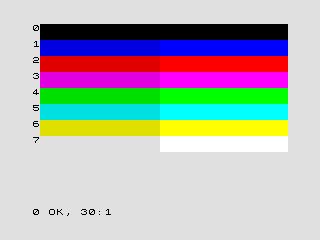
Edit: For example using these colours (The Zx Spectrums colour Palette) gives it a very bold and distinctive retro look about it. The colours clashed and didn't work but somehow it still looked good. Using simple straight lines to define where different sections of the site are in my opinion would look pretty cool. Offcourse this is just me kicking ideas about. I'll see if I can make some sort of layout to show you exactly what I mean.
Edit: For example using these colours (The Zx Spectrums colour Palette) gives it a very bold and distinctive retro look about it. The colours clashed and didn't work but somehow it still looked good. Using simple straight lines to define where different sections of the site are in my opinion would look pretty cool. Offcourse this is just me kicking ideas about. I'll see if I can make some sort of layout to show you exactly what I mean.
Yeah your idea sounds cool but i was thinking of doing it with console design colors like that brown and grey and red, you know the ones. but anyway draw what you were thinking of up and well see how it looks,
Kurt_ wrote: I would use tact switches but I want the mushy feel. Mushy = God. (I typed that correctly).
I think you'll find that a lot more people like the link bar on the left, thats how I like it. Or make it across the top, then everyone wins!dudex77 wrote:Ok looks cool but i would prefer the site info link bar thing on the right side, a line seperating the logo and the rest of the page and a different color scheme if you can get that put together, awesome!
I really don't like frames (did you mean the same frames I'm thinking, your code doesn't look like I'd have thought), not all browsers display them the same, and they look n00bish. If you want something frame-like, do something like my site. Then it'll work better for most people.

with the links thing i was just thinking of having it organised with tags for later on so on the side you could click a console and it would only display stuff about that console. the links would be best along the top i think
edit: im thinking we go with a layout similar to makezine.com but you know with a retro look though
edit: im thinking we go with a layout similar to makezine.com but you know with a retro look though
Kurt_ wrote: I would use tact switches but I want the mushy feel. Mushy = God. (I typed that correctly).
-
Bass Creator
- Posts: 300
- Joined: Fri Feb 02, 2007 11:51 am
Hmm the retro thing is cool
New Code Fixed some things wobbled
New Code Fixed some things wobbled
Code: Select all
<!DOCTYPE HTML PUBLIC "-//W3C//DTD HTML 4.0 Transitional//EN">
<HTML>
 <HEAD>
  <TITLE>RR Formating</TITLE>
  <META NAME="Generator" CONTENT="EditPlus">
  <META NAME="Author" CONTENT="">
  <META NAME="Keywords" CONTENT="">
  <META NAME="Description" CONTENT="">
 </HEAD>

 <BODY>
  <CENTER>
  <DIV width="500" height="" id="toplogo">RR Logo<br /><br /><br /><br /><br /><br /><br /></DIV><br />
</Center>
<DIV id="sbar">Site info side info site info site info<br />
<A HREF="">link 1 </A><br /><A HREF="">link 2</A></div>


 </BODY>
</HTML>
<STYLE TYPE="text/css">
#toplogo {
border: 2px solid #000;
background-color: #797979
}
body {
background-color: #804000
}
#sbar {
width: 100px;
background-color: #FF0000;
border: 1px solid #000000;
height: 700px;
</STYLE>
Reddit


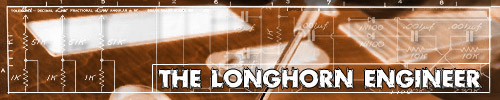
here my design so far a bit of choice might help and give bass creator some ideas.
Heres the code.
its a bit long.
and a screen shot.

Heres the code.
its a bit long.
Code: Select all
<%@ Page Language="VB" MasterPageFile="~/Default.master" Title="Your Name Here | Home"
CodeFile="Default.aspx.vb" Inherits="Default_aspx" %>
<asp:content id="Content1" contentplaceholderid="Main" runat="server">
<div class="shim column"></div>
<div class="page" id="home" style="font-size: 8.4pt">
<div id="sidebar">
<asp:loginview id="LoginArea" runat="server">
<AnonymousTemplate>
<asp:login id="Login1" runat="server">
<layouttemplate>
<div class="login">
<h4>Login to Site</h4>
<asp:label runat="server" id="UserNameLabel" CssClass="label" associatedcontrolid="UserName">User Name</asp:label>
<asp:textbox runat="server" id="UserName" cssclass="textbox" accesskey="u" />
<asp:requiredfieldvalidator runat="server" id="UserNameRequired" controltovalidate="UserName" validationgroup="Login1" errormessage="User Name is required." tooltip="User Name is required." >*</asp:requiredfieldvalidator>
<asp:label runat="server" id="PasswordLabel" CssClass="label" associatedcontrolid="Password">Password</asp:label>
<asp:textbox runat="server" id="Password" textmode="Password" cssclass="textbox" accesskey="p" />
<asp:requiredfieldvalidator runat="server" id="PasswordRequired" controltovalidate="Password" validationgroup="Login1" tooltip="Password is required." >*</asp:requiredfieldvalidator>
<div><asp:checkbox runat="server" id="RememberMe" text="Remember me next time"/></div>
<asp:imagebutton runat="server" id="LoginButton" CommandName="Login" AlternateText="login" skinid="login" CssClass="button"/>
or
<a href="register.aspx" class="button"><asp:image id="Image1" runat="server" AlternateText="create a new account" skinid="create"/></a>
<p><asp:literal runat="server" id="FailureText" enableviewstate="False"></asp:literal></p>
</div>
</layouttemplate>
</asp:login>
</anonymoustemplate>
<LoggedInTemplate>
<h4><asp:loginname id="LoginName1" runat="server" formatstring="Welcome {0}!" /></h4>
</LoggedInTemplate>
</asp:loginview>
<hr />
<asp:formview id="FormView1" runat="server" datasourceid="ObjectDataSource1" ondatabound="Randomize" cellpadding="0" borderwidth="0" enableviewstate="false">
<ItemTemplate>
<h4>Photo of the Day</h4>
<table border="0" cellpadding="0" cellspacing="0" class="photo-frame">
<tr>
<td class="topx--"></td>
<td class="top-x-"></td>
<td class="top--x"></td>
</tr>
<tr>
<td class="midx--"></td>
<td><a href='Details.aspx?AlbumID=<%# Eval("AlbumID") %>&Page=<%# Container.DataItemIndex %>'>
<img src="Handler.ashx?PhotoID=<%# Eval("PhotoID") %>&Size=M" class="photo_198" style="border:4px solid white" alt='Photo Number <%# Eval("PhotoID") %>' /></a></td>
<td class="mid--x"></td>
</tr>
<tr>
<td class="botx--"></td>
<td class="bot-x-"></td>
<td class="bot--x"></td>
</tr>
</table>
<p>Lorem ipsum dolor sit amet, consectetuer adipiscing elit, sed diam nonummy nibh euismod </p>
<p><a href='Download.aspx?AlbumID=<%# Eval("AlbumID") %>&Page=<%# Container.DataItemIndex %>'>
<asp:image runat="Server" id="DownloadButton" AlternateText="download photo" skinid="download"/></a></p>
<p>See <a href="Albums.aspx">more photos </a></p>
<hr />
</ItemTemplate>
</asp:formview>
<h4>
Our Latest Piece of Work</h4>
<p>Lorem ipsum dolor sit amet, consectetuer adipiscing elit, sed diam nonummy nibh euismod tincidunt ut laoreet dolore magna aliquam erat volutpat.</p>
</div>
<div id="content">
<h3>Welcome to Retro Gamer.</h3>
Hello and welcome to Retro gamer. Retro Gamer is a retro gameing site thae provides
game reveiws on varous retro consoles.
<hr />
<div id="whatsnew">
<h4>What's New</h4>
<p>This web site has just being built so give us some time..</p>
</div>
<div id="coollinks">
<h4>Cool Links</h4>
</div>
<hr />
<h4>
</h4>
<h4>
</h4>
<h4>
What's Up Lately
</h4>
<p>
</p>
</div>
</div>
<asp:ObjectDataSource ID="ObjectDataSource1" Runat="server" TypeName="PhotoManager"
SelectMethod="GetPhotos">
</asp:ObjectDataSource>
</asp:content>

