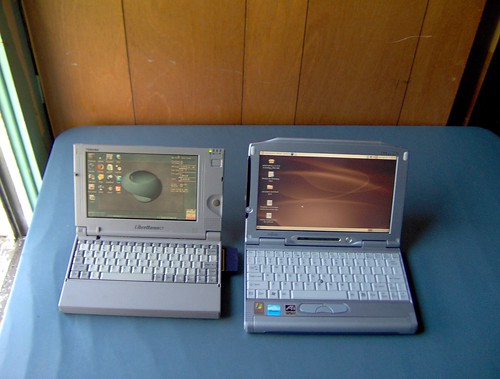
Even newer toy(possibly better than a Libretto or a Jornada)

Want to just shoot the breeze? Forum 42 is the place!

Moderator: Moderators

tom61
Senior Member
Posts: 1517
Joined: Fri Mar 25, 2005 6:51 pm

Post by tom61 »

I've finally managed to find time to take some side-by-side shots. All photos link back to their Flickr page with the option of viewing larger size.

Image

Image

Image

In Windows (95 and XP Pro)
Image

In Linux (DSL and Ubuntu)
Image

I was going to show browsing on the two separate systems, but the Libretto's Wifi card wouldn't work right.

Lifebook browsing the forums:
Image

Running Chromium BSU(3D acceleration works with the open source drivers):
Image
Image

Awesome little system. Nearly everything works out of the box in Linux, which is great, as that's my prefered OS right now. I need to download and install the program that lets the touchscreen work, but everything else just works.

Good points:
Small size for a sane price
Out-of-the-box Linux compatability
Decently priced replacement batteries (which I will need)
Keyboard nearly on par with the average laptops (and beats some sub-notebook's I've seen)
Volume and brightness control on keyboard (have to press FN key)
Capable of handling most videos (non-HD), YouTube and Pandora
Passable 3D accel. (good enough for Chromium at 800x600 at medium)

Bad points:
Only USB 1.1
Sound from speakers worse than average laptop
Can get fairly hot during use
Only 256MB of RAM, and 16MB is taken by 'codemorphing'
The CPU has to get used to the instructions in the code, so some things are slow at first
HD caddy is a pain to deal with, if you need to
The only status indicators are LCD based under the main LCD, including charging, so you have to open it to see the current charging status.
Skyone
Moderator
Posts: 6390
Joined: Tue Nov 29, 2005 8:35 pm
Location: it is a mystery
Contact:

Post by Skyone »

Wow! I might have to by myself something of the sort... and it has a touchpanel too... damn! :P
tom61
Senior Member
Posts: 1517
Joined: Fri Mar 25, 2005 6:51 pm

Post by tom61 »

I was wondering why you didn't reply earlier.

Hmm, I might as well give an update while I'm here:

The touchscreen is working under Linux now, just a simple userspace utility run from a terminal was needed. Took me three tries to get it fairly close to my liking. With a screen this size, it is hard to position your hand hovering over the screen precisely to touch the right spots in calibration. I think you could write mathematical symbols, etc. without much difficulty. Oddly, if you start drawing a bunch of stuff, it eventually starts lagging, and when you lift the pen up it takes time for it to catch up. Not sure if it's the userspace utility, GIMP (which I was drawing in), or the Tranmeta CPU not yet being used to drawing, or a combination. I mostly use it for scrolling, opening and closing of applications, so that's OK.

I just ordered the extended battery (as the main battery lasts only an hour currently) and a slim USB DVD burner to go with this. That should extend the usefulness of this laptop a fair bit. I might be able to trade for a 100GB laptop drive with someone I know, so that would up the capacity to 'desktop replacement' status.

This is just so close to what I've been wanting for so long. :? :( A processor like a C7 or beefier, 512MB of RAM, and USB 2.0 would be excellent, but too costly for me. :( Last I checked, the next model up that I'm aware of cost $1500+ on eBay most days.


As for the Libretto, I'm considering taking it apart and making a miniture DVD projector out of it. The screen resolution is 800x480, which is just a hair over 720p. With the DVD decoder card, it can do 720P decoding in real time. If I do make it into a projector, another possiblity is getting a TV tuner card. I think the lowest OS I could find a card compatable was Windows 98, which means playing around with upgrading the Libretto to Win98, which sometimes causes problems with the decoding card.
Post Reply