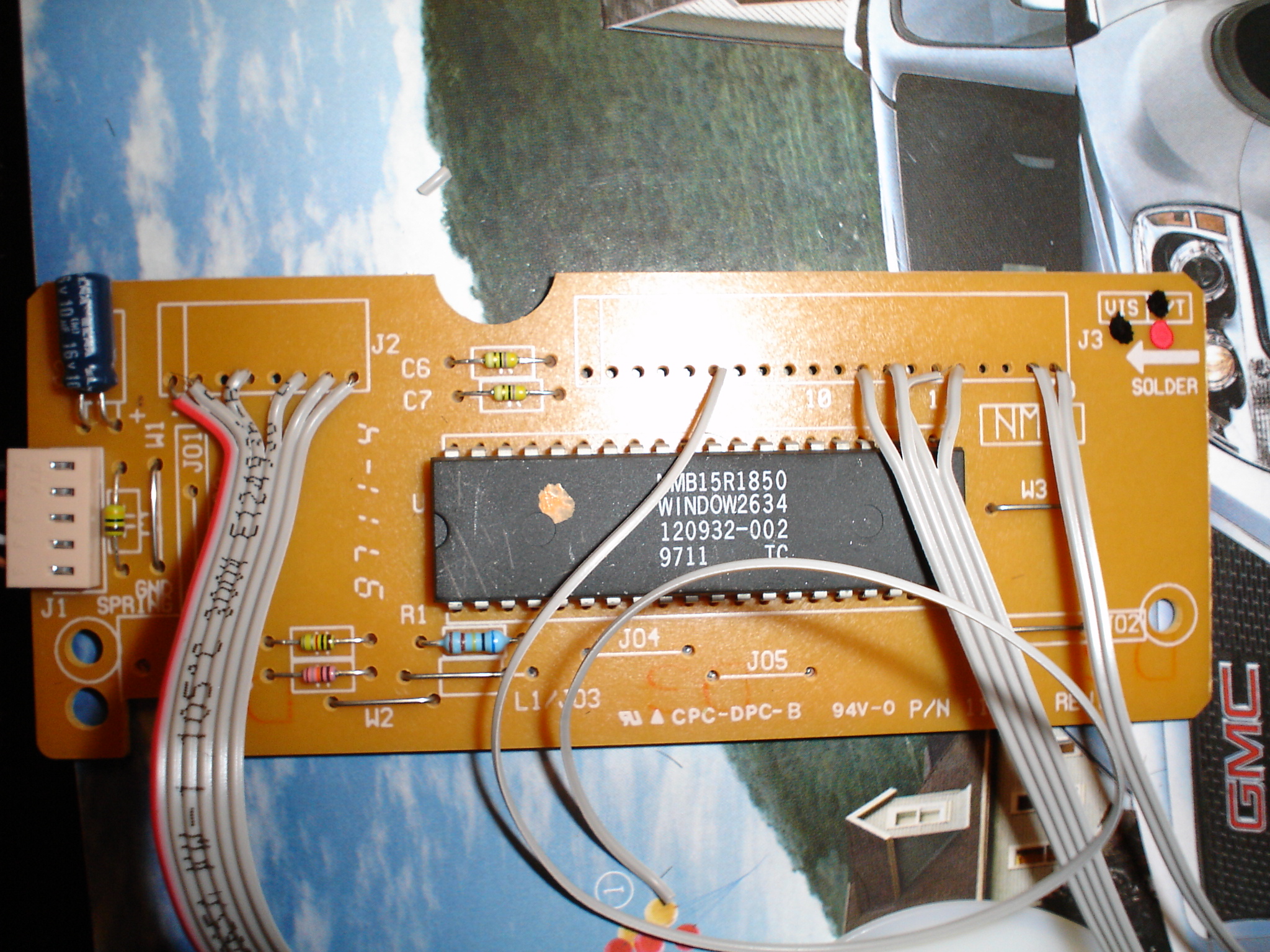
lately I've been wishing more and more that I had a controller I could use to play emulators on my computer. I've looked several times at how to connect a nes/snes controller to a parallel port, but that wasn't exactly the solution i was looking for. This afternoon I had a stroke of genius and realized that I could hack a keyboard into the controller I've been looking for. As you may or may not know, the controller card in a keyboard is pretty small....probably no bigger than a snes or nes controller mobo. So I grabbed an old keyboard, deciphered the pins that correspond to the up, down, left, right, a, b, x, y, l and r buttons and set to work. Here's what I've got so far. As luck would have it none of my computers at home have ps2 ports, so I'll have to either get a USB converter or wait until no one is looking and work on it at work.
<img src=http://www.austinbull.com/pictures/keycontroller.jpg width=400>
My new little project
Moderator: Moderators
-
A_Username
- Posts: 335
- Joined: Mon Mar 13, 2006 5:00 pm
- Location: Sioux Falls, SD
- Contact:
Re: My new little project
Nice Idea, never thought of it. How hard was it to install the keyboard controller ship? I always wire up a SNES-to-Paralle Port Circut.myersn024 wrote:lately I've been wishing more and more that I had a controller I could use to play emulators on my computer. I've looked several times at how to connect a nes/snes controller to a parallel port, but that wasn't exactly the solution i was looking for. This afternoon I had a stroke of genius and realized that I could hack a keyboard into the controller I've been looking for. As you may or may not know, the controller card in a keyboard is pretty small....probably no bigger than a snes or nes controller mobo. So I grabbed an old keyboard, deciphered the pins that correspond to the up, down, left, right, a, b, x, y, l and r buttons and set to work. Here's what I've got so far. As luck would have it none of my computers at home have ps2 ports, so I'll have to either get a USB converter or wait until no one is looking and work on it at work.
<img src=http://www.austinbull.com/pictures/keycontroller.jpg width=400>
-Derek

I can't believe I never thought of that. It is kind of like, "DUH!"
Let us know how that works out and looks'n stuff obviously.
Let us know how that works out and looks'n stuff obviously.
<a href="http://www.tbowlcomic.com"><img src="http://www.uncannyassociates.com/pics/t ... 468x60.jpg" alt="TBOWLComic" border="0"></a>
this is one of the classic approaches of wiring up a controller for mame cabs. you can read all about it at arcadecontrols.com..
personally, i think using a ps/2 keyboard is fairly limiting. first, you will have issues if you plug/unplug it after bootup. second, assuming that it works like the vast majority of keyboards, you may have problems when dealing with more than 3 simultaneous keypresses. another issue is lag, which is not much of an issue with the ps/2 interface, but if you are going usb, especially with an adapter, it may be more relevant.
personally, i think using a ps/2 keyboard is fairly limiting. first, you will have issues if you plug/unplug it after bootup. second, assuming that it works like the vast majority of keyboards, you may have problems when dealing with more than 3 simultaneous keypresses. another issue is lag, which is not much of an issue with the ps/2 interface, but if you are going usb, especially with an adapter, it may be more relevant.
-
Unidentified Assilant
- Senior Member
- Posts: 2531
- Joined: Thu Oct 21, 2004 12:26 pm
- Location: Yea I like machine head


I know what you mean. I did some reading on this yesterday and I know all about the too many simultaneous key presses issue. However, all info I've found says that a standard keyboard should be able to handle 16 to 18 simultaneous key presses as long as you have mapped the matrix correctly and choose the correct keys. I'm only making a single controller for emulators so I really don't need that many. There are some issues with what is known as key blocking, but that's only if you press three keys that are in three corners of a square in the matrix at the same time. If my key mapping is correct, I shouldn't run into any problems using the controller the way I'm trying to.bgnome wrote:this is one of the classic approaches of wiring up a controller for mame cabs. you can read all about it at arcadecontrols.com..
personally, i think using a ps/2 keyboard is fairly limiting. first, you will have issues if you plug/unplug it after bootup. second, assuming that it works like the vast majority of keyboards, you may have problems when dealing with more than 3 simultaneous keypresses. another issue is lag, which is not much of an issue with the ps/2 interface, but if you are going usb, especially with an adapter, it may be more relevant.
Anyway, I've still got to get to a computer with a ps2 port (neither laptops nor my iMac have them) on it so I can test my mappings and make sure I've got the proper keys mapped. Once I've got it right, I'll probably get a ps2 to USB adapter and use it that way. I do feel that lag will be any real issue when I use it to play 16 bit and lower games. When I make more progress, I'll post some more pictures.