Hey, I recently bought a PSone screen. It works fine. So I opened it up.
When I had unscrewed the circit board, Ben's book told me to remove all four plugs. Two of which are small 2 wire ones (Which lead the the speakers), and 2 are ribbon cable.
When removing one of the small 2 wire ones, I actually managed to break the plug. Now i've got the wires, and the plug socket. Does anyone know how to fix it, maybe by somehow soldering the wires to the inside of the plug.
:S
Please help.
PSone Screen Speaker Cable
Moderator: Moderators

-
CronoTriggerfan
- Moderator
- Posts: 4131
- Joined: Fri Jan 27, 2006 3:07 pm
- Location: University of Michigan - Ann Arbor
- Contact:
No, no, no. Check the sticky next time.
CTFan
Good luckThe Almighty Screen Sticky wrote:
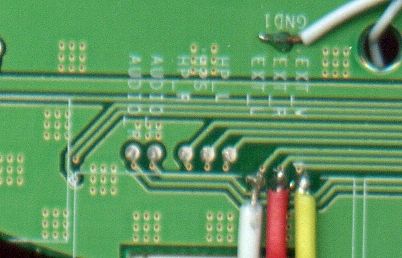
To input composite video plus left and rght audio without using the mini av/in jack do this:
Yellow - Comp. video
Red - Right audio
White - Left audio
*Remember to tie the consoles and the screens grounds together!
Source: http://www.benheck.com/phpBB/viewtopic. ... 9&start=21
CTFan

-
CronoTriggerfan
- Moderator
- Posts: 4131
- Joined: Fri Jan 27, 2006 3:07 pm
- Location: University of Michigan - Ann Arbor
- Contact:
-
bicostp
- Moderator
- Posts: 10491
- Joined: Mon Mar 07, 2005 5:47 pm
- Steam ID: bicostp
- Location: Spamalot
- Contact:
I think Rellizate broke the connector that joins the speaker to the motherboard, not the input.CronoTriggerfan wrote:No, no, no. Check the sticky next time.
Good luckThe Almighty Screen Sticky wrote:
To input composite video plus left and rght audio without using the mini av/in jack do this:
Yellow - Comp. video
Red - Right audio
White - Left audio
*Remember to tie the consoles and the screens grounds together!
Source: http://www.benheck.com/phpBB/viewtopic. ... 9&start=21
CTFan
Just solder the two wires to their pins on the connector. It should work fine, as long as you don't bridge the connections.
Twitter
http://www.pcwgaming.com" onclick="window.open(this.href);return false;
If you want a Dropbox account, please use my referral link
http://www.pcwgaming.com" onclick="window.open(this.href);return false;
If you want a Dropbox account, please use my referral link
-
CronoTriggerfan
- Moderator
- Posts: 4131
- Joined: Fri Jan 27, 2006 3:07 pm
- Location: University of Michigan - Ann Arbor
- Contact:

-
CronoTriggerfan
- Moderator
- Posts: 4131
- Joined: Fri Jan 27, 2006 3:07 pm
- Location: University of Michigan - Ann Arbor
- Contact:
Well it may suck to hear, but that's pretty much your only option, unless you wanna go scraping up leads and tracing them with that multimeter....
If it's really that big a deal, you could always just request a new speaker w/the plug in tact in The Trading Post. I'm sure someone would be willing to help you out!
CTFan
If it's really that big a deal, you could always just request a new speaker w/the plug in tact in The Trading Post. I'm sure someone would be willing to help you out!
CTFan

well if it is only auio that is your problem there is one soltuion if all else fails... individual amplifiers for each channel
I know scary sonding but just check by segasonicfan's site (if it what he did on his pstwop) you can get some small 3.5 watt amps and add a few extra components that are required and you are done...
But Like I said it is what you want to do if all else fails
I know scary sonding but just check by segasonicfan's site (if it what he did on his pstwop) you can get some small 3.5 watt amps and add a few extra components that are required and you are done...
But Like I said it is what you want to do if all else fails
I refuse to dignify myself with an intelligent and witty signature
-
CronoTriggerfan
- Moderator
- Posts: 4131
- Joined: Fri Jan 27, 2006 3:07 pm
- Location: University of Michigan - Ann Arbor
- Contact:
 I'd rather solder 2 surface-mount spaced traces than build 2 individual amp circuits anyday!
 -
Turbo Tax 1.0
- Portablizer Extraordinaire
- Posts: 4773
- Joined: Wed Mar 30, 2005 6:19 pm
- Location: Delaware, no sales tax
- Contact:
