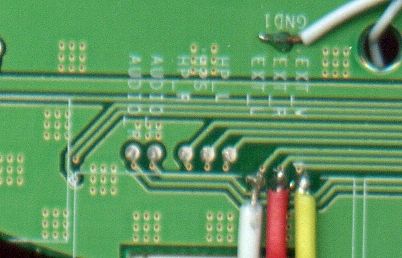
If you're making a portable you probably need something to watch it on. (Unless you want to guess what's happening in the game, but I wouldn't advise that) Anyway, this forum is your "Hacking a pocket TV/screen" one-stop solution. Share your experiences and knowledge here.
Moderator: Moderators
khaag
Senior Member
Posts: 2261 Joined: Sat Mar 18, 2006 7:54 pm
Post
by khaag Thu May 25, 2006 6:15 pm
If I do this on my Zenith Screen and then touch each wire to the A/V cables from my Gamecube, will I get the video/audio on my screen? Or do I have to connect something else to it to?
PS-Mods, if this should be somewhere else, feel free to move it to the correct place!
Klefmung
Senior Member
Posts: 1517 Joined: Fri Aug 05, 2005 12:23 amLocation: Crystal palace
Contact:
Post
by Klefmung Thu May 25, 2006 6:19 pm
Nope, just hook video in there.
gannon wrote: hmm... *ponders about power abuse*
benheck wrote: Wow, guess I should have searched my own forums! Oh wait, I don't have to since the rules don't apply to me
khaag
Senior Member
Posts: 2261 Joined: Sat Mar 18, 2006 7:54 pm
Post
by khaag Thu May 25, 2006 6:22 pm
Klefmung wrote: Nope, just hook video in there.
Huh? What are you saying "Nope" to?
Klefmung
Senior Member
Posts: 1517 Joined: Fri Aug 05, 2005 12:23 amLocation: Crystal palace
Contact:
Post
by Klefmung Thu May 25, 2006 6:24 pm
Nothing has to be in between it and composite out.
gannon wrote: hmm... *ponders about power abuse*
benheck wrote: Wow, guess I should have searched my own forums! Oh wait, I don't have to since the rules don't apply to me
Harshboy
Portablizer
Posts: 3610 Joined: Tue Oct 11, 2005 3:44 pm
Post
by Harshboy Thu May 25, 2006 6:29 pm
dont forget to ground everything
bicostp
Moderator
Posts: 10491 Joined: Mon Mar 07, 2005 5:47 pmSteam ID: bicostpLocation: Spamalot
Contact:
Post
by bicostp Thu May 25, 2006 6:30 pm
That will work. Just make sure you connect the ground wire, too.
khaag
Senior Member
Posts: 2261 Joined: Sat Mar 18, 2006 7:54 pm
Post
by khaag Thu May 25, 2006 6:34 pm
What I mean is this:
Will that work? Sorry if thats what you meant and I just didn't understand...
EDIT: How do I ground it?
Skyone
Moderator
Posts: 6390 Joined: Tue Nov 29, 2005 8:35 pmLocation: it is a mystery
Contact:
Post
by Skyone Thu May 25, 2006 6:45 pm
khaag wrote: What I mean is this:
Will that work? Sorry if thats what you meant and I just didn't understand...
EDIT: How do I ground it?
There are two wires in an A/V plug, one signal, one ground.
khaag
Senior Member
Posts: 2261 Joined: Sat Mar 18, 2006 7:54 pm
Post
by khaag Thu May 25, 2006 6:51 pm
OK. So I would have to have ground coming from the screen? Where can I get ground from? (On the screen?) Does somebody have a picture of their setup that will help me out?
blackbox_dev
Senior Member
Posts: 1906 Joined: Sun Jan 15, 2006 5:19 pmLocation: Formerly known as iam7805
Post
by blackbox_dev Thu May 25, 2006 6:52 pm
Then connect the ground from the A/V cable to any ground on the board.
I'd imagine right now you wish you were a cuttlefish...
khaag
Senior Member
Posts: 2261 Joined: Sat Mar 18, 2006 7:54 pm
Post
by khaag Thu May 25, 2006 6:56 pm
So Can i connect the ground to where it shows in this pic?
EDIT: On an A/V jack, is the inside part of it ground, or the outside part of it ground?
Last edited by
khaag on Thu May 25, 2006 7:01 pm, edited 1 time in total.
Life of Brian
Moderator
Posts: 2867 Joined: Wed Aug 03, 2005 5:55 pmLocation: Oklahoma
Contact:
Post
by Life of Brian Fri May 26, 2006 2:39 am
Answer to edit: The outside part's ground. The center gives you the signal. Just keep in mind that's pretty much rule of thumb for any a/v jack you come across.
dragonhead wrote: sweet. ive spent a third of my life on benheck!