stupid me =). PSone screen help

If you're making a portable you probably need something to watch it on. (Unless you want to guess what's happening in the game, but I wouldn't advise that) Anyway, this forum is your "Hacking a pocket TV/screen" one-stop solution. Share your experiences and knowledge here.

Moderator: Moderators

Post Reply
geekbait111
Posts: 413
Joined: Tue Feb 14, 2006 9:15 am
Location: hiding your attic...waiting

stupid me =). PSone screen help

Post by geekbait111 »

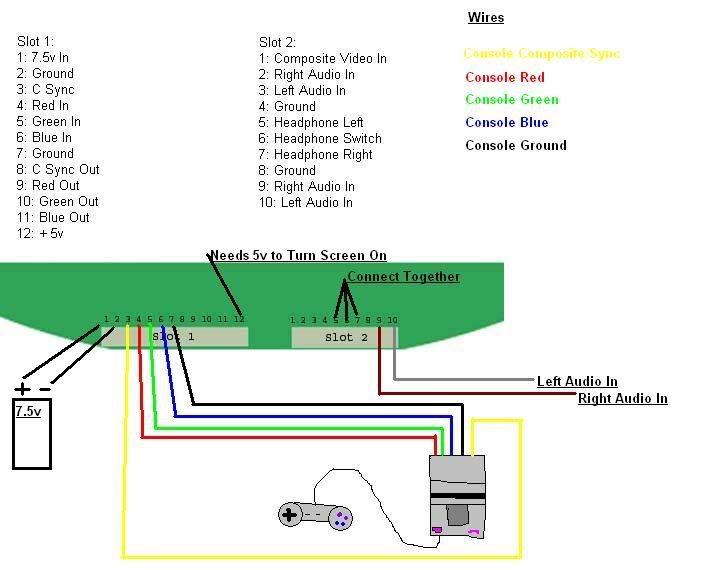
This is how you would hook up a console with rgb to the screen.
Image
If you arn't going to use rgb just hook it up like this.
Image
Yellow-Composite Video
Red-Right Audio
White-Left Audio
Make sure you connect the consoles ground to the screen too.
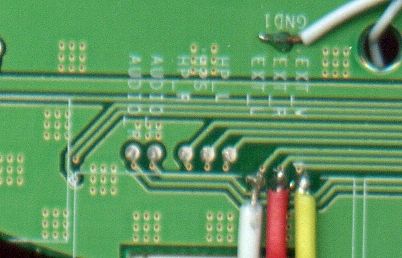
And just saying I’m not doing RGB. So I follow the 2nd picture…
1) what’s the 2 white wires above the red,white, and red? And I assume the battery stuff is still the same but
2) where do you get the 5 volt to power the screen (on slot 12)? Or do you still need it for the non-rgb stuff?
3) do you still need to connect thing 5 6 and 7 for non-RGB?
4) for the left and right audio, is that the speakers? If not, what?
Kurt_
Portablizer
Posts: 5748
Joined: Thu Nov 24, 2005 10:32 am
Steam ID: kurbert
Location: Ontario, Canada
Contact:

Post by Kurt_ »

I believe the one going through the hole is just the +5V that pal screens need to turn on, and the other is the ground connected to the snes's ground.

2) You don't. You hook up the +5 volts to your systems regulator out, and hook up the +7V to the screen.

3) 4,5, and 6 and RGB. 7 is ground. Read the pinouts.

4) for the left and right audio, is that the speakers? If not, what?
Yes.
Hey, sup?
marshallh
Moderator
Posts: 2987
Joined: Sat Sep 10, 2005 2:17 pm
360 GamerTag: marshallh
Location: here and there
Contact:

Post by marshallh »

You also need to hook up C-Sync. IIRC the PSone LCD can strip the sync info from the N64's Luma output (I think the pin is marked L on the N64)
Image
geekbait111
Posts: 413
Joined: Tue Feb 14, 2006 9:15 am
Location: hiding your attic...waiting

Post by geekbait111 »

? what's C-Sync??? Can you give me a full definition? (by the way I have no plans for an N64p, though thankies for the info)
edit: nevermind... meow
geekbait111
Posts: 413
Joined: Tue Feb 14, 2006 9:15 am
Location: hiding your attic...waiting

Post by geekbait111 »

oh wait a sec Kurt...(or anyone reading this message) I was talking about slot 2 when soldering 4+5+6 together not slot 1, well anyway these are my current pregundos I ...
in slot 1
where do I solder
1) #8
2)#9
3)#10
and 4)#11
on slot 2
#5)Is the comp. video (#1)is the yellow cord on a standard set of phono plugs?
#6) why is there 2 right and left audios???
Now for misc. questions…
#7) why are there 4 grounds and what do you do with all of them (connect them to the sega’s ground?)
eight) where do you connect mono, stereo L/R, and possibly video (yellow cord)

P.S sorry for so many questions, it's all so confuzing to a geek :( .
But good news I'm getting my screen on thursday, and I have most other materials (including the sega) :D ..
timmeh87
Senior Member
Posts: 3047
Joined: Mon Nov 14, 2005 10:19 pm
Location: Ontario, Canada

Post by timmeh87 »

in slot 1, 8,9,10,and 11 go nowhere. these are the 'out' pins, use them if you want your portable to have video out (i think).

slot 2:
pin 1 is standard "yellow" video.
i dont know about the audio... just use the contacts in the picture below it.

it is common for things to have more than one ground, they are all connected together, and you only need to connect one to sega's ground. you can actually get ground from anywhere else on the board, you dont need to use that specific connector. but you can.

so, to connect your l/r/v, then use the picture below the pin diagram that tells you were to connect them :roll:
Image

"Linux is only free if your time is worthless"
geekbait111
Posts: 413
Joined: Tue Feb 14, 2006 9:15 am
Location: hiding your attic...waiting

Post by geekbait111 »

Super edit: nevermind about deleted post, Thankies all!!!
geekbait111
Posts: 413
Joined: Tue Feb 14, 2006 9:15 am
Location: hiding your attic...waiting

Post by geekbait111 »

Hi, I'm talking about the LED mod now, anyway I was wondering if you just solder the pins in the ribbon cable back together when attatching the PSone screen back, thanks!
demonofaj
Portablizer Extraordinaire
Posts: 2553
Joined: Tue Jun 21, 2005 2:52 pm
PSN Username: ajsen1gma
Steam ID: demonofaj
Location: NYC (718)
Contact:

Post by demonofaj »

Uh....don't try to solder onto the prongs that much, as in the little piece of metal that connects jack and mobo, it's a pain, and I did it, and sooo much solder got lost/jammed under thething, I gotta find a whole bevy of alternate points :(
"Life's a female of the dog species, then you die.."
geekbait111
Posts: 413
Joined: Tue Feb 14, 2006 9:15 am
Location: hiding your attic...waiting

Post by geekbait111 »

wow :( . Ok I'll try not to do what you did (sorry to hear that). But okeydokey, thankies
geekbait111
Posts: 413
Joined: Tue Feb 14, 2006 9:15 am
Location: hiding your attic...waiting

Post by geekbait111 »

well I normally wouldn't double post, but this is far too important! That I can't post the seal with a pancake on it!!! :cry: . Anyway I just got back from somewhere and found out that it just clamped back together *gasp*. Will it still work? Anyway this is also a REALLY stupid ques.
-how do you turn on the screen? Just plug the DC plug into the wall (temp. for me) and hook up the wires for AV and turn on the system? Would that work? thankies!
Post Reply