Audio: Dead line...

Includes Atari 2600, Nintendo 8-bit, Sega Master System, MSX and more!

Moderator: Moderators

Post Reply
CronoTriggerfan
Moderator
Posts: 4131
Joined: Fri Jan 27, 2006 3:07 pm
Location: University of Michigan - Ann Arbor
Contact:

Audio: Dead line...

Post by CronoTriggerfan »

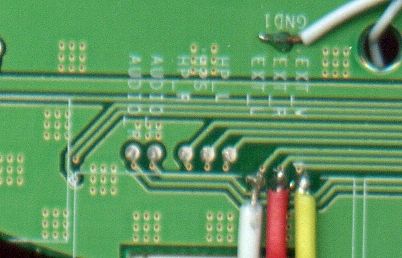
Well, my portable is working, but my audio isn't. I hooked it up to a headphone jack like 3 times, nothing. Then I tried 3 or 4 different PSOne speakers to the screen, and STILL nothing. Is my PSOne audio amp busted? What do I do? PLEASE HELP ME :cry: !!!

CryingTriggerfan :(
Image
Turbo Tax 1.0
Portablizer Extraordinaire
Posts: 4773
Joined: Wed Mar 30, 2005 6:19 pm
Location: Delaware, no sales tax
Contact:

Post by Turbo Tax 1.0 »

i sthe volume up :P ? and did you short the 3 headphone connections like it says to do in the sticky

Image
above and to the left of the vid and audio inputs you need to jump those three pads that say HP
when life gives you lemons make flux
Image
snesp mk4
CronoTriggerfan
Moderator
Posts: 4131
Joined: Fri Jan 27, 2006 3:07 pm
Location: University of Michigan - Ann Arbor
Contact:

Post by CronoTriggerfan »

I just checked, and I didn't jump those 3 lines. What does jumping them do? Will it just make the headphone jack work, or will it make the speakers work, too? Right now, I get a clicking noise from the speakers. It starts off slower, and increases in speed. Does that have anything to do with not jumping those lines?

EDIT: Oops :oops: this is a SNES question, not NES. Could a mod or admin please move it?
Image
Post Reply