PSone LCD Screen Question
Moderator: Moderators
-
cowtipperz88
PSone LCD Screen Question
Ok I am new to this and have a few questions.I bought a new PSone LCD Screen and wanted to know somethings. Is there a way for the screen to be hacked so that it may have a audio in(yellow port) and video in(White Port) port so you can hook up a camera or xbox or even a PS2.Or is there a way to even hook-up a dvd plays or any thing like that to the screen.And I don't mind soldering or any suggestions like that.Thanks
Yep, exept yellow is video and white is audio. Just get one of these:
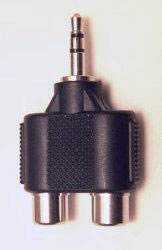
Or these:
You'de probably be able to find them at a radioshack or electronics store. When you have one of those, just plug in the yellow and white plugs into the adaptor. (You might need a coupler for the cable.) Then just plug it into "a/v in" on the back of the screen.
Or these:
You'de probably be able to find them at a radioshack or electronics store. When you have one of those, just plug in the yellow and white plugs into the adaptor. (You might need a coupler for the cable.) Then just plug it into "a/v in" on the back of the screen.
Last edited by HK-47 on Sat Mar 26, 2005 5:08 pm, edited 1 time in total.
Corrected message. HK-47 bandwidth stealer, eh? You know better than that!HK-47 wrote:Yep, exept yellow is video and white is audio. Just get one of these:
Or these:
You'de probably be able to find them at a radioshack or electronics store. When you have one of those, just plug in the yellow and white plugs into the adaptor. (You might need a coupler for the cable.) Then just plug it into "a/v in" on the back of the screen.


-
Cowtipz888

-
this-is-me
- Posts: 93
- Joined: Fri Mar 11, 2005 10:44 am
- Location: Sitting here watching the shootout between Unidentified Assilant and Electric Rain on my TV
The problem with that is that you can't use stereo if you do it that way.HK-47 wrote:Yep, exept yellow is video and white is audio. Just get one of these:
Or these:
You'de probably be able to find them at a radioshack or electronics store. When you have one of those, just plug in the yellow and white plugs into the adaptor. (You might need a coupler for the cable.) Then just plug it into "a/v in" on the back of the screen.
Who else would I be?
-
nos_slived
- Higher Idiot
- Posts: 3476
- Joined: Mon Mar 21, 2005 6:32 pm
- Location: Burnaby, BC, Canada
- Contact:

-
this-is-me
- Posts: 93
- Joined: Fri Mar 11, 2005 10:44 am
- Location: Sitting here watching the shootout between Unidentified Assilant and Electric Rain on my TV

-
nos_slived
- Higher Idiot
- Posts: 3476
- Joined: Mon Mar 21, 2005 6:32 pm
- Location: Burnaby, BC, Canada
- Contact:
-
nos_slived
- Higher Idiot
- Posts: 3476
- Joined: Mon Mar 21, 2005 6:32 pm
- Location: Burnaby, BC, Canada
- Contact: