hey i am making a snesp and opened my snes original got the mobo out and desoldered the "multi a/v out", power jack, on/off switch (then jumped it), reset, and took off the rf box. could sumone send diagrams on getting l/r audio and connectin stuff 2 the screen and battery. also i kno it runs on 10 volts. any idea how to hook it up??? thx
dragonman
snesp ( im usin the orig snes) got sum questions
Moderator: Moderators
-
dragonman101
- Posts: 40
- Joined: Mon Jul 18, 2005 10:41 am
-
LethalMeatball
- Posts: 79
- Joined: Wed Jun 22, 2005 5:44 pm
- Location: Oregon
-
dragonman101
- Posts: 40
- Joined: Mon Jul 18, 2005 10:41 am
-
dragonman101
- Posts: 40
- Joined: Mon Jul 18, 2005 10:41 am
-
EvilnessNMyVeins
- Posts: 235
- Joined: Fri Jun 03, 2005 9:16 pm
- Location: Medina, Ohio
http://doomportables.gptheatre.co.uk/im ... inouts.gif
for Nintendo Pinouts
http://benheck.com/phpBB/viewtopic.php?t=2278
This is for the screen
And the expansion Bay you can take off its not very fun though...
for Nintendo Pinouts
http://benheck.com/phpBB/viewtopic.php?t=2278
This is for the screen
And the expansion Bay you can take off its not very fun though...
-
usbcd36
- Posts: 1293
- Joined: Sun May 15, 2005 5:04 pm
- Location: Inside Samus's arm cannon [gulp]___ Gender: Male
You can find better AV pinouts here: http://www.doomportables.gptheatre.co.uk/video.php
That way, you can get RGB instead of crappy composite on the SNESp you're building. (It isn't actually any harder to get, it just requires 3 extra wires to connect the screen to the SNES).
That way, you can get RGB instead of crappy composite on the SNESp you're building. (It isn't actually any harder to get, it just requires 3 extra wires to connect the screen to the SNES).
-
dragonman101
- Posts: 40
- Joined: Mon Jul 18, 2005 10:41 am
RGB is by far better then composite as you have a line for RED, GREEN, BLUE and sync, while composite has one line for all that. Its prefered that if you can get RGB out use it.
The use of the reisistors as far as I know is to better controll the signal strength and any spiking that could happen.
The use of the reisistors as far as I know is to better controll the signal strength and any spiking that could happen.
vskid wrote:Nerd = likes school, does all their homework, dies if they don't get 100% on every assignment
Geek = likes technology, dies if the power goes out and his UPS dies too
I am a geek.
-
dragonman101
- Posts: 40
- Joined: Mon Jul 18, 2005 10:41 am
ummm on the doomportable hack it says 1 and 7 are audio... im using a original snes and i was told 11 and 12 were audio. on doom portables it says that 11 and 12 are blue and green. also what is the *sync* is that like the wire that connects them all to a certain spot. im not sure how to do this. do you just think i should use composite or could someone make a verryyyyy simple tutorial? thanks
dragonman
dragonman
-
usbcd36
- Posts: 1293
- Joined: Sun May 15, 2005 5:04 pm
- Location: Inside Samus's arm cannon [gulp]___ Gender: Male
Ah, well doomportables doesn't have the official pinouts, it treats the jack like you are looking at it from the front. Just think of it this way:
Jack:
Top row 1-6
Bottom row 7-12
So if you were looking at the bottom of a SNES board, it would be:
Oh, and sync is the stabilization of the picture on RGB. It is required for the screen to display a picture.
If you want to connect the SNES to a PSone screen with RGB, do this:
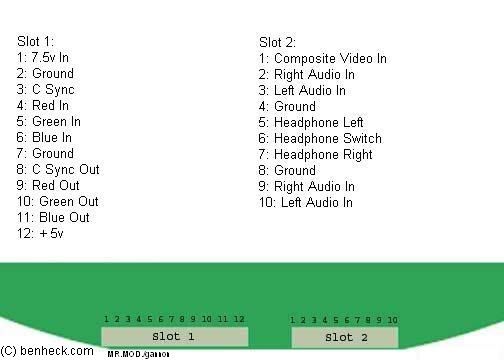
Using this diagram, connect pin "5" to the Csync input on the screen, connect pin "6" to the red in spot on the screen, connect pin "12" to the green in spot on the screen and pin "11" to the blue spot on the screen. Then connect the audio to the lower/leftmost spots on the screen. Tie the grounds together and you're ready to play!
Jack:
Code: Select all
    |–|
/–––   –––\
| ------- |
\–––––––––/
Bottom row 7-12
So if you were looking at the bottom of a SNES board, it would be:
Code: Select all
(AV jack up here^)
7 8 9 101112
• • • • • •
• • • • • •
1 2 3 4 5 6
If you want to connect the SNES to a PSone screen with RGB, do this:
Using this diagram, connect pin "5" to the Csync input on the screen, connect pin "6" to the red in spot on the screen, connect pin "12" to the green in spot on the screen and pin "11" to the blue spot on the screen. Then connect the audio to the lower/leftmost spots on the screen. Tie the grounds together and you're ready to play!
-
dragonman101
- Posts: 40
- Joined: Mon Jul 18, 2005 10:41 am
-
EvilnessNMyVeins
- Posts: 235
- Joined: Fri Jun 03, 2005 9:16 pm
- Location: Medina, Ohio
Just use composite on the website I posted above it goes with the numberings on the snes board.
It's here
http://doomportables.gptheatre.co.uk/im ... inouts.gif
I don't think you need RGB to make a 16 bit game better, I doub't its noticable or even if it is, desireable.
If you were making it out of a PS or higher I would suggest RGB but not this.
It's here
http://doomportables.gptheatre.co.uk/im ... inouts.gif
I don't think you need RGB to make a 16 bit game better, I doub't its noticable or even if it is, desireable.
If you were making it out of a PS or higher I would suggest RGB but not this.
-
dragonman101
- Posts: 40
- Joined: Mon Jul 18, 2005 10:41 am
-
dragonman101
- Posts: 40
- Joined: Mon Jul 18, 2005 10:41 am
-
dragonman101
- Posts: 40
- Joined: Mon Jul 18, 2005 10:41 am

