Trying to build my own game system
Moderator: Moderators
-
dashthehero
- Posts: 56
- Joined: Mon Apr 11, 2005 6:22 pm
Trying to build my own game system
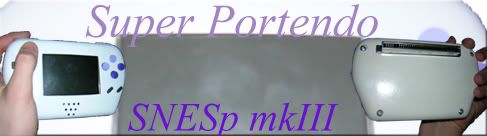
i have an idea for a game system im making, and i need someone to tell me if it'll work. im going to make games with a game-creating program i have. then im going to save them on SanDisks. then i'll take the drive that holds the Sandisk out of a computer and i'll take a computer motherboard out of a computer, hook up the sandisk drive to it, and wire together batteries, a screen, and some other stuff. the sandisk is the game cartridge. when i insert it into the sandisk holder, and turn the power on, the computer should be able to read what's on the sandisk. i just need a way to make it so that when it reads the sandisk then it'll automatically play what's on it. when i make a game i'll set the controls (such as Ctrl for shoot, Alt for jump, and the directional keys to move around). i'll then take those keys off of a keyboard and wire it up with everything else, and i'll cover the ctrl, alt, direction keys, and other keys i might have with A, B, Select, Start, L, and R buttons. and of course i'll build a case. does anyone think this'll work?
-
bicostp
- Moderator
- Posts: 10491
- Joined: Mon Mar 07, 2005 5:47 pm
- Steam ID: bicostp
- Location: Spamalot
- Contact:
The best way I can think of is to make the Sandisks DOS-bootable, and put the game program into the AUTOEXEC.BAT file. I've made numerous floppies that automatically run a game when they're booted from (for quick gaming on those library computers that have EVERYTHING locked.  )
)
 funny story: The last April 1 my school was in session, I booted about 20 PCs off of the same boot floppy, and loaded a copy of DigDug onto them all. (Of course this game has no "EXIT" function. :lmao:
) funny story: The last April 1 my school was in session, I booted about 20 PCs off of the same boot floppy, and loaded a copy of DigDug onto them all. (Of course this game has no "EXIT" function. :lmao:Twitter
http://www.pcwgaming.com" onclick="window.open(this.href);return false;
If you want a Dropbox account, please use my referral link
http://www.pcwgaming.com" onclick="window.open(this.href);return false;
If you want a Dropbox account, please use my referral link
Sounds like you have many of the basics down.
I would make a suggestion of changing the media you plan to use. As Compactflash cards have IDE/ATA support builtin it could be far easier to do then Sandisk when your opperating without a OS preinstalled.
Otherwise good luck on your project.
I would make a suggestion of changing the media you plan to use. As Compactflash cards have IDE/ATA support builtin it could be far easier to do then Sandisk when your opperating without a OS preinstalled.
Otherwise good luck on your project.
vskid wrote:Nerd = likes school, does all their homework, dies if they don't get 100% on every assignment
Geek = likes technology, dies if the power goes out and his UPS dies too
I am a geek.
-
shelter pitfall
- Posts: 318
- Joined: Sat Jul 10, 2004 5:20 pm
- Contact:
WOW! That is a cool trick.bicostp wrote:
Dashthehero, good luck with your project.
Friend's site: http://rhapsody.shiroi-kaisou.net/
-
Turbo Tax 1.0
- Portablizer Extraordinaire
- Posts: 4773
- Joined: Wed Mar 30, 2005 6:19 pm
- Location: Delaware, no sales tax
- Contact:

-
dashthehero
- Posts: 56
- Joined: Mon Apr 11, 2005 6:22 pm
 it might take a while, though.
-
dashthehero
- Posts: 56
- Joined: Mon Apr 11, 2005 6:22 pm
-
bicostp
- Moderator
- Posts: 10491
- Joined: Mon Mar 07, 2005 5:47 pm
- Steam ID: bicostp
- Location: Spamalot
- Contact:
Let's use my DigDug example.
1. Download DigDug from Home of the Underdogs
2. insert a blank floppy into your disk drive
3. Right-click the "3.5" Floppy A:" icon and select "Format"
4. Perform a Quick Format and tell it to "Copy System Files".
5. Extract digdug.exe onto the floppy.
6. Open Notepad, and type this:
(Replace digdug.exe with your program's name, of course.)
7. Save that file onto the A: drive as "AUTOEXEC.BAT"
8. Restart your computer with the floppy inserted. It will automatically load DigDug. (Your hard drive will be perfectly safe.)
Now you know how to make either a useful tool or a great prank. You can safely remove the floppy after the game is loaded, because it never reads it again.
You can adapt this for other forms of removable media, such as CompactFlash disks.
1. Download DigDug from Home of the Underdogs
2. insert a blank floppy into your disk drive
3. Right-click the "3.5" Floppy A:" icon and select "Format"
4. Perform a Quick Format and tell it to "Copy System Files".
5. Extract digdug.exe onto the floppy.
6. Open Notepad, and type this:
Code: Select all
@echo off
A:\digdug.exe
7. Save that file onto the A: drive as "AUTOEXEC.BAT"
8. Restart your computer with the floppy inserted. It will automatically load DigDug. (Your hard drive will be perfectly safe.)
Now you know how to make either a useful tool or a great prank.
You can safely remove the floppy after the game is loaded, because it never reads it again.You can adapt this for other forms of removable media, such as CompactFlash disks.
Twitter
http://www.pcwgaming.com" onclick="window.open(this.href);return false;
If you want a Dropbox account, please use my referral link
http://www.pcwgaming.com" onclick="window.open(this.href);return false;
If you want a Dropbox account, please use my referral link
-
dashthehero
- Posts: 56
- Joined: Mon Apr 11, 2005 6:22 pm
-
mycoplasma
- Posts: 35
- Joined: Fri Jan 07, 2005 1:58 pm
- Location: Washington D.C.
Don't use MSword for this, use notepad. If you select "all files" when you're saving it in word, it'll save it as a word document, only with the extension .BAT instead of .DOC. You want to use notepad instead because when you select "all files" in notepad, it'll instead save it as a text file, only it'll have an extension of .BAT instead of .TXT. The reason a text file will work but not a word document is because when you save it as a word document, it includes the text as well as a bunch of junk like margins and fonts, which will cause error messages when you try to boot from your compactflash/sandisk card, while when you save it as a text document, all it includes is the text.i can't save the file as a AUTOEXEC.BAT. it only saves as word document or all files.
-
legoboy
- Posts: 253
- Joined: Sun Apr 17, 2005 7:49 pm
- Location: some utterly insignificant little blue-green planet far out in the western arm of the galaxy
- Contact:
actually some computers can boot off of USB drives (IBM and a few other companies do this with iPods I believe). So, format your card as a bootable DOS drive, put your stuff on it with an autoexec.bat that has one line just telling the computer to run your exe. Please note that this only works with DOS exes. If your games were made for windoze, then you will also need to load a stripped down version of windoze on it. The best part about this method is you won't need any extra hard drive, just your motherboard, IO devices, some ram, and your USB card reader. Good luck, and I hope some of this helps.
-
Unidentified Assilant
- Senior Member
- Posts: 2531
- Joined: Thu Oct 21, 2004 12:26 pm
- Location: Yea I like machine head
Could someone please tell me what a sandisk is and its storage space?
I had an idea like this with floppies, I put AUTOEXEC.BAT and LoppyNES, and a Super Mario Brothers Rom, and suprised my little brother, for when he turned the computer on, SMB loaded! That turned into an idea!
Dashthehero, could you please tell me what program you are using and where I could find a copy? I use The Games Factory, which is Windows-Based to make Windows-Based games, are you making DOS games?
Also, I really like this idea and would love to try it myself, by booting from a CD and CompactFlash, but when my computer with Windows ME got stuck in Real-Time DOS, the CD Drive wouldn't be reconigsed by DOS, but it don't matter now because I have Windows XP on that PC now
I might do this with a Motherboard and the random stuff I need, put some games on a CD/CF with emulators or anything else I want, put them in, boot up the PC, and your playing! Make 2 controllers and then I'm done!
EDIT: Does a DOS Boot work on Windows XP? Otherwise I'll be taking a look and investing money into a 486 to muck around with
EDIT 2: I just made a MS-DOS Boot Disk with Windows XP, now a copy of Contra, LoppyNES and AUTOEXEC, and ContraPC is born!
I had an idea like this with floppies, I put AUTOEXEC.BAT and LoppyNES, and a Super Mario Brothers Rom, and suprised my little brother, for when he turned the computer on, SMB loaded! That turned into an idea!
Dashthehero, could you please tell me what program you are using and where I could find a copy? I use The Games Factory, which is Windows-Based to make Windows-Based games, are you making DOS games?
Also, I really like this idea and would love to try it myself, by booting from a CD and CompactFlash, but when my computer with Windows ME got stuck in Real-Time DOS, the CD Drive wouldn't be reconigsed by DOS, but it don't matter now because I have Windows XP on that PC now
I might do this with a Motherboard and the random stuff I need, put some games on a CD/CF with emulators or anything else I want, put them in, boot up the PC, and your playing! Make 2 controllers and then I'm done!
EDIT: Does a DOS Boot work on Windows XP? Otherwise I'll be taking a look and investing money into a 486 to muck around with
EDIT 2: I just made a MS-DOS Boot Disk with Windows XP, now a copy of Contra, LoppyNES and AUTOEXEC, and ContraPC is born!
Somebody please buy my Dreamcast >_> £20+shipping

-
Unidentified Assilant
- Senior Member
- Posts: 2531
- Joined: Thu Oct 21, 2004 12:26 pm
- Location: Yea I like machine head
Sorry for the double post but I love this idea, and I had an idea
You could always try Floppy Disks, since even WinXP allows you to do MS-DOS Boot Disks, I just put Contra, LoopyNES and Wrote an AUTOEXEC.BAT file to go onto it to, so now I can just put that disk in my drive and play Contra whenever I want to! All I need to make now is a NES controller, and I'm set.
The Idea: If you are using any version of Windows, download JoyToKey software, its amazing, it can convert Keystrokes and Mouse Movement into Joypads, it even has support for POV Switches and Support for Axis' not X or Y, easily worth the download (and it's free)
You could always try Floppy Disks, since even WinXP allows you to do MS-DOS Boot Disks, I just put Contra, LoopyNES and Wrote an AUTOEXEC.BAT file to go onto it to, so now I can just put that disk in my drive and play Contra whenever I want to! All I need to make now is a NES controller, and I'm set.
The Idea: If you are using any version of Windows, download JoyToKey software, its amazing, it can convert Keystrokes and Mouse Movement into Joypads, it even has support for POV Switches and Support for Axis' not X or Y, easily worth the download (and it's free)
Somebody please buy my Dreamcast >_> £20+shipping
-
JackFrost22
- Sir Posts-alot
- Posts: 4186
- Joined: Fri Jun 04, 2004 4:10 pm