If I were a signal where would I be?

Includes but not limited to: SNES, Genesis, Sega CD, PlayStation 1, Nintendo 64, Dreamcast, Game Gear and I guess the Virtual Boy.

Moderator: Moderators

Post Reply
DrRobotnic
Posts: 16
Joined: Wed Mar 16, 2005 2:52 am
Location: Italy
Contact:

If I were a signal where would I be?

Post by DrRobotnic »

OK, i need help, for the past day or so i have been trying to hook up my N64 to my psone lcd screen. The screen i am using is a Thrustmaster with RGB input (the thrustmaster model is a lot like (almost identical) to the madcatz model). And i have to hook it up to this screen. I have found the RGB in points on the LCD screen, and i can get i nice crisp picture of a red screen a blue screen and a green screen and if i tinkle it enought i can get purple ;-).. coughh, sorry off the topic.
And the N64 doesn't seem to have RGB output, however i have read in doom portable that it can be hacked to do so, Gannon says he can get a signal so why can't I? I have an old version of the N64
NUS 11 XXXX XXXX
Why is this sooo frustrating!?!

Sorry, any help would be nice.

Thanks
I'll get you sonic
gannon
Moderator
Posts: 6974
Joined: Sun Apr 04, 2004 4:48 pm
Location: Near that one big lake
Contact:

Post by gannon »

at http://gamesx.com they show a mod for making a n64 output rgb. I think you have to add a 220uF capacitor to each line to get it to work though.
nos_slived
Higher Idiot
Posts: 3476
Joined: Mon Mar 21, 2005 6:32 pm
Location: Burnaby, BC, Canada
Contact:

Post by nos_slived »

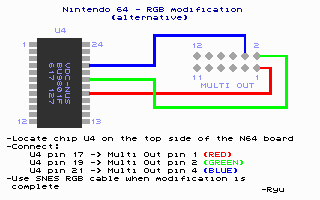
All the 64's from the 17XXXX series and earlier have RGB (They sould all have U4 chip). The pins of the multiout(from back of N64) are 6 12 11.
Image
Usually the RGB runs from pins 17 19 21 and go through some resistors and back up to the multiout(I have also read that the went through some cap's, but I'm not sure).

Ryu's method was to connect a piece of ribbon cable from the chip and go directly to the multiout, bypassing the resistors.
Image

Spongebuell's method(posted on this page of DoomPortables.org) is to connect a 200uF cap to each output(at multiout) and connect to your screen, and connect composite video to your screen as well. I am guessing that it would be a film capacitor, as an electrotyc capacitor only takes in a charge, then shoots it out the same pin. The only way that I can think of using an electrotyc cap would work is if you had "circuit trace"->"diode"->"cap and output".

Did you try using composite video as well as RGB? Are you sure that you even had the RGB wires?
Image
DrRobotnic
Posts: 16
Joined: Wed Mar 16, 2005 2:52 am
Location: Italy
Contact:

In Depth

Post by DrRobotnic »

OK, here’s the more in depth view of what I am trying to do. I am firstly trying to make a portable.
And I have to hook up my N64 to my PSone screen. The screen I am using is the Thrustmaster model.
I have realized that if I connect (what I think is the ground) on the LCD screen these three points on the LCD screen I can get red, green and blue. And I thought, whoooh this seems like RGB :wink: . So what I intend to do now is hook up the three points from the pinouts of the video card (or whatever it is) on the N64 to the corresponding points on the RGB input. Thus Sony and Nintendo will be one!!!! :twisted:
Is there anything I am missing out.. Obviously this is my first portable and I hate to confess, I am a newbie. :oops:
I'll get you sonic
nos_slived
Higher Idiot
Posts: 3476
Joined: Mon Mar 21, 2005 6:32 pm
Location: Burnaby, BC, Canada
Contact:

Post by nos_slived »

I have never used a PS1 screen, nor have I ever seen the wires of one, which makes this hard to help you with. If you take some pics(or find some online that you can post), it will be easier. From the sounds of it, what you thought was ground, is actually video(either composite, or one of the colours). Have you tried connecting the screen using just composite? Start at the bottom and work your way up.
Image
DrRobotnic
Posts: 16
Joined: Wed Mar 16, 2005 2:52 am
Location: Italy
Contact:

Even more detail

Post by DrRobotnic »

OK, here is are the pictures of my Thrustmaster PSone screen. This screen is not the official Sony that Ben uses for the portables in his book. And it doesn’t have an AV input like the Sony version does. I know this because I actually own a Sony PSone screen, however through negligence of reading carefully through Ebay sellers my screen is a NTSC however living in England all my stuff is PAL. So that was a major bummer.
Anyway, if I hook one of the RGB inputs to what I think is the ground, I can get a nice crisp Red or Green or Blue plain screen. So this led me to believe that this is defiantly the RGB inputs.
I have tried using composite video on all the pins around it one by one and I have not managed to get a signal.
So RGB all the way.
Anyway, this is my problem in even more detail.

The Thrustmaster Screen (nothing dodgey in the name :oops: )
Image


The RGB input (or so i think :? )
Image

If these pictures don't work, click here and here
I'll get you sonic
DrRobotnic
Posts: 16
Joined: Wed Mar 16, 2005 2:52 am
Location: Italy
Contact:

Those stupid newbies

Post by DrRobotnic »

OK, face it James. You are a stupid NEWBIE!!! :?: :!: :?: !!!
SO if the pictures don't work. Which they sure as hell don't for me, click this link (PLEASE WORK)
http://videogameportables.blogspot.com/
I'll get you sonic
DrRobotnic
Posts: 16
Joined: Wed Mar 16, 2005 2:52 am
Location: Italy
Contact:

OK, SCRAPPPPPP

Post by DrRobotnic »

ok, time for a cleanup. Scrap all that last stuff i said. I have a PAL N64 and thus cannot get the RGB out mod working.
BUT...
I know more now, i have found the pinouts for the N64 and my PSone screen.

---The first pic at this address---

Now when i hook up the ground to ground and audio to audio i can get the MARIO theme tune (coool).
But now regarding picture. I can't seem to get a picture when i hook it up. I think it has something to do with the video ground the psone has and the N64 doesn't seem to have it. I've hooked up the Video Ground to a normal ground but i can't get it working.

Can someone please help the Newbie.

P.S. Doing portabalising is Cooool.
I'll get you sonic
OfWolfAndMan
Posts: 24
Joined: Wed Mar 30, 2005 6:44 am
Location: Looking at the Unidentified Assilant standing over there on Soldering Island... dead. Jeff's Fault!

Post by OfWolfAndMan »

Its easy enough to use a gamecube screen with a n64

Or you can try this mod http://www.gamesx.com/rgbadd/rgbn64.htm

I know it says NTSC only but they are trying to work out why so It may not be some time.
nos_slived
Higher Idiot
Posts: 3476
Joined: Mon Mar 21, 2005 6:32 pm
Location: Burnaby, BC, Canada
Contact:

Post by nos_slived »

OfWolfAndMan wrote:Its easy enough to use a gamecube screen with a n64

Or you can try this mod http://www.gamesx.com/rgbadd/rgbn64.htm

I know it says NTSC only but they are trying to work out why so It may not be some time.
That's exactly what I told him in my post. I even gave Ryu credit.
Image
Triton
Moderator
Posts: 7397
Joined: Mon May 24, 2004 12:33 pm
360 GamerTag: triton199
Steam ID: triton199
Location: Iowa
Contact:

Post by Triton »

cool portablizing blog james (for that is what i shall call you!) good luck with your RGB mod! i have nothing really helpful to add to this (
OfWolfAndMan
Posts: 24
Joined: Wed Mar 30, 2005 6:44 am
Location: Looking at the Unidentified Assilant standing over there on Soldering Island... dead. Jeff's Fault!

Post by OfWolfAndMan »

nos_slived wrote:
OfWolfAndMan wrote:Its easy enough to use a gamecube screen with a n64

Or you can try this mod http://www.gamesx.com/rgbadd/rgbn64.htm

I know it says NTSC only but they are trying to work out why so It may not be some time.
That's exactly what I told him in my post. I even gave Ryu credit.
Sorry, I didn't see your post
SpongeBuell
Senior Member
Posts: 5190
Joined: Wed Apr 07, 2004 10:52 am
Location: Colorado
Contact:

Post by SpongeBuell »

shoot, I just saw this post. The RGB method I posted will NOT work. It was meant for the SNES, and I found out later that they have disabled the RGB lines in the N64. Sorry 'bout that.
Life of Brian wrote:
RYW wrote:RYW:

Rare
Yellow
Weasel
I'll be honest with you - I would have never guessed that.
Post Reply