You guys seem to know your screen hacking (as opposed to other forums I've visited), so I'll ask here even though this is a bit different than console mods.
I want to put a 7" (or so) touch screen in my HTPC, and connect it to the video cards second DVI or S-Video. (I also have a cable that is S-video on one end and 3x RCA that are red, green and blue on the other end that came with the card.)
What is the easiest way to do this? I read about Asus uFoto frames (they can work as a 2nd monitor over USB) which could probably do the job with one of those $40 touch-screen films, but I can't find a single place that sells them.
Any suggestions on how to do this cheaply? I live in Norway, so it helps if I can get this stuff over ebay, most sellers are nice and put 'gift' on the decleration.
7" LCD (w or w/o touch) for HTPC case mod?
Moderator: Moderators
Are you sure its RGB (red green blue) to S-Video and not just a connector that looks like it?
well anyway, if the card can output DVI-A, then it would be able to do the thing with VGA. Seeing as how you got a cable with RGB cables attached, it can probably output that somehow as well (are there really just two DVI ports?)
If that's the case, you could easily take any screen that can take RGB and mod that in. You'll probably have better luck finding a cheap 7" screen that was designed to take RGB as opposed to VGA/DVI. That would not be a touchscreen, though.
well anyway, if the card can output DVI-A, then it would be able to do the thing with VGA. Seeing as how you got a cable with RGB cables attached, it can probably output that somehow as well (are there really just two DVI ports?)
If that's the case, you could easily take any screen that can take RGB and mod that in. You'll probably have better luck finding a cheap 7" screen that was designed to take RGB as opposed to VGA/DVI. That would not be a touchscreen, though.

Here's a photo of the cable (took it with the webcam on my eee), I'm quite sure those are red, green and blue.

Are s-video and composite compatible things? If so, that's probably what it is and not RGB output as in a scart interface.
I guess the video card (HiS Radeon 2600 HD Pro iSilence III) is DVI-I. The product page doesn't say explicitly but it says VGA and 2nd VGA "Yes", along with "TV out YES", and the same for DVI and 2nd DVI.
So any screen I can find in a console travel pack or whatever that is the right size is very likely to do the job? I think the touch screen films they have on dealextreme will do the trick for that type of functionality.
they are, but this is not s-vid and that plug you have is not an S-video plug, it just looks like one. So yeah, you'll be fine using pretty much any screen that can take RGB (it might have composite as well, I don't know about that)
Now, 7" is pretty big, so I don't really have any recommendations.
edit: looks like I'm wrong about the RGB
Now, 7" is pretty big, so I don't really have any recommendations.
edit: looks like I'm wrong about the RGB
Last edited by Kyo on Sun Jan 04, 2009 1:24 pm, edited 2 times in total.
That's not an RGB cable. That's a component video cable. The connector on the back of a videocard is compatible with s-video (I think) but also has connections for component and composite video.
DealExtreme has a 7" screen and a matching touch film. Just search for LCD screen. I don't think either one is very good though.
DealExtreme has a 7" screen and a matching touch film. Just search for LCD screen. I don't think either one is very good though.
It will be displaying the Vista Media Center interface, so I don't think it matters if the touch screen film is not so precise, those icons are pretty big, so it'll be fine as long as it responds to every touch and so on.
I've browsed dealextreme for an LCD screen all day it seems but I haven't found one, so I just ordered one of these.
It's only ~30USD so if it doesn't do the trick I'm not out that much (yet).
I guess component and composite are the same colors on RCA cables, but I doubt this is component. It's not a very fancy graphics card, and the product site says it does not support Ypbpr.
But I guess as long as I have at least VGA and composite output, this Joytech screen might do the trick? One of the customer reviews reads "Excellent piece of kit and with the composite video in on the back you could plug just about anything into it [...]"
Thanks for your input, guys.
I've browsed dealextreme for an LCD screen all day it seems but I haven't found one, so I just ordered one of these.
It's only ~30USD so if it doesn't do the trick I'm not out that much (yet).
I guess component and composite are the same colors on RCA cables, but I doubt this is component. It's not a very fancy graphics card, and the product site says it does not support Ypbpr.
But I guess as long as I have at least VGA and composite output, this Joytech screen might do the trick? One of the customer reviews reads "Excellent piece of kit and with the composite video in on the back you could plug just about anything into it [...]"
Thanks for your input, guys.
How much do they suck? I canceled the order for now.
Will they display this?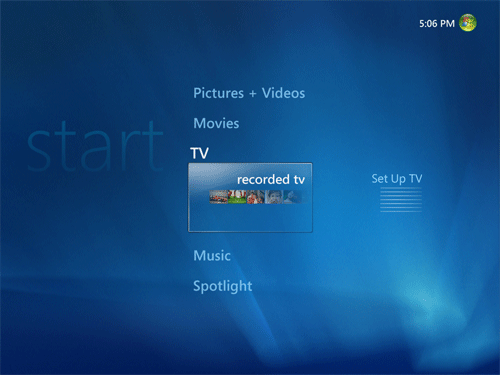
It doesn't need to do much more than that.
Not that it matters much at this point, but what's with the S-video/RGB cable then? I'm too lazy to try it out, but I'll reckon it's for people without S-video inputs on their TV, so you can plug it in and probably get 480i on a component input instead.
Will they display this?
It doesn't need to do much more than that.
Not that it matters much at this point, but what's with the S-video/RGB cable then? I'm too lazy to try it out, but I'll reckon it's for people without S-video inputs on their TV, so you can plug it in and probably get 480i on a component input instead.

Ok, I see what you mean there.
The 7" touch screen film is 16:9 anyway, so that is another chink in the chain. I might try to go for the 5"/5.4" 4:3 screens, and use the 7" touch on top. The dimensions are like thus:
So it'll barely fit on the height, and if it should lose calibration it will mean dismantling stuff probably. There are some crosshairs in each corner of the touch film you have to press to calibrate so that might be a female of the dog species.
Thanks for your help, I might try this out and make another post with results if I ever get there.
The 7" touch screen film is 16:9 anyway, so that is another chink in the chain. I might try to go for the 5"/5.4" 4:3 screens, and use the 7" touch on top. The dimensions are like thus:
Code: Select all
5.4" 4:3
Width	4.3200
Height	3.2400
Area	13.9968

7" 16:9
Width 	6.1010
Height 	3.4318
Area 20.9377Thanks for your help, I might try this out and make another post with results if I ever get there.

Yeah, I found that too after a while when I was just browsing. Impossible to find with the search function.
I've looked around on ebay and found a few others, down to $80 USD at least. I guess I don't _really_ need 7" with touch functionality, I do have a remote so I can still use a 5" to select music on the HTPC and such without having the TV on. But who knows when enough is enough, eh? o_O
I guess if I can make a 7" touch screen for $120 that is not too bad though, but I'm not too sure about the image quality on the screens that only have composite input.
I found a Lilliput 7" that runs on 12v that I can get for ~95 USD here in Norway (which is shocking), so I might just take the plunge and see how it fares and either get acceptable results or inspire fear and loathing in others.
I've looked around on ebay and found a few others, down to $80 USD at least. I guess I don't _really_ need 7" with touch functionality, I do have a remote so I can still use a 5" to select music on the HTPC and such without having the TV on. But who knows when enough is enough, eh? o_O
I guess if I can make a 7" touch screen for $120 that is not too bad though, but I'm not too sure about the image quality on the screens that only have composite input.
I found a Lilliput 7" that runs on 12v that I can get for ~95 USD here in Norway (which is shocking), so I might just take the plunge and see how it fares and either get acceptable results or inspire fear and loathing in others.