thanks!
i guess i´ll try to get one of those step-down convertors but i dont have high hopes!
nes/snes retro duo! pics, review, hacking info 7/27/10
Moderator: Moderators
My first retro duo did that too. I had to get another do you still hear the sound from the snes games? I could on mine.eggeye wrote:hi guys. new here. I have a problem with my retro duo and i'd really appreciate some help. Basically the console won't play snes games but nes games seem to work fine. Has anyone else heard of this problem? I just opened it this evening brand new. I've tried leaving the s-video in and out but all i get is a blank screen. I really hope that i'm not going to have to return it to the ebay seller....
Any advice or help is really appreciated.

Shoot me an invite!
-
Life of Brian
- Moderator
- Posts: 2867
- Joined: Wed Aug 03, 2005 5:55 pm
- Location: Oklahoma
- Contact:
I did not discover this, but I wanted to make sure this information is in the general Retro Duo information thread:
Want to hook up RGB? Use this PDF link for the data sheet of the video encoder of the Retro Duo. Basically it says that you can get RGB from pins 21, 22, and 23 from the chip labeled "KA2198BD".
Grahf and I have messaged each other a couple of times about the subject, and I thought I would post his excellent response to a question I had for him:
One last thing - do I need to hook up composite sync? Is that even relevant to RGB?
Want to hook up RGB? Use this PDF link for the data sheet of the video encoder of the Retro Duo. Basically it says that you can get RGB from pins 21, 22, and 23 from the chip labeled "KA2198BD".
Grahf and I have messaged each other a couple of times about the subject, and I thought I would post his excellent response to a question I had for him:
Sometime next week I'll be testing whether or not caps and resistors are needed with the Retro Duo's video encoder chip when used with a PSOne/Zenith screen. If I don't, then hip hip hooray! An easy way to get RGB from the Retro Duo!grahf wrote:Life of Brian wrote:I was wanting to message you about getting RGB off of the Retro Duo. You mentioned in zzatack's thread (I think that's his name) about not even needing to use caps for the mod if using a PSOne screen? I was wondering if you could elaborate a little bit more about it.
Check out the reply I made in that thread. Do a search for KA2198BD in google, and you'll find it's datasheet.
Basically the purest form of video inside consoles is RGB. The video encoder ICs take this raw signal, and normalize it. They then output composite, s-video, or RGB, depending on the console maker. Basically in the FC Twin/Retro Duo the potential for RGB or S-video is there, even though it never makes it out the back. These same ICs (CXA1645 or clones) are used in many newer Genesis models, most Playstations, Saturns, etc. There are older varieties that could only do RGB -> composite or crap s-video (early Genesis and NeoGeo). Some systems, such as the real SNES don't rely on any external video encoders, and could output everything on its own.
Anyhow, the cap+resistors are only needed on the output lines of these chips to further "trim" the signal to be suitable for a TV. On the PSone LCD, it's not needed. On the CXA at least, don't know if the clone is with the range it can handle.
One last thing - do I need to hook up composite sync? Is that even relevant to RGB?
dragonhead wrote:sweet. ive spent a third of my life on benheck!

-
lovablechevy
- Portablizer Extraordinaire
- Posts: 1104
- Joined: Wed Nov 01, 2006 3:09 pm
- Location: busy with a project
- Contact:
csync syncs the rgb lines together. so, yes. it is necessary for rgb. 
they call me the Queen of Bondo, though maybe i should be called the Queen of Epoxy Putty
current project - code name: blue mushroom!
current project - code name: blue mushroom!
-
Life of Brian
- Moderator
- Posts: 2867
- Joined: Wed Aug 03, 2005 5:55 pm
- Location: Oklahoma
- Contact:
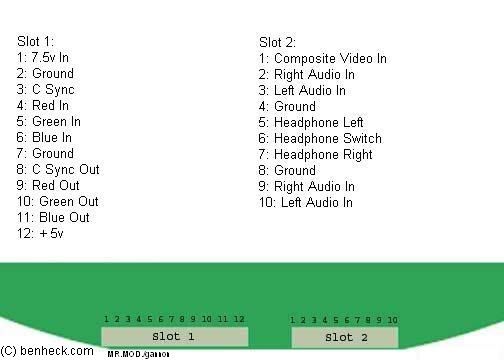
I connected RGB as follows. However, I am getting a blank black screen with no audio. Any ideas?
KA2198BD (diagram here):
R Out is pin 23
G Out is pin 22
B Out is pin 21
C Sync In is pin 10
Zenith screen (diagram here):
R In is pin 4
G In is pin 5
B In is pin 6
C Sync Out is pin 8
I also disconnected composite video output from the Retro Duo and composite video input on the screen. I connected RGB with no caps or resistors on any of these lines. Before this, the screen worked fine with composite video input and audio was fine.
What do you suggest I try next?
KA2198BD (diagram here):
R Out is pin 23
G Out is pin 22
B Out is pin 21
C Sync In is pin 10
Zenith screen (diagram here):
R In is pin 4
G In is pin 5
B In is pin 6
C Sync Out is pin 8
I also disconnected composite video output from the Retro Duo and composite video input on the screen. I connected RGB with no caps or resistors on any of these lines. Before this, the screen worked fine with composite video input and audio was fine.
What do you suggest I try next?
dragonhead wrote:sweet. ive spent a third of my life on benheck!
-
lovablechevy
- Portablizer Extraordinaire
- Posts: 1104
- Joined: Wed Nov 01, 2006 3:09 pm
- Location: busy with a project
- Contact:
did you put the +5v to pin 12 of the screen? it needs it to go into rgb mode...Life of Brian wrote:I connected RGB as follows. However, I am getting a blank black screen with no audio. Any ideas?
KA2198BD (diagram here):
R Out is pin 23
G Out is pin 22
B Out is pin 21
C Sync In is pin 10
Zenith screen (diagram here):
R In is pin 4
G In is pin 5
B In is pin 6
C Sync Out is pin 8
I also disconnected composite video output from the Retro Duo and composite video input on the screen. I connected RGB with no caps or resistors on any of these lines. Before this, the screen worked fine with composite video input and audio was fine.
What do you suggest I try next?
these are all that should be connected to the screen for rgb mode:

you want csync in hooked up, not csync out.
they call me the Queen of Bondo, though maybe i should be called the Queen of Epoxy Putty
current project - code name: blue mushroom!
current project - code name: blue mushroom!
-
Life of Brian
- Moderator
- Posts: 2867
- Joined: Wed Aug 03, 2005 5:55 pm
- Location: Oklahoma
- Contact:
Hi everyone. I have just ordered a retro duo console and I'm in Europe. I read in this post that Terranigma doesn't work on it, however you mention that it works with a converter. Do you mean that it works on the retro duo with a converter added or just that it works on a ordinary ntsc snes with a converter in it?
-
lovablechevy
- Portablizer Extraordinaire
- Posts: 1104
- Joined: Wed Nov 01, 2006 3:09 pm
- Location: busy with a project
- Contact:
it says exactly what you need in the description for how it plays on the retro duo:deeyay wrote:Hi everyone. I have just ordered a retro duo console and I'm in Europe. I read in this post that Terranigma doesn't work on it, however you mention that it works with a converter. Do you mean that it works on the retro duo with a converter added or just that it works on a ordinary ntsc snes with a converter in it?
you need the pro action replay mk 2.t or mk 3.lovablechevy wrote:* terranigma - does not work. this upset me. if my understanding is correct, this game has the strongest form of lock out available. however, it does work when using the pro action replay mk 2.t.

mk 2 (you can't tell from packaging if it is the first mk 2 release or the mk 2.t. this can only be found out from using it)

mk 3
they call me the Queen of Bondo, though maybe i should be called the Queen of Epoxy Putty
current project - code name: blue mushroom!
current project - code name: blue mushroom!
-
lovablechevy
- Portablizer Extraordinaire
- Posts: 1104
- Joined: Wed Nov 01, 2006 3:09 pm
- Location: busy with a project
- Contact:
i doubt it will work for you. that game has the strongest forms of lockout and the only way people have gotten it to work on an ntsc system is with those two converters listed above. and then you have to use the right ntsc game with it to get it to work even.deeyay wrote:I don't have the pro action replay but I have a super game converter (that pretty much takes most ntsc games on my pal system) and I am guessing/hoping that converter will do the trick too on my future retro duo. Thank you for your answer!
but, if your converter does work, let me know and i'll add that, too.
they call me the Queen of Bondo, though maybe i should be called the Queen of Epoxy Putty
current project - code name: blue mushroom!
current project - code name: blue mushroom!
-
bacteria
- Portablizer Extraordinaire
- Posts: 3984
- Joined: Fri Apr 20, 2007 12:14 am
- Location: Hampshire, UK
- Contact:
My casing is taking shape nicely (pun intended!), assuming it turns out fine I intend to splash out and get a Retro Duo (as the board is small, a UK SNES board is too big for my new case) and may also get an NTSC PSone screen for full compatibility. My games are all PAL format, hoping i'm not disappointed with the performance of the Retro Duo as PAL seems to be the worst of the three formats the Retro Duo takes. Typical. Oh well, it will allow me to add a lot to the compatibility list with my range of PAL carts!  Won't buy one until I know my casing comes out lovely from my master mold though!
Won't buy one until I know my casing comes out lovely from my master mold though!
Retro Duo
Hi, I have a question for everyone who owns a Retro Duo or had the chance to play with one.
You know how the NES blinks everytime you put a game in and your never quite sure if you will be able to play or not. I'm wondering if the Retro Duo does the same thing when you put a game in it. Because if it doesnt It's worth buying, but if it does my SNES works fine, so it wont be worth it.
And it will actually play my Super Mario Bros. 3 and most of NES games.
Thank you very much
You know how the NES blinks everytime you put a game in and your never quite sure if you will be able to play or not. I'm wondering if the Retro Duo does the same thing when you put a game in it. Because if it doesnt It's worth buying, but if it does my SNES works fine, so it wont be worth it.
And it will actually play my Super Mario Bros. 3 and most of NES games.
Thank you very much