Super Joy 3/Mega Joy/general NOAC/ Complete Pinout
Moderator: Moderators
-
Turbo Tax 1.0
- Portablizer Extraordinaire
- Posts: 4773
- Joined: Wed Mar 30, 2005 6:19 pm
- Location: Delaware, no sales tax
- Contact:
-
The_Hushed_Casket
- Posts: 3
- Joined: Fri May 13, 2005 6:41 pm
-
Turbo Tax 1.0
- Portablizer Extraordinaire
- Posts: 4773
- Joined: Wed Mar 30, 2005 6:19 pm
- Location: Delaware, no sales tax
- Contact:

-
Triton
- Moderator
- Posts: 7398
- Joined: Mon May 24, 2004 12:33 pm
- 360 GamerTag: triton199
- Steam ID: triton199
- Location: Iowa
- Contact:
awesome info, one question i have, on the controller board of my superjoy 3 is a switch connected to one of the pins, is that the switch yoyu said disabled the roms?
Visit us at Portablesofdoom.org
-
Turbo Tax 1.0
- Portablizer Extraordinaire
- Posts: 4773
- Joined: Wed Mar 30, 2005 6:19 pm
- Location: Delaware, no sales tax
- Contact:
-
G-force
- Moderator
- Posts: 3609
- Joined: Mon Apr 19, 2004 1:43 pm
- Location: Sweet home Indiana
- Contact:
If it's on the controller board it's probably the power switch. It might be something else if it's different from mine. The internal/external games switch is just a separate switch soldered onto two cartridge pins with two wires.Triton wrote:awesome info, one question i have, on the controller board of my superjoy 3 is a switch connected to one of the pins, is that the switch yoyu said disabled the roms?

-
Triton
- Moderator
- Posts: 7398
- Joined: Mon May 24, 2004 12:33 pm
- 360 GamerTag: triton199
- Steam ID: triton199
- Location: Iowa
- Contact:
good info tho, but its hard to print and a bit confusing, i have my cartslot made and gettin ready to wire it and making sure i understand helps, its made of 2 34 pin card edge connectors, aka floppy cable. can you ilistrade or elaborate any?
Visit us at Portablesofdoom.org
-
G-force
- Moderator
- Posts: 3609
- Joined: Mon Apr 19, 2004 1:43 pm
- Location: Sweet home Indiana
- Contact:
For the giude I used a NES connector from a Family Converter. 2 floppy cable connectors will be the same as the NES connector, since the middle pins aren't connected on the NES connector either. Just follow the guide pin for pin, and you should be good. I'm not sure if that answers your question or not.
It is a bit tricky to understand, but I really can't come up with a better way to do it. And for printing you might try printing it landscape style. I myself haven't tried printing it so thats only an idea.
It is a bit tricky to understand, but I really can't come up with a better way to do it. And for printing you might try printing it landscape style. I myself haven't tried printing it so thats only an idea.
Yes you can do that. I assumed that people might want to chop off the epoxy glop from the rest of the board, that is why I labeled the traces so close to the epoxy glop. If size is not an issue it would be much easier to just keep the whole board intact, and just solder to the gold colored contacts where the buttons would normally connect.demonofaj wrote:Yea and on the controller thing, I solder DIRECTLY ON the traces, or can I follow them and solder at the pins
Last edited by G-force on Mon Oct 24, 2005 5:45 pm, edited 1 time in total.
-
nos_slived
- Higher Idiot
- Posts: 3476
- Joined: Mon Mar 21, 2005 6:32 pm
- Location: Burnaby, BC, Canada
- Contact:

Sorry, but I'm confused on how to locate pin 1 for the NES side in your guide. I plan on soldering my Game Genie in my portable permanently, and it's pins are already numbered.
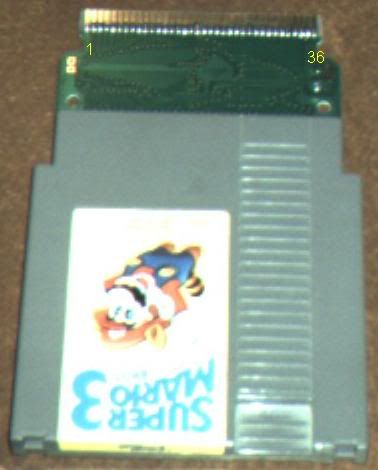
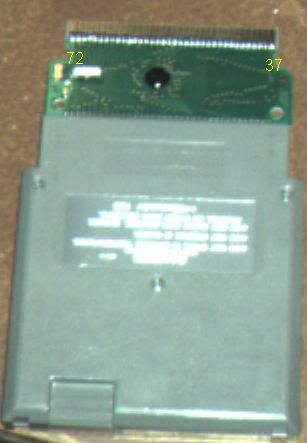
Does Game Genie pin 1 goto SJ3 Pin 2? I'm confused cause in your guide it says that pin 1 is on the back side of the NES cartridge. Is the Game Genie pinout diffrent than yours or am i just confusing myself and they are actually numbered the same?
Does Game Genie pin 1 goto SJ3 Pin 2? I'm confused cause in your guide it says that pin 1 is on the back side of the NES cartridge. Is the Game Genie pinout diffrent than yours or am i just confusing myself and they are actually numbered the same?
-
G-force
- Moderator
- Posts: 3609
- Joined: Mon Apr 19, 2004 1:43 pm
- Location: Sweet home Indiana
- Contact:
You're the second person to bring that up. When I made the guide I didn't know what pin 1 was on the NES connector or on the Super Joy 3. So I just picked one and called it pin one, hoping that was the right name. I guess I'll have to change it now that I know. All the information is still correct, the pin names are just reversed.
Thanks for bringing this to my attention.
Thanks for bringing this to my attention.