
Did some experimenting with the HDMI and component connections of the Xbox 360 while doing some more modding to the latest Xbox 360 laptop. Now I will bore you all with my findings.
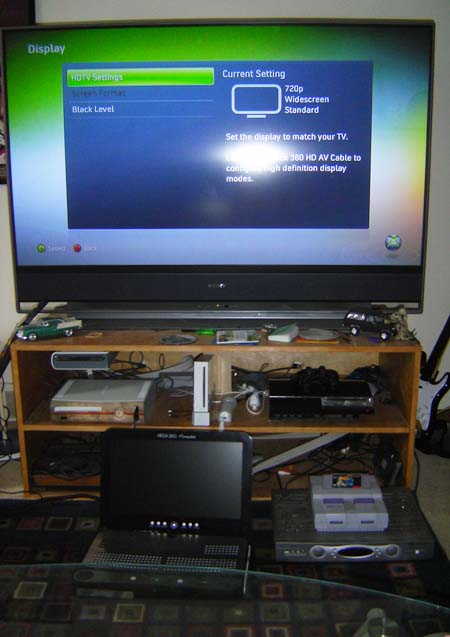
Xbox 360 portable outputting component video
Originally I didn’t think you could have the HDMI connected and still get a component signal (which is required to have any sort of “external output” on an HDMI-enabled 360 laptop) but I have found the way. For some boring discussion and the how-to, check the rest of the story. I figured I should post this stuff in case it’s of use to anybody.
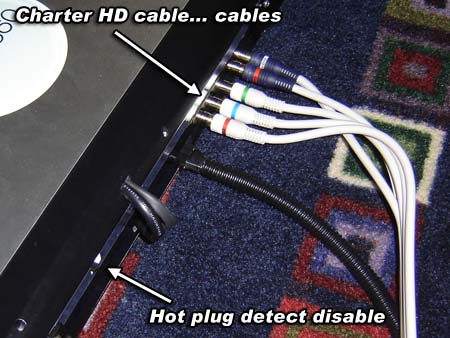
Component cables hooked up to the Xbox 360 portable
The first couple Xbox 360 laptops I built had a lot of output options besides the built-in screen… however they were also all analog (video). Recently I’ve been using HDMI-DVI cables for an all-digital picture, but this creates a problem if you want to have external outputs, such as component.
For a normal system this isn’t a problem, but with a laptop you can’t well disconnect the HDMI cables and what not. To find a solution to this problem, I experimented with a spare Xbox 360 to come up with this truth table:
- Xbox 360 with HDMI cable attached to screen – No component
- Xbox 360 with HDMI cable attached to unplugged screen – No component
- Xbox 360 with HDMI cable but attached to nothing – Component works
- Xbox 360 with no video cables of any kind attached – 4 red rings (but not of death)
Keep in mind these tests were done with the pins on the A/V plug set to Component. It would seem that if an HDMI cable is plugged into a screen the A/V plug settings will always be overriden, except for audio analog/digital select. There are 3 pins on the A/V plug which determine what [analog] video mode the Xbox is set to. Table below:

So let’s say you’re using an Xbox 360 with HDMI. The default is to send the audio over the HDMI cable digitally for the TV. However with the Xbox 360 laptops the screens don’t have an audio decoder (and they input DVI which doesn’t have that connection) so we need to manually tell the 360 that we want analog audio. Thus, in that case pins 20 and 24 are tied to ground. If you’re using HDMI but do not set any of the pins then analog audio will not be present on the A/V port.
Also please keep in mind all these tests are done assuming we’re not using any of the original A/V cables at all. As you are no doubt aware these often include TV/HDTV switches, and the little audio dongle included with the Elite sets the A/V plug to analog HDMI.
One thing cool about the Xbox 360 is that it remembers the last video setting you used for each mode. Thus if you’ve got VGA set to 1920×1080, then switch to component and go 1280×720, when you go back to VGA mode it’ll remember that was at 1920×1080. This is also true for going between digital HDMI and analog video.
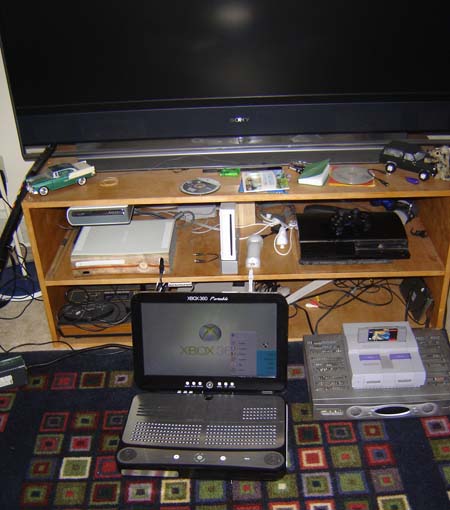
Quite the rambling blog entry huh? Anyway, to trick the XBox into allowing component video, even though the HDMI cable is plugged in and connected to an operational, powered-up screen is to disable or make switchable the HOT PLUG DETECT connection.
Check the links below for a comparison of the HDMI/DVI pinouts and the location of the HOT PLUG DETECT pins.
HDMI and DVI both have a pin called HOT PLUG DETECT which basically just goes to ground (through some caps and crap) on the screen device end. This is why even if the screen is unplugged (from the wall) it will still return that the cable is plugged in, since the ground in the screen is tied to the Xbox though the cable sheilding.
By putting a switch interrupt on HOT PLUG DETECT we can make the Xbox 360 think that the cable isn’t plugged into anything, and thus it will allow analog video modes to be used.This is easy to do on the Xbox 360 laptop since I used an HDMI-DVI adapter cable and then manually wire the DVI end to save space.
Please note that you cannot output both digital HDMI and analog video at the same time. Well I hope this article helped clear up Xbox 360 video outputs for anyone who’s been doing any modding involving that.
Sweet, I tried it and it worked kinda, just have a few things to work out(Like my skillz)and it should work!
i dont actually need the HDMI stuff, but thats a sweet entertainment setup you got there ben.
*shakes head*
ben, you bought a HDDVD drive?1?!? wtf?
Miike said: “ben, you bought a HDDVD drive?1?!? wtf?”
If you listened to the podcast, you’d know Jones has one, and moved in with Ben “recently”.
God… its sad that I know that about two guys who live 2,000 miles from me.
Speaking… new podcast?
Maybe?
I just want to know (and i bet a few others would as well) how many 360s have you bought/ owned at one time/ have come into your posesion? and also same question again but replace 360s with consoles. for me 4 (its not many i know i grovel at you level of console owneship)
hey erm i was just wondering what set of pins on the bottom of the motherboard are the hdmi ones? coz there are a lot and i cant find them, or do you just solder into the hdmi port, coz for my current project i need 2 hard wire an hdmi connection, but i also one an hdmi out, and what better hdmi out that the standard hdmi out, any tips, this is the same model as the one i have? could i someone help, or at least give a suggetion
Thanks for the info! I might make good use of this when I have to move my console next month!
also,
Starfox in the SNES console… nice!
I hope you don’t usually keep any electronic equipment with air vents on on that carpet. Few things shorten equipment lifespan more than keeping it on a carpet, blocking the air vents. They will also suck up all the dirt from it like a vacuum cleaner.
@hossrex
It’s sad that I don’t listen to the podcast and they live 20 miles from me.
how much are you selling this for
So, if it can’t output Analogue and Digital at the same time, yet you have both plugged in… how does the xbox/you choose which is active at any given time?
how much do one of those cost?
Thank you for taking the time to map this out, it made getting my optical out mod a lot easier (using component cable with optical out along with the HDMI port instead of buying the Elite dongle)
For anyone else looking to do this, just de-solder (or cut if your really lazy) all the wires that go to the video connection cables along with the black jumper that jumps 26 to 28, then throw a dab of solder across the TV/HDTV switch pins.
Will this be implemented in any of your designs? I’d like that switch to be part of your tutorial on whatever xbox you do it on. Personally i haven’t bought the slim because my old one never crapped out. In reality, the only reason I have for making a 360 laptop is because I need to bring it with me to a lot of different places where test out games I made on xna at school.